Choose Halloween midnight, October 31 at 18:00, or a custom party. Set the year and time zone, share the exact target, and use a quiet fullscreen countdown.
Set your Halloween countdown
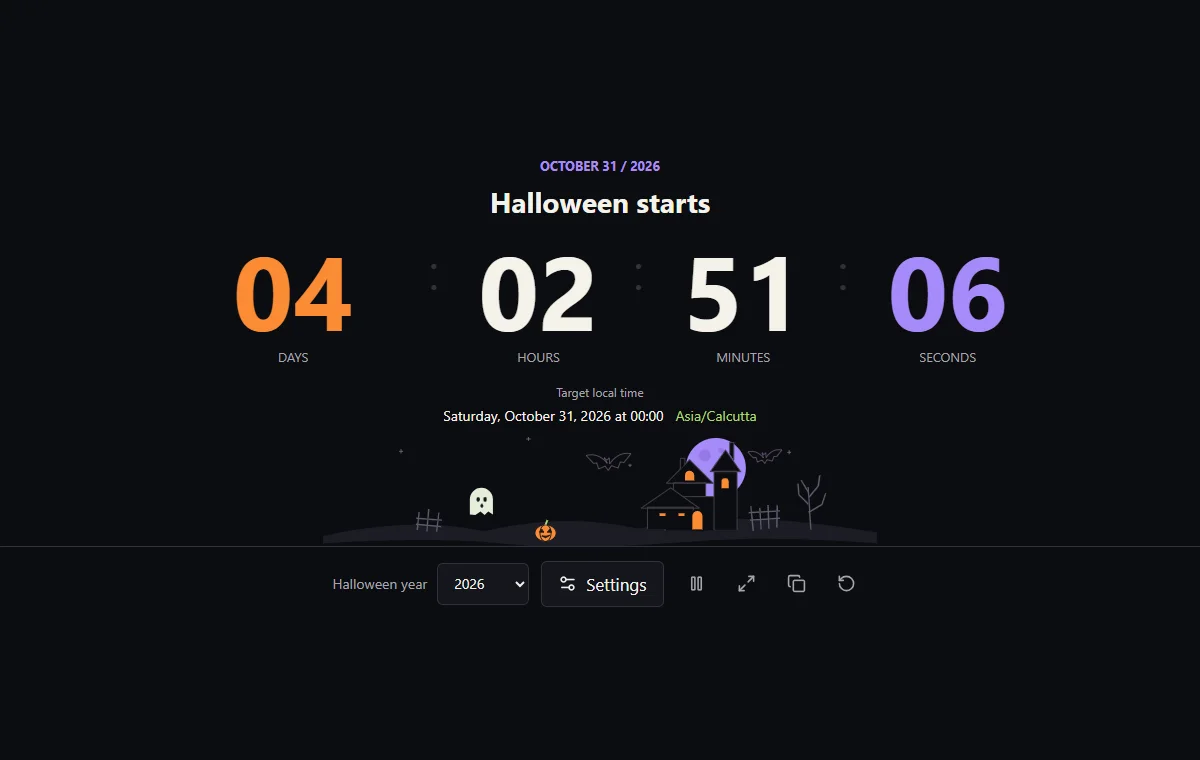
Start with the date that matters to your group, then confirm the local time and named zone below the numbers.
Choose the year and occasion
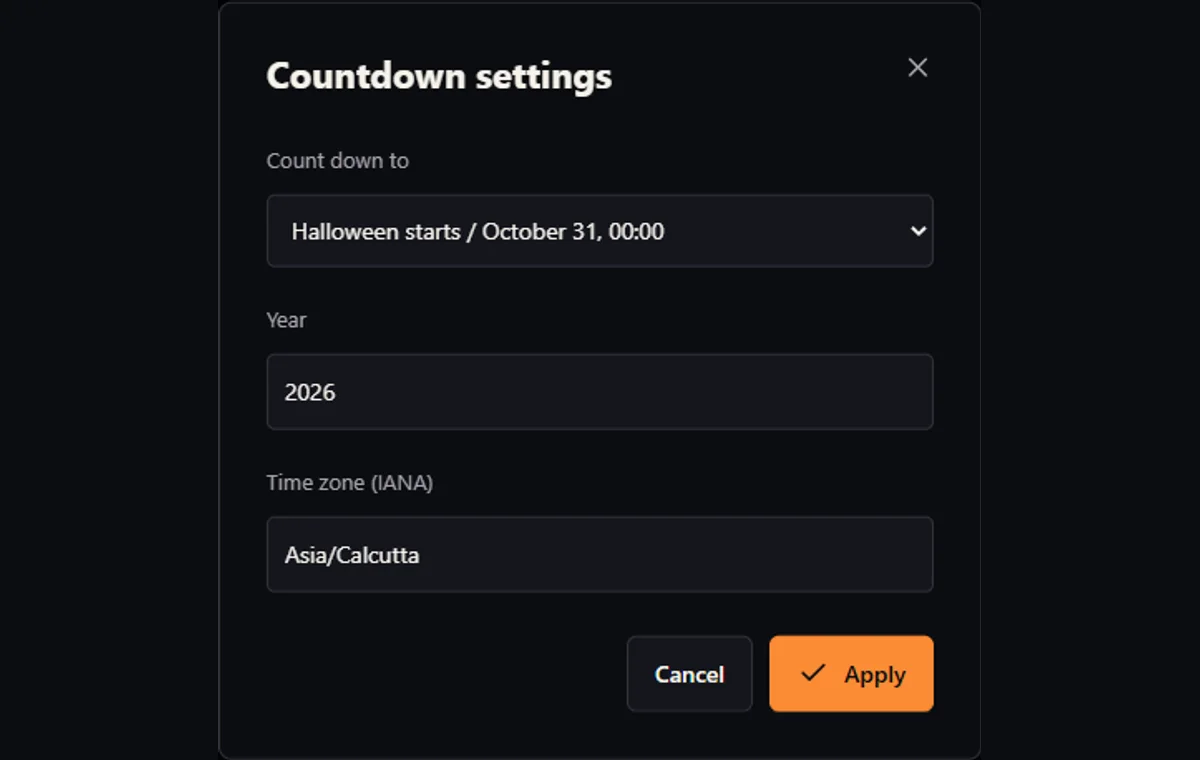
Use the year selector for October 31. Open Settings to choose midnight, the 18:00 trick-or-treat preset, or a custom party date and time.
Confirm the time zone
Enter an IANA zone such as Europe/London or America/New_York and apply it. Read the target local time and zone together before sharing.
Share or display the countdown
Copy the link to preserve the target. Use fullscreen for a group display; Escape exits it. Pause animation stops the scene, not the clock.
Practical countdown setups
A classroom display
Choose the school’s zone and the correct year. For a celebration during lessons, set a custom date and start time rather than counting to midnight or assuming school is open on October 31.
A neighborhood meeting
Use 18:00 only if that is your agreed meeting time. If the organizer announces a different hour or day, enter it as a custom party and send a fresh link.
Friends in different countries
Choose the host’s zone for one shared event. Everyone using the same link counts toward the same instant, even when their own calendars show another date.
Midnight, evening or your own party
Start of October 31
Halloween starts means the beginning of October 31, normally 00:00, not the midnight that ends the day. This is useful for anticipation displays and a shared seasonal milestone. The general page initially chooses the next such deadline in the device’s time zone; a dedicated year page keeps its stated year, even when that Halloween has passed.
Evening preset or custom event
The 18:00 preset is a convenient evening target, not an official trick-or-treat schedule or a prediction of sunset. Ask the organizer which time applies locally. A party on the preceding weekend, a school event during the day, or a late-night film screening belongs in the custom date-and-time mode.
Changing years and checking the target
The year selector changes an October 31 target and its address. Choosing a year while a custom party is active switches back to the midnight preset. Settings accept years from 2000 through 2100; a custom date includes its own year. Check the target line after every change rather than relying on the heading alone.
| Target | Deadline in the selected zone | Useful for |
|---|---|---|
| Halloween starts | October 31, 00:00; first valid time if midnight is skipped | The start of the calendar date |
| Trick-or-treat | October 31, 18:00 | An evening meeting agreed by your group |
| Custom party | Your selected date and time | School events, weekend parties and online gatherings |
One calendar date, different instants
Choose a named time zone
An IANA name such as Asia/Calcutta identifies a time zone, not the language of the page or the viewer’s physical location. The selected zone determines how the entered clock time becomes a deadline. The IANA time-zone database describes changing civil-time rules; a fixed abbreviation or guessed UTC offset is not a substitute for the named zone.
Compare two local midnights
Here is a fixed, worked example: October 31, 2026 at 00:00 in Asia/Calcutta is October 30 at 18:30 UTC. The same local date and clock time in America/New_York is October 31 at 04:00 UTC. Those deadlines are 9 hours 30 minutes apart. They are two local starts of Halloween, not one worldwide midnight.
Share the host’s zone
For a long-distance gathering, agree on the host’s zone and share that target. Changing the zone in Settings keeps the entered local date and time but changes the instant they describe; it does not merely relabel an existing event. Page language, by contrast, changes the presentation without changing the deadline. Check the named zone next to the target time before distributing the link.
What a countdown day means
Count 24-hour blocks
The numbers measure elapsed duration, split into blocks of 24 hours, then hours, minutes and seconds. They do not count crossed calendar dates, school days or business days. A display of one day means 24 hours remain; it does not necessarily mean the target is tomorrow on every viewer’s calendar.
Include clock-change hours
Daylight-saving changes make that distinction useful. In the tested London example, from October 31, 2021 at 00:00 to 18:00 on the same date, 19 hours elapse because the clock goes back. Subtracting the printed clock numbers would suggest only 18 hours. The countdown compares absolute timestamps, so it includes that extra hour.
Check rounding and arrival
MDN’s explanation of zoned date-times distinguishes clock readings from exact instants. When checking an apparent discrepancy, compare the full target date, zone and current device time first. The display rounds a positive fractional second upward, so it does not show all zeros before the deadline. On arrival, the numbers stay at zero and the selected target stays pinned.
Skipped and repeated clock times
Custom times must be unambiguous
A custom local time can be impossible or ambiguous around a clock change. This tool rejects both cases rather than moving a party without asking. As tested examples in America/New_York, March 8, 2026 at 02:30 is skipped, and November 1, 2026 at 01:30 occurs twice. Neither custom setting is accepted.
The handling of ambiguous local times documented by MDN explains the underlying distinction. In this interface there is no selector for the first or second occurrence. Choose a different, unambiguous time and confirm it with the organizer. An invalid zone, impossible date, or out-of-range year also leaves the previously running target unchanged; Cancel closes an unfinished draft.
Midnight preset: the first valid instant
The midnight preset has a different purpose: identifying the start of October 31. It uses that date’s first valid instant in the zone. If midnight is skipped, the target line shows the actual first valid clock time; if midnight repeats, the earlier start is used. Do not assume this day-start rule also resolves a custom party entered at an ambiguous midnight.
Device time, background tabs and arrival
Check the device clock
This is a visual countdown based on your device clock, not an independent time service. A wrong system date or time makes the remaining duration wrong. Enable your device’s normal automatic clock setting if appropriate, and compare the intended deadline with the organizer’s schedule. Changing the system clock while the tool is open can make the display jump.
Catch up after background delays
Browsers may throttle background timers, as MDN’s Page Visibility documentation describes. The tool recalculates from the current timestamp instead of subtracting one second per callback, and refreshes when page visibility changes. It can therefore catch up after a delayed update; this is not a promise that a hidden tab will repaint every second.
Know what happens at zero
At the deadline the title changes and the count stops at zero. There is no sound, push notification or closed-browser alarm, and the tool does not keep a sleeping screen awake. Use a separate reminder for a departure or appointment. Next Halloween explicitly selects another target; Reset returns to the next start of Halloween in the device’s zone. Neither happens silently at arrival.
Traditions and planning without one universal timetable
Separate historical context from schedules
The National Museum of Ireland connects Samhain with the seasonal transition into winter. The Library of Congress discusses All Hallows’ Eve and its relationship to All Saints’ Day. These histories help explain the date and imagery, but they do not establish one modern celebration schedule for every country, school or household.
The museum’s ghost-turnip collection records Irish turnip-lantern traditions. The scene’s pumpkin, ghost and house are festive visual choices, not a historical reconstruction or a statement that every community observes Halloween in the same way. A history lesson can compare such evidence with local customs without presenting folklore as a verified account of supernatural events.
Plan around the announced event
For practical planning, treat the year as part of the invitation. A school may celebrate on a teaching day; friends abroad may need to meet on a different local date. Start with the organizer’s announced date, use a custom time when October 31 is not the actual event, and share a fresh link whenever the plan changes. A countdown communicates the agreement; it does not determine the custom.
Calculation, limitations and corrections
Calculation method
The chosen date, time and validated IANA zone are resolved to an absolute deadline. Halloween midnight uses the first valid instant of October 31; evening and custom times reject gaps and repetitions. Remaining time is calculated against the device timestamp, rounded upward to whole seconds and split into 24-hour days.
A selected or shared target stays fixed after arrival. Only initial selection on the general page, Reset or an explicit next-target action chooses another Halloween. Language and display settings do not alter the deadline.
Limits and reliability
The supported year range is 2000–2100. Zone rules depend on the date-time data available to the browser and device; future civil-time rules can change. Keep software current and recheck important future events with the organizer.
This tool is not an alarm or an official local event schedule. Background suspension, a sleeping device, an inaccurate clock or blocked clipboard access can affect what you see or copy. Settings are recoverable through the current or copied address, not a separate party archive.
Corrections and recovery
If the result looks wrong, check the complete target date, named zone and device clock before resetting. For a skipped or repeated custom time, agree on an unambiguous alternative. An invalid shared setup shows a warning and the page’s default target; verify it before sending a replacement link.
When reporting a reproducible issue, include the selected year, mode, local date and time, zone, browser and expected result. Remove unrelated personal information from the address. Historical corrections should identify the disputed passage and the relevant museum or library evidence.
Countdown questions
Does midnight mean the start or the end of October 31?
The start. The Halloween preset normally targets October 31 at 00:00 in the selected zone. If that midnight is skipped by a zone transition, it uses the first valid instant of the date.
Is 18:00 the official trick-or-treat time?
No. It is a planning preset, not local guidance or sunset data. Check your organizer’s announcement and use a custom date and time when the agreed schedule differs.
Will the countdown automatically switch to next year?
Not while it is running or after arrival. The selected target stays at zero. Use Next Halloween, Reset, the year selector or Settings when you want another target.
Can I count down to a party on another day?
Yes. Choose the custom party in Settings and enter its actual date, time and zone. Its link uses the general countdown page rather than an October 31 year address.
Why are two local Halloween midnights different?
A local date and clock time need a zone to identify an instant. Midnight in Calcutta and midnight in New York occur at different UTC times. Share one chosen zone for a simultaneous gathering.
Why was my party time rejected?
Check the date, year range and IANA zone. A time skipped or repeated during a clock change is rejected too. There is no first-or-second-occurrence control; choose an unambiguous time.
Does Pause animation stop the countdown?
No. It stops only scene motion. Time continues to update, including in fullscreen. The scene also respects the device’s reduced-motion preference.
Will it ring if the browser is closed?
No. There is no audio alarm, push reminder or closed-browser scheduler. Use a separate reminder for a time-sensitive event; the visible countdown catches up when the page resumes.
What can I do when Copy link fails?
Use the selectable link shown below the controls. It retains the target and page language. Verify the target line after opening it, especially if an invalid-shared-settings warning appears.