Port Scanner Online

Check the ports that matter, without guessing what the result means.

Only check public systems you own or have permission to test.

How do you check a port without losing the context?

Start with a question about your own server, choose a small list, then keep the evidence alongside the answer. Our scanner checks public reachability from an outside network, not from your device.

Step 1

Choose the host and a small port list

Illustration, not a live result

clocktools.app

80 · 443

Enter a domain or public IPv4 or IPv6 address. The website preset selects 80 and 443; use a custom list for another service. URL paths and embedded port numbers do not choose the ports: the TCP ports field does.

Step 2

Run one deliberate check

Illustration, not a live result

TCP · 443

Press Scan ports or Enter. You can cancel while it runs. We sample one public DNS address and test up to 12 ports; cancel or reset prevents a late result from replacing your screen.

Step 3

Read, compare and keep the evidence

Illustration, not a live result

443 · HTTP response

HTTP 200

Detailed evidence

Look at the observation before the time. Expand evidence for the method and sampled address. Copy a report, download PNG, CSV, JSON or text, or share the setup without automatically running another scan.

A closer look at our port scanner

Here is the actual ClockTools interface, from choosing ports to reading a completed check. These are saved screenshots of our own website, not results for your host or a promise of what your next check will show.

ClockTools Port Scanner interface with a public host, port preset and selectable custom TCP ports
Choose the host and ports independently. The selected chips show which ports will be checked; choosing a preset does not start a scan.
ClockTools Port Scanner results for clocktools.app with port observations and report controls
A completed check of clocktools.app, captured for this guide. Read the observation and timestamp together. Your result may differ; saved screenshots do not update live.

Practical situations

After a website move

Check 80 and 443 on your own domain after changing hosting or DNS. An HTTP response can come from a proxy, including a 403 or 502 response. Open our Website Down Checker for page-level status rather than assuming a connection means a working website.

Before handing over remote access

If SSH should be publicly reachable, check 22 on a server you manage. A refusal is different from a timeout. Review which address the service listens on and any allowlist; never weaken access controls just to turn a result green.

Reviewing database exposure

Check only the database ports you intentionally use. A successful connection to 3306, 5432 or 6379 deserves an access-policy review, not an automatic vulnerability verdict. Private database networks are deliberately outside this tool’s scope.

Writing a useful support ticket

Include the host, selected ports, completed time and evidence in your report. Compare two checks on the same host and sampled IP after an authorized change. A changed observation is a useful clue, not proof that your change caused it.

How did one address learn to serve so many applications?

The useful idea behind a port is not a numbered hole in a machine. It is a way for a computer to keep different conversations apart. A server can offer several services at one IP address because its operating system directs an arriving connection to the appropriate listening application. The client also has an endpoint of its own. Together, the two endpoints distinguish a connection from other conversations taking place at the same time.

The September 1981 TCP specification, RFC 793, already described this relationship between ports, sockets and processes. Familiar services could use known endpoints, while other conversations could discover their endpoints dynamically. This was part of TCP's design, not a feature invented for today's web. That distinction helps explain why a destination port and a temporary client-side port play different roles, even when both are just numbers on the screen.

Shared conventions made those numbers useful across different computers and software. RFC 6335, published in August 2011, documented the service-name and port-number registration procedures. The registry is a coordination system, not an inspection of your server. When our scanner labels 22 as SSH, it is giving you a familiar reference; it cannot tell you which program is actually listening there or whether access to that program is appropriately secured.

TCP's core specification was consolidated in RFC 9293 in August 2022. The fundamentals remain relevant even when a modern service sits behind a reverse proxy or load balancer. A connection can reach a front door while the application behind it is unavailable. We want our results to help you ask the next useful question, rather than mistake an accessible endpoint for a complete health or security assessment.

  1. 1981

    Connections have two endpoints

    RFC 793 describes how ports and sockets distinguish application conversations. A single host can participate in several TCP connections at once.

  2. 2011

    A shared registry, not a verdict

    RFC 6335 sets out registration procedures and the three port-number ranges. An assigned service name does not certify the software or its safety.

  3. 2022

    The TCP specification is consolidated

    RFC 9293 replaces RFC 793. Connection establishment remains separate from the application's own behaviour and from any security review.

One port, three useful questions

Imagine you maintain a server whose SSH service should accept authorized connections on TCP 22. The observations below are a fictional troubleshooting example, not measurements from ClockTools and not an instruction to expose a private service.

  1. Step 1 · TCP 22

    Is the intended endpoint listening?

    Connection refused

    An explicit refusal tells you the attempt was rejected. On a system you manage, review whether the service is running and listening on the intended address. An access rule can also reject a connection. The result alone cannot identify which setting needs attention.

  2. Step 2 · TCP 22

    Can this network reach it?

    Timed out

    A later timeout is not automatically progress or a firewall diagnosis. Check the public address, routing and intended access policy. Compare from an authorized network, and record whether the sampled IP changed. Alter one relevant setting at a time so your notes remain useful.

  3. Step 3 · TCP 22

    Does the application work as intended?

    TCP connected

    A TCP connection is a narrower conclusion than a successful SSH login. Verify the server identity, authentication and intended permissions through your normal administrative process. Keep credentials out of a shared scan report. Public access is not always the desired outcome.

A good before-and-after record keeps the host, sampled address, port, time and change notes together. Our comparison highlights changed observations, but it does not establish why they changed. If the IP or checking network differs, treat the two records as different viewpoints rather than a controlled experiment.

Ports, connections and the bigger picture

Why does a port number tell only part of the story?

Think of an IP address as an endpoint and a TCP port as a numbered place where a connection can arrive. A service must be listening there, the route must work, and access rules must allow the attempt. Our usual service label is a reference to a familiar convention, not a discovery of installed software. A server can use 443 for something other than the web, or move an application to another port.

The IANA service registry gives these conventions a shared vocabulary. Keep that distinction when talking to support: “a TCP connection was accepted on 22” is evidence; “this server runs a particular SSH version” is not a conclusion this tool can make. We do not send login attempts, inspect banners or probe for exploits.

How did ports become a shared internet convention?

A useful network needs both an address and a way to distinguish conversations at that address. Port conventions make that possible without requiring every visitor to negotiate a new number for every service. RFC 6335 describes the registry’s three ranges: system ports 0–1023, user ports 1024–49151 and dynamic or private ports 49152–65535. Our input accepts 1–65535; port 0 is not a test destination here.

These ranges are about assignment, not a ranking of safety. A high port is not automatically private, and a well-known port is not automatically trustworthy. A browser also uses temporary local ports for its own connections; those are different from the destination ports you enter here. When documenting a setup, record the transport as well as the number. TCP 53 and UDP 53 are different checks, and we test TCP only.

What does a successful TCP handshake actually establish?

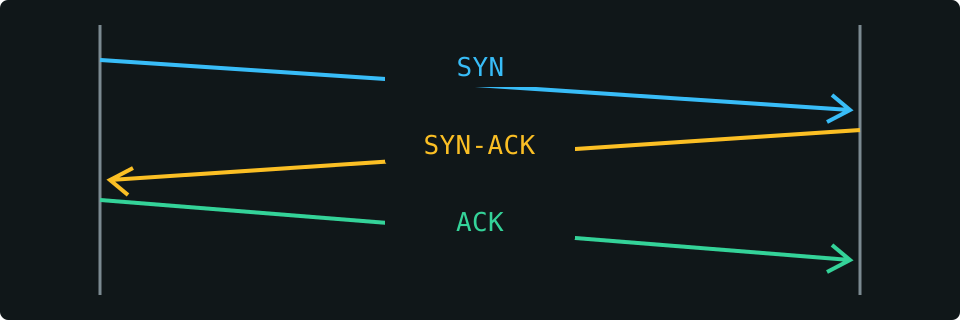
The TCP specification describes a three-way exchange: SYN, SYN-ACK and ACK. Establishing a connection is an important first step, but it is not the whole application conversation. A listening web service might still have a certificate problem, a login requirement or a broken backend. We close the test connection without authenticating or exercising the application.

For web ports, our result may instead say HTTP response. Read that literally: a web endpoint replied. A 404 is still a reply, a 403 may be an access rule, and a 502 may come from a gateway that cannot reach its backend. None establishes that the hidden origin server is listening. Attempt time includes the work of that attempt; it is not a ping, a pure round-trip time or a benchmark of your home connection.

Connection initiatorListening endpoint
Diagram of a TCP connection: request, acknowledgement and confirmation between two endpoints
A simplified TCP handshake. These three messages establish a connection; they do not prove the application is healthy.

Why can your local result differ from an outside check?

A local application can work while outside connections fail. It may listen only on a loopback address, sit behind a router without a forwarding rule, or be protected by an allowlist. NAT and carrier-grade NAT also complicate inbound access. Before changing a router, use our What Is My IP tool to review your visible address, and compare the network you manage with our IP Subnet Calculator.

A domain can return several IPv4 and IPv6 addresses. We sample one validated address for TCP, so a result does not cover every server or every address family. A proxy can answer for a domain without exposing its origin. Nmap’s port-state guide likewise treats states as observations from a particular scan, not permanent properties. A timeout leaves several explanations open; try a known-good authorized check from another network and keep both timestamps.

How to interpret a check responsibly

Our port checker validates public hosts and a bounded list of decimal TCP ports, samples one safe DNS address and records the outcome of each connection attempt. It distinguishes explicit refusal, timeout, an unavailable check and an HTTP response on web ports. Familiar service names are hints, not software identification.

For a disputed observation, send the public host, selected ports, timestamp, observation and evidence through our contact page. Include the expected configuration and an authorized comparison, but never passwords or private network details. We review reproducible classification or display errors; changing remote conditions are not rewritten as permanent facts.

Port scanner questions

Does an open port mean my server is vulnerable?

No. Reachability and vulnerability are different questions. Review whether public access is intended, then check authentication, updates and access controls through your normal security process. This tool does not identify software versions or test exploits.

Can I check port forwarding from here?

You can check the public address and destination port of a system you control. The service must be running, forwarding must target the correct internal host, and firewalls must permit the connection. A timeout does not identify which layer failed; private and local addresses cannot be tested here.

Why is port 25 unavailable?

This checking service does not support outbound tests on port 25. We show that limitation instead of pretending the remote SMTP port is closed. For a mail client, 587, 993 or 995 may be relevant, but they are not substitutes for testing SMTP delivery on 25.

Does this test UDP, DNS health or every IP behind a domain?

No. We check selected TCP ports and sample one public DNS address. TCP 53 is not a UDP DNS test. A working connection does not prove accurate DNS answers, working email delivery or the health of every server behind a domain.

Why is a port not verified rather than closed?

A restricted probe or an ambiguous connection failure cannot prove refusal. We reserve Connection refused for explicit refusal evidence, distinguish timeouts, and label HTTP responses separately. Not verified means the actual TCP state remains unknown.

What do the saved history and share link contain?

The last five completed observations are stored in this browser when storage is available. Clear history removes that local list. A share link contains only the host and selected ports and never starts a scan automatically; reports contain the completed observation and its limitations.