Step 1
Choose a public page
Illustrative example, not a live result
https://clocktools.app/Use a page you manage or have permission to inspect. Query strings are removed from the initial request; never submit secrets.
Inspect public WordPress clues, REST discovery, visible theme and plugin assets, response details and evidence scores without claiming backend certainty.
Inspect public WordPress clues, REST discovery, visible theme and plugin assets, response details and evidence scores without claiming backend certainty.
https://clocktools.app/Use a page you manage or have permission to inspect. Query strings are removed from the initial request; never submit secrets.
wp/v2 · wp-contentReview REST namespaces, generator metadata and asset paths. A failed probe is unavailable evidence, not a negative finding.
JSONExport the dated report before a migration or support handover. Treat exposed names and versions as clues, not a complete inventory.
Before quoting a migration, inspect the homepage and a representative public content page separately. Record the final URL, REST evidence, theme paths and plugin slugs. Then ask the owner for the actual administration inventory and deployment details. Public findings help frame questions about forms and content, but do not establish migration effort or identify every server-side dependency.
After a theme or plugin change, a public page may still reference old assets. Export a dated report and compare it with the owner’s current configuration and cache behavior. Check the same page anonymously in your browser before purging anything. A stale generator or stylesheet is evidence of the served response, not a reason to reinstall WordPress.
For a support handover, keep JSON rather than only the score. Include the page response, failed probes and sample asset paths so the next maintainer can explain why a clue was or was not observed. Remove sensitive URLs from any ticket. A share link sets up another inspection; it does not transmit your authenticated session or reproduce the earlier evidence automatically.
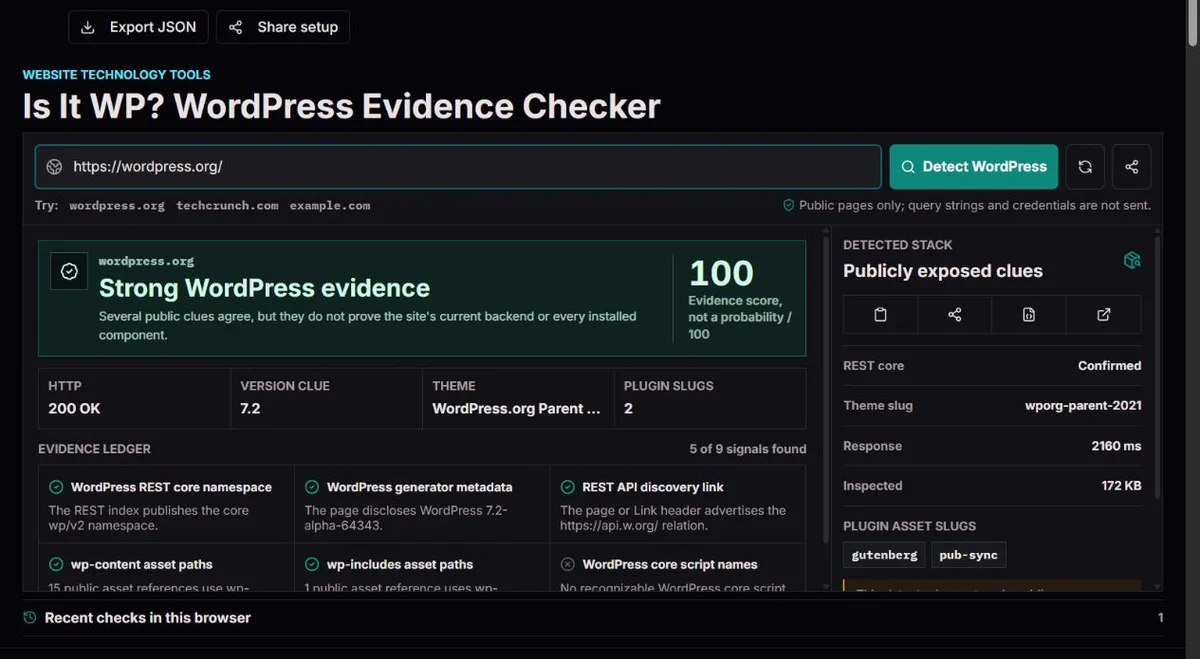
WordPress documents a discovery relation named https://api.w.org/ in HTML links or the HTTP Link header. It lets clients locate an API root even when the installation is not at the domain root. The checker tries a public REST candidate and looks for core namespaces.
A wp/v2 namespace is meaningful, but a failed API request does not prove absence. Firewalls, authentication rules and headless arrangements may hide it. The score sums weighted clues, capped at 100; it is not a calibrated percentage chance. WordPress REST discovery guide.
A theme path can disclose a slug; its public style.css header may disclose a name, version or parent template. Those fields describe what was published and may be stale or edited. A child theme and parent theme are not interchangeable.
Plugin paths only expose assets referenced by the inspected response. Server-only plugins, bundled files and renamed directories may leave no recognizable path. A version clue is not proof of security status, licensing, update availability or every installed component. WordPress stylesheet documentation.
A public page contains a WordPress generator value and wp-content images, but its API returns 404. This could be an export, a cache or a protected API. The evidence supports further investigation, not a claim that a live WordPress server is present. Ask the owner what generates and serves the page.
Each signal has one of three states: found, not found or unavailable. Not found means the inspected response did not contain that recognizable clue. Unavailable means the relevant request or response could not be used. These states are not interchangeable. If a firewall serves an error page, the absence of a theme path tells you little about the page an ordinary visitor receives. The compact view shows the first six signal rows and key stack fields. Export JSON for the complete signal list and returned theme stylesheet metadata, including clues not shown in that compact view.
The current weights are explicit: REST core contributes 45, WordPress generator metadata 35, discovery 25, each content/includes path signal 20, recognizable core scripts 15, cookie prefixes 12, publishing discovery 10 and pingback 8. The sum is capped at 100. Ten references to one plugin do not create ten independent platform signals; an asset count and a clue weight answer different questions.
The verdict also considers whether the main page was inspectable. A failed, error, truncated or non-HTML page is inconclusive even if some clues survive. With usable HTML, REST core plus another clue, or at least three clues totaling 55 or more, yields strong evidence. Thirty or more without those conditions can yield likely; a smaller positive score stays inconclusive. These are implementation rules, not measured probabilities or proof of a live backend.
| Observed clues | Score | Reading the result |
|---|---|---|
wp-content only | 20 | Inconclusive: one path is limited evidence. |
| Generator only | 35 | Likely with usable HTML, not backend proof. |
wp/v2 plus discovery | 70 | Strong public evidence with usable HTML. |
| Several clues on an HTTP 403 page | Depends on clues | Inconclusive: the intended page was not fully inspected. |
| No clues in usable HTML | 0 | No public signals found, not a zero-percent probability. |
The checker prefers the public discovery URL when it can read one from an HTTP Link header or HTML. Otherwise it derives a conventional wp-json/ candidate from visible content paths or the page origin. It does not search every subdirectory. A publication running under /news/ can therefore behave differently from a homepage served by another system, particularly when the homepage exposes no useful API relation.
The REST discovery documentation defines the https://api.w.org/ relation. For this tool, the practical question is whether the candidate actually returns recognizable core namespaces or routes. A link pointing to an API and a usable API index are separate evidence rows; a link alone does not establish that its destination worked during the check.
Custom namespaces are also worth retaining, but their names are not automatically a plugin inventory. An owner may register routes in a theme or custom code. Older publishing clues such as RSD, Windows Live Writer markup and X-Pingback carry smaller weights. ClockTools observes those references; it does not submit publishing requests or test credentials. A disabled publishing interface can change the evidence without changing the CMS.
A resource under /wp-content/themes/atelier/ identifies a visible directory slug. The strongest theme candidate is the one with the most referenced assets, with alphabetical ordering as a tie-breaker; that is not an authenticated active-theme selection. ClockTools may fetch its conventional style.css and display the header fields it can read. If no name is returned, the slug remains a slug rather than an invented product name.
Two theme directories deserve investigation, not an automatic conflict warning. In the child-theme model, a Template value identifies a parent directory. In an illustrative report with atelier-child and atelier, ask which contains local customizations and which supplies parent files. A cached or independently referenced resource can create a second slug too. Confirm the arrangement in the site’s administration before planning an update.
Plugin references under /wp-content/plugins/ and /wp-content/mu-plugins/ are grouped by visible slug and asset count. Must-use plugin documentation explains the special loading model, but an exposed directory still does not reveal every installed component. A contact page may load form assets that the homepage never uses. For a migration, inspect that public page separately and reconcile the findings with the owner’s active and must-use inventory.
Server-only plugins, bundled assets, custom paths and CDN rewriting can be invisible here. Conversely, an old cached reference can remain after a component was removed. A version in theme metadata concerns that theme; an arbitrary asset ?ver= value is not a reliable WordPress core version. The core version clue is read only from an explicitly identifying generator value, so a blank version field is often the correct result.
Keep header fields in their own roles: Theme Name is the published display name, Author and Theme URI are declared attribution, and Text Domain identifies a translation domain rather than a website hostname. Those declarations can help find the maintainer’s intended documentation, but they are editable text. They do not authenticate ownership, establish a license entitlement or demonstrate that an update is available for the deployed files.
A traditional site can serve WordPress-generated HTML directly, while a cached site serves an earlier copy. A static export can preserve the same markup and asset directory names without running WordPress for each visitor. A headless frontend can obtain content from a private or separate WordPress service without publishing any familiar paths. The checker observes delivery evidence, not every system involved in producing the content.
This distinction explains both kinds of surprising result. A high score on an exported site can be a fair description of public clues while a claim about the live backend would be wrong. A no-signal result on a headless frontend can also be fair while the editors still use WordPress. Ask the owner where content is authored, how it is built and what serves the public response. Those answers are more useful for a project than arguing over one detection label.
For a fixed example, the existing static-export scenario contains generator metadata and wp-content references but no usable core REST response. Those two clues total 55, yet by themselves do not meet the three-clue strong-evidence rule; with usable HTML the result can be likely. If the main page is blocked or truncated, it remains inconclusive. A higher score can result when copied publishing clues are present too, without proving that the backend is running.
Start with the submitted page and final URL. A redirect can lead to another host, a language page or a generic challenge, so you may not have inspected the content you expected. Compare the response status and inspected byte count before examining component names. If the HTML was truncated, clues beyond the inspected portion may be missing; do not treat that list as exhaustive.
The inspection is anonymous and bounded: a public page, one REST candidate and, when available, one theme stylesheet. It does not execute the page’s JavaScript. Initial query strings are removed, so a query-dependent page may not match your browser view. Do not work around that by submitting a signed preview URL or a login link. Use a normal public path, and inspect your own authenticated pages locally.
For a blocked API or rate limit, keep the unavailable row, try later and review your own access rules if appropriate. Do not disable protection just to improve a detector score. For a public version disclosure, verify installed versions and updates in the authenticated system; this tool performs no vulnerability comparison. A useful correction report includes the safe page URL, time, expected clue and relevant public response, not just “the score is wrong.”
The checker inspects bounded anonymous public HTML, one REST candidate and an available theme stylesheet, with validated public destinations and bounded redirects. It does not forward browser login or execute page JavaScript. The ledger preserves found, not-found and unavailable evidence separately. Theme and plugin output describes exposed references; local recent history and JSON export are conveniences, not authenticated inventories.
Strong evidence is not certainty. Public content can be copied, cached, proxied or deliberately misleading. No-signal results cannot exclude a hidden WordPress backend. This is not a vulnerability scan, plugin inventory or authenticated admin inspection. Do not submit signed links or account identifiers.
Report a reproducible problem with the page URL, safe input, checked-at time, expected result and source evidence through the Contact page. Include the public source response when possible, without account details or secret links. A changed source record is not necessarily a calculation error. Compare the same name, page and observation time before requesting a correction.
No. It is a capped sum of explicit weights, with verdict rules that also consider whether the HTML was usable. Read the ledger and response state. A zero score can reflect a headless or transformed frontend, and a high score can reflect copied or cached material; neither is a measured probability.
The intended HTML may be blocked, truncated, non-HTML or an error response. Some clues can survive on a partial page without making the missing evidence meaningful. Preserve the report, compare the final URL and status and check a normal public page rather than forcing a yes-or-no label.
Yes. Generator metadata, published asset paths and discovery markup can survive a static export or cache. The result describes those clues. To distinguish an export from a live application, ask the owner how pages are built and served; this inspection cannot observe a private build pipeline.
No. It is selected from publicly referenced theme directories, not the administration settings. A child theme, parent theme, cache or extra resource can expose more than one slug. Read any stylesheet metadata and verify the active arrangement with the owner before installing, updating or purchasing a similarly named theme.
No. Only recognizable asset references from the checked page are grouped into slugs. A form plugin may appear on a contact page but not the homepage; a server-only plugin may never appear. REST namespaces are retained as API clues and are not automatically converted into plugin claims.
Those values can belong to a plugin, theme or cache build rather than WordPress core. ClockTools does not use them to guess the core version. An explicit generator disclosure may supply a version clue; without one, check the authenticated system instead of substituting an asset number.
No. The candidate may be restricted, unavailable or wrong for a custom installation. A discovery relation and a usable core namespace are separate findings. Inspect the page evidence too and, for a site you manage, confirm the intended API route and access policy without removing protection merely for detection.
No. It does not test logins, enumerate users, exploit components or compare versions against a vulnerability database. Exposed names help an owner review public disclosure, not assess the whole system. Use authenticated inventory and an authorized security workflow for that separate task.
Browser cookies and authorization are not forwarded, JavaScript is not run and the initial query string is removed. Your browser may receive a personalized page, different cache entry or authenticated API response. Compare the same public path anonymously and retain the final URL and time when investigating the difference.