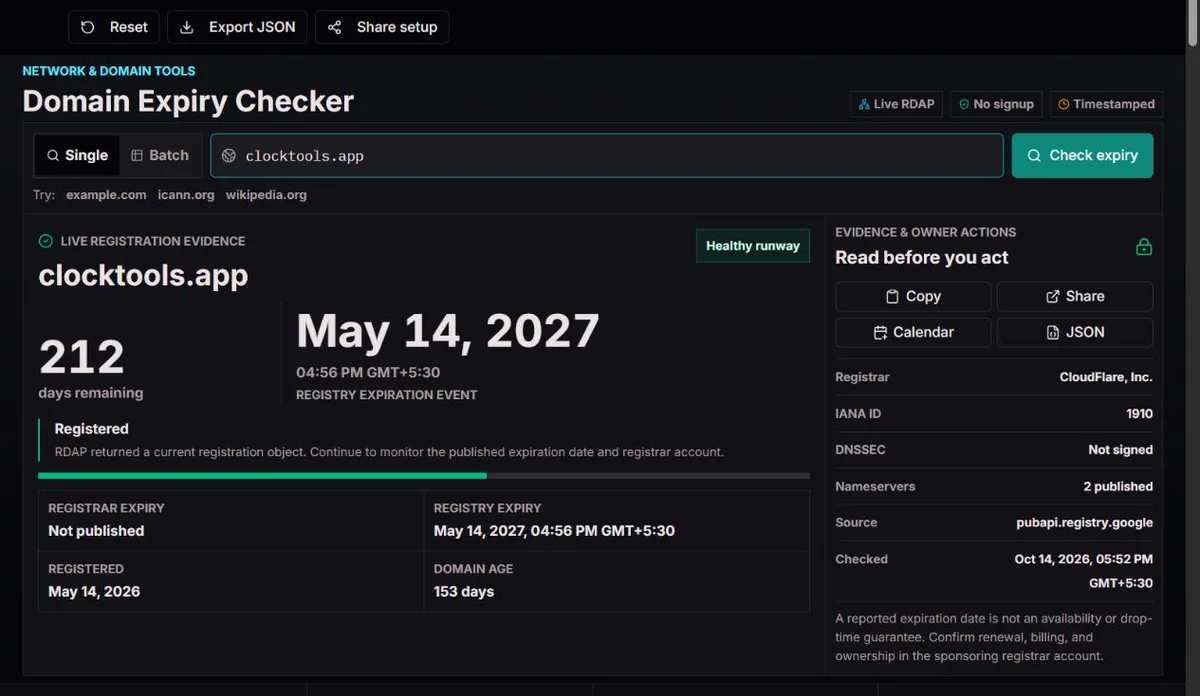
Check public RDAP registration dates, compare registrar and registry expiry, review lifecycle evidence and export renewal reports.
How to use
Check public RDAP registration dates, compare registrar and registry expiry, review lifecycle evidence and export renewal reports.
Step 1
Enter the registration name
Illustrative example, not a live resultshop.clocktools.app → clocktools.app
Paste a domain, URL or subdomain. The lookup reduces it to the registrable domain; it does not fetch your private page.
Step 2
Compare dates and statuses
Illustrative example, not a live resultexpiration / registrar expiration
Read the chosen timestamp and the published status together. A registry extension does not prove that the owner paid the registrar.
Step 3
Plan and save
Illustrative example, not a live resultJSON · CSV · ICS
Export the evidence or a calendar reminder. Confirm payment and renewal in the registrar account; an imported reminder does not renew anything.
Practical uses
Renewal handover
An agency inherits a company website, but the hosting invoice does not identify the registrar. Check the registration name, note the sponsoring registrar and compare the public term with the company account. Save JSON for the handover, then assign a named renewal owner. Nameservers identify delegation, not the person entitled to renew; access and billing still need a separate handover.
Small domain portfolio
For a small portfolio, choose batch mode and put one domain or URL on each line. Submit at most ten non-empty entries; the limit is checked before normalization and duplicate removal. URLs or subdomains of the same registration are combined after the batch is accepted, so they do not create separate renewals. Export CSV to sort known dates and put unknown or failed rows on an investigation list. A successful row beside a failure does not resolve that failure.
Expired-name investigation
When an interesting name appears expired, read its recovery and deletion statuses before spending time on a purchase plan. Keep the exact source and observation time, then ask a registrar about current eligibility and restrictions. A parked website, a past timestamp and a missing RDAP object are different observations, none of which reserves the name for you.
Published expiry
Renewal or recovery
Possible deletion
Conceptual lifecycle, not a fixed schedule. Registries and registrars set applicable processes; expiry and deletion are separate events.
Background and engineering
The clocktools.app report presents public registration dates and status fields as a timestamped snapshot. An expiry date is not confirmation that renewal has been arranged.
From a directory to structured events
The WHOIS specification of October 1985 describes a port-43 directory with human-readable replies. Parsing varied text was a different problem from interpreting a clearly named registration event. RDAP uses structured JSON to expose objects, statuses and timestamps.
The report identifies the public registration source and the time the record was checked, so you can keep that context when comparing dates or asking for help. If the source does not publish an expiration event, the date remains unknown. A returned registration record does not establish that you own the domain or give you permission to change it. RDAP response specification.
A registrar-facing term and a registry record can diverge during automatic renewal handling. Compare both dates when published. The countdown uses registrar expiration first, then registry expiration, and rounds remaining 24-hour periods upward.
Status combinations matter more than a dramatic countdown. Pending delete can coexist with redemption or pending restore. In those combinations, recovery-related status takes precedence; a deletion-only state must not be inferred from one word. Contact the sponsoring registrar for the actual recovery options. ICANN status explanations.
Worked example: a future registry date after an unpaid renewal
These are fixed teaching values, not live records. Suppose the registrar date is 15 October 2026, the registry date is 15 October 2027, and the record says auto renew period. The later registry date is not proof of a paid year. Check the invoice and account term before changing your renewal plan.
Registrar term
2026-10-15
Registry record
2027-10-15
Next action
Confirm payment and the registrant-facing term
Check the registration, not the hosting account
A web address contains several layers. In https://shop.example.co.uk/offers, the useful registration unit is example.co.uk, not co.uk and not the individual shop hostname. ClockTools uses public-suffix rules to reduce URLs and subdomains to that unit. Before interpreting a result, compare the normalized name with the asset you intended to check. A spelling error can produce a perfectly valid report for the wrong domain.
Internationalized names can appear in readable Unicode and in an ASCII form beginning with xn--. Those are two representations of a name, not two renewal contracts. Check the spelling carefully, particularly where similar-looking characters are possible. A batch of alternate URLs is not a search for every registration owned by an organization; include each genuinely separate domain yourself.
Registration, hosting, DNS and HTTPS are separate services. The registrar manages the registration term; nameservers describe where DNS is delegated; the website may be hosted elsewhere. A healthy registration can coexist with a broken DNS record or expired TLS certificate. If the site is unavailable but the term is comfortably in the future, investigate those layers rather than buying another year as a speculative fix.
Read the exact instant behind the countdown
The result distinguishes registry expiration from registrar expiration. When both are usable, the latter supplies the countdown; otherwise the registry event is used. That preference makes the displayed number more relevant to the published customer-facing term, but it cannot establish what was paid or promised in an account. Keep the selected-date label when you copy a number into a ticket.
The calculation is remaining milliseconds divided by 86,400,000, rounded upward. In a fixed example, an expiry of 2026-10-15T00:00:00Z checked at 2026-10-14T12:00:00Z displays one day, although only twelve hours remain. A date ten hours in the past can round to zero. The exact timestamp and lifecycle warning therefore matter more than a reassuring-looking whole number.
Readable timestamps use the browser’s locale and timezone, while Z in the exported timestamp means UTC. Two colleagues may see different calendar dates for the same instant without a source disagreement. The urgency band organizes attention: up to seven days is critical, up to thirty is urgent and up to ninety calls for planning. These are ClockTools display thresholds, not guaranteed renewal or restoration windows.
Turn status evidence into the right next action
Read the complete status list, not just the headline. The ICANN status guide distinguishes ordinary restrictions from lifecycle states. In practical triage, a transfer lock and a DNS hold lead to different questions: the first may require no change during a normal renewal, while the second needs an explanation from the registrar even when the published term is current.
A recovery-related status changes the priority from routine payment planning to contacting the sponsoring registrar promptly. Do not repeatedly try another registrar’s purchase form as a substitute for restoration. A combination containing pending delete with redemption or restore evidence must be read as a combination, not treated as a deletion-only appointment. ClockTools preserves the codes so you can ask support a specific question.
There is no universal expiry-to-purchase timetable. For applicable generic domains, the expired-registration recovery policy is useful background; it is not a calendar that this checker applies to every country-code name. Registrar handling, registry rules and the current published state determine the available next step. Check the relevant operator when planning any recovery.
Different evidence, different decisions
Published evidence
Useful interpretation
Next check
client transfer prohibited
A transfer restriction, not an expiry result
Leave it in place unless an authorized transfer needs it removed.
client hold / server hold
Registration and DNS publication can differ
Ask the registrar why the hold exists; check DNS separately.
auto renew period
Registry renewal handling is visible
Confirm the customer term and payment in the registrar account.
redemption period / pending restore
Recovery needs attention
Ask whether restoration is available or already processing.
Deletion-only pending delete
A late deletion state
Do not promise restoration or an exact release time.
Use reminders as a work plan, not a renewal system
For a domain you manage, start with the registrar account: confirm the term, renewal setting, payment method and monitored contact address. Record who can approve payment and who can recover account access. A reminder sent to a departed employee is not useful protection. Keep this ownership information in your internal asset register, not in a public lookup input.
The calendar action downloads an ICS all-day event based on the UTC date of the selected expiry. It includes reminders 90, 60, 30, 14 and 7 days beforehand, plus a reminder one day beforehand. These intervals are fixed, not configurable controls. Import the file into a calendar and inspect the resulting event and alerts. Calendar applications differ in how they import alarms, and reminders already in the past should not be expected to fire retroactively.
Use the earlier alerts for procurement and access checks, then use the later ones for escalation if renewal remains unresolved. After paying, check the account confirmation and run a fresh lookup. Keep the old JSON as before-renewal evidence, but update your calendar and working records to the new term. The imported event is a snapshot; it does not subscribe to later RDAP changes or alter itself when the registration is renewed.
Distinguish missing data from a failed lookup
A registration object without an expiry event is different from no object and different again from a request failure. For a known registration with a missing date, consult the registrar account or the TLD operator. Do not derive expiry from creation date, domain age or last update: those fields describe other events and do not reveal the purchased term.
For a rate limit or temporary timeout, save the error and retry later rather than immediately resubmitting a whole batch. If one row fails, concentrate on that name. A malformed or mismatched source response is not usable registration evidence. A clean not-found result describes the selected service’s answer; verify spelling and service coverage before interpreting it as an unregistered name.
CSV helps compare portfolio rows; JSON retains more of the source, selected date and status evidence for support. Recent checks in this browser help revisit a name, but opening or sharing an input is not continuous monitoring. If an important date is disputed, send the registrar the normalized name, checked-at time, source URL and both published dates. Keep credentials, payment details and transfer authorization codes out of the report.
Methodology
The checker normalizes the registration name, reads bounded public RDAP data and validates the returned domain object. It preserves source and observation time, selects registrar expiry before registry expiry when available and interprets the full status combination. Recent checks are automatically saved in this browser when local storage is available, and you can clear the history. Exports record observations; they do not create scheduled checks or carry out a renewal.
Limits
This is not a renewal service, deletion predictor or availability guarantee. Some registries omit dates or lack RDAP. Source delays, rate limits and restricted data can prevent a result. Calendar alerts depend on the calendar app. A DNSSEC delegation flag is not an independent cryptographic validation.
Corrections
Report a reproducible problem with the page URL, safe input, checked-at time, expected result and source evidence through the Contact page. Include the public source response when possible, without account details or secret links. A changed source record is not necessarily a calculation error. Compare the same name, page and observation time before requesting a correction.
Does expiry mean deletion or purchase availability?
No. A published term can end while registration or recovery handling continues. Read the current statuses and ask the registrar about the applicable process. Even a not-found RDAP response does not confirm price, eligibility or reservation rules, and this tool cannot reserve a name or predict who will obtain it.
Why is an expiry date missing for a registered domain?
The public service may omit the event or have limited coverage for that TLD. If a registration object was returned, the missing field is not evidence that the registration never expires. Use your registrar account for the contract term; do not calculate a replacement from domain age or last-changed time.
Why did the registry date move forward when I have not paid?
Registry auto-renew handling can move its recorded date while the registrant-facing term remains unresolved. Compare the registrar date, renewal-related statuses and account invoice. A later public timestamp is a reason to reconcile the records, not permission to ignore an unpaid renewal.
Why does the tool show zero days while the timestamp is already past?
Days remaining are rounded upward in 24-hour units. A small negative interval can therefore appear as zero. Read the exact date and time and the past-expiry lifecycle message. Renew or ask about recovery based on the real term, not on an assumption that zero means a full day remains.
Can I renew or restore a domain through ClockTools?
No. Renewal and restoration take place through the sponsoring registrar or its authorized channel. The report can help identify that registrar and describe the public state. If you no longer have account access, begin the registrar’s account-recovery process; a public lookup does not verify your ownership or grant access.
Why are several pasted addresses reduced to one batch row?
URLs and subdomains under one registrable name usually concern the same registration. The limit counts non-empty submitted entries before normalization or duplicate removal: eleven URLs for one domain are still too many. Reduce the input to ten entries or fewer; blank lines do not count. The accepted batch then combines repeated registration names. Check the normalized output before assuming a name is missing. Truly separate registrations, including other TLDs, need their own entries.
Will the calendar reminders update after renewal?
No. The ICS file creates a dated event, not a subscription. After renewal, check the new term, replace or edit the imported event and verify that your calendar accepted its reminders. Importing the same file repeatedly may produce duplicates depending on the application; review the calendar rather than assuming it merged them.
Do a DNSSEC flag and nameservers prove the website is working?
No. They describe published registration and delegation evidence. The DNSSEC flag is not an independent chain-validation test, and nameserver names do not establish a healthy HTTP response. Diagnose DNS, certificate and website availability separately when visitors report a problem.
Do shared links or recent-history entries keep checking the domain?
No. Shared links prefill an input and require a deliberate check. Local history helps you revisit previous names but is not an alert service or complete portfolio archive. Use exported evidence for a handover and a separate accountable monitoring workflow when repeated checks and notifications are required.