Step 1
Define the views
100 000 V
V × 30.4375
V × 4
V × 30.4375
V × 4
Choose a period and whether your input is public views or Engaged views. The count must match the denominator used by your RPM.
A useful estimate has a stated denominator and income basis. Begin with your own authorized reports when available; public counts are not verified income.
A useful estimate has a stated denominator and income basis. Begin with your own authorized reports when available; public counts are not verified income.
Choose a period and whether your input is public views or Engaged views. The count must match the denominator used by your RPM.
Use illustrative defaults or an ordered custom range. Total Analytics RPM can include membership revenue, so the calculator ignores the separately entered membership amount for that basis.
Read the range, inspect the platform-only target and edit conversion assumptions. Copy, CSV and Share preserve the scenario’s important assumptions.
Suppose comparable uploads reach 25,000 views each during the chosen horizon. Set Per Video, four uploads per month and a custom RPM range of 2, 4 and 6 USD: the platform scenarios are 200, 400 and 600 USD monthly. Eight uploads double the arithmetic, not necessarily audience demand. Compare the extra production workload and whether the same view assumption still holds. This is a model of a publishing plan, not a payment calendar.
For a 1,000-USD platform-only target, a typical RPM of 4 needs 250,000 matching monthly views; lowering it to 2 needs 500,000. Keep sponsorship and affiliate additions separate while comparing those requirements. If the lower case demands more views than your channel’s comparable history supports, revisit the target or assumptions. The calculator does not decide whether a career or spending commitment is financially sustainable.
A channel lookup can show recent average and median views, sample size and estimated upload pace. A mean much higher than the median suggests that a few larger videos may drive the sample. Inspect video ages and formats before applying the mean. Use the result to construct a hypothetical volume scenario, then replace it with owner-authorized monthly reports when available; public lifetime counts cannot verify another creator’s income.
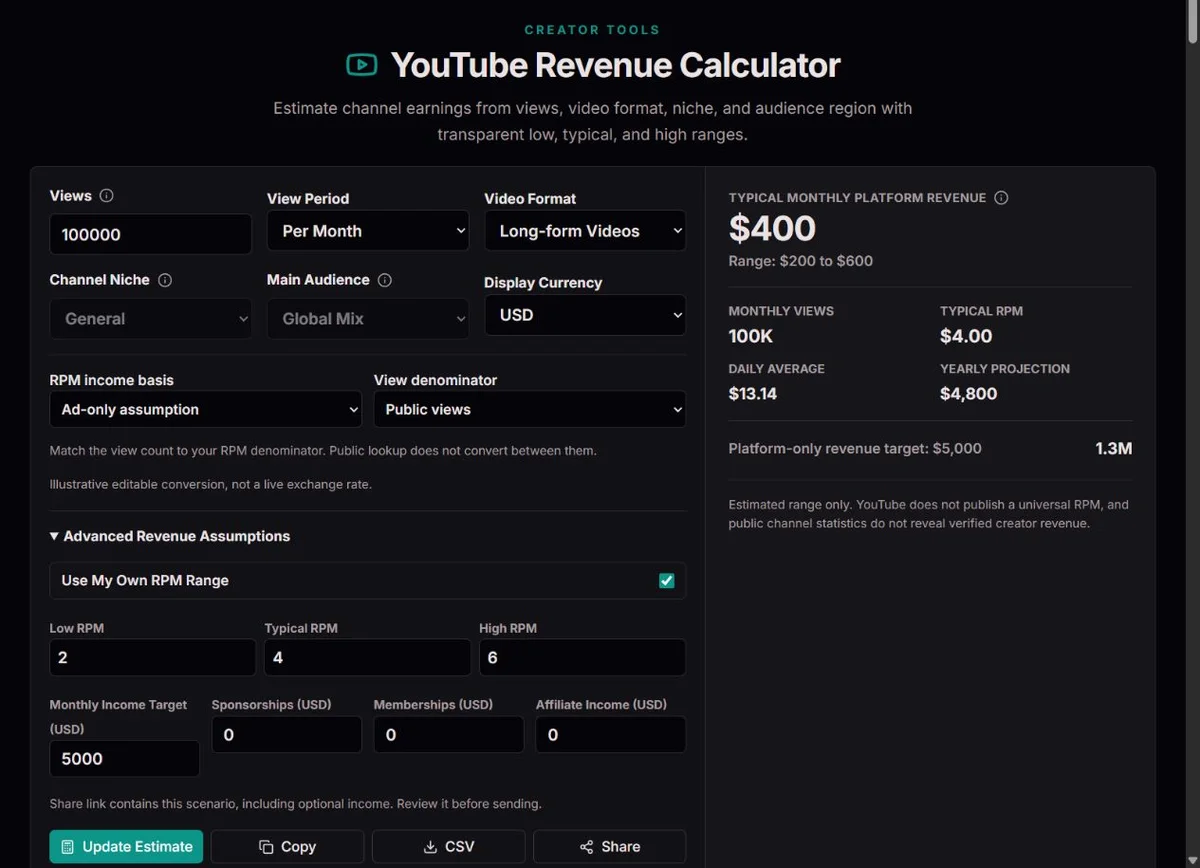
Fixed example: 100,000 matching views × $4 ÷ 1,000 = $400. Adding $200 sponsorship gives $600; a $1,000 platform-only target still requires 250,000 views at $4 RPM.
YouTube’s explanation of RPM and CPM distinguishes creator revenue per thousand relevant views from advertiser spending per thousand ad impressions. RPM is after platform revenue sharing; CPM is not the same denominator or income basis. A view without an ad can still be in an RPM denominator, while one playback can generate several ad impressions. Do not multiply an advertiser CPM by all public views or deduct a platform share again from an already net RPM.
This calculator offers an ad-only assumption and Total Analytics RPM. The latter can include more than ads, such as Premium and memberships, depending on the report. It therefore requires your own custom range and disables the separate membership addition. Select a definition you can explain: total platform revenue divided by matching views is a different quantity from an ad-only estimate.
The calculation is matching monthly views / 1000 * RPM. “Typical” means the central input scenario, not the statistically expected payment. Low and high are alternative assumptions, not confidence bounds. A neat range can still be misleading when its view count covers the wrong period or its RPM comes from a different format. Check those definitions before adjusting decimal precision.
Per Month uses the entered count directly. Per Day multiplies it by 30.4375, an average-month convention rather than the number of days in a named calendar month. Per Video multiplies it by uploads per month. A daily estimate of 10,000 therefore becomes 304,375 monthly views; 25,000 per video across four uploads becomes 100,000. Use the monthly mode with the actual dated total when reconciling a real report.
The per-video assumption needs a horizon. Lifetime views of old uploads are not the same as views arriving in the month of publication. A new upload may earn views for months, while older videos continue adding views now. Use comparable first-month performance for a new-upload plan, or your channel’s actual total monthly views for a channel-wide scenario. Do not add a back-catalogue total twice.
The daily display divides typical monthly platform revenue by the same average-month factor. The yearly projection multiplies it by 12. Neither models seasonal advertising, viral events, later claims or payout timing. Read these outputs as a constant-assumption conversion, then compare separate months if your own history changes materially through the year.
| Entered volume | Monthly basis | Typical platform scenario |
|---|---|---|
| 100,000 per month | 100,000 views | 400 USD |
| 10,000 per day | 304,375 views | 1,217.50 USD |
| 25,000 per video; 4 uploads | 100,000 views | 400 USD |
| 25,000 per video; 8 uploads | 200,000 views | 800 USD |
YouTube’s Shorts counting guidance records the change on 31 March 2025: public Shorts views count starts and replays without a minimum watch-time requirement, while the previous measure remains as engaged views in Analytics. Shorts RPM uses engaged views. The view-denominator selector here labels your assumption; it does not convert a public count to engaged views. Multiplying public Shorts starts by an engaged-view RPM can overstate the comparable volume.
The Shorts monetization policy describes a pooled feed-ad model, unlike treating an ad impression beside every long-form playback as a payment unit. This tool does not reconstruct that pool, music allocation or eligibility. The illustrative Shorts RPM range is just a planning input. An owner’s matched Shorts report is the more useful basis for a specific channel scenario.
Mixed blends the built-in long-form and Shorts ranges by the percentage of views, not uploads. At General and Global Mix, a 75% Shorts share gives a typical illustrative RPM of 0.25 * 4 + 0.75 * 0.06 = 1.045 USD. At 100,000 comparable views the arithmetic is 104.50 USD. That example is valid only under a deliberately consistent denominator; it is not permission to merge incompatible public and engaged counts.
For a channel with separate long-form public views and Shorts engaged views, calculate each format separately and add the resulting revenue scenarios outside the tool. A single total Analytics RPM can be used only with its own matching denominator. When a custom range is active, it replaces the built-in blend, so changing Shorts Share no longer adjusts the RPM.
The built-in long-form range is 1.5, 4 and 8 USD; Shorts uses 0.02, 0.06 and 0.15 USD before factors. These are illustrative defaults, not official rates, measured live averages or forecasts for every monetized channel. General, finance/business, technology/software, education/tutorials, fitness/wellness, travel, gaming, entertainment and music apply broad topic factors; audience regions apply another factor.
For example, the technology factor 1.35 and US/Canada factor 1.3 turn the built-in long-form typical 4 into 7.02 USD. At 100,000 monthly views that gives 702 USD. This only shows the model’s multiplication; it does not establish that technology content or a creator living in Canada earns that rate. Region concerns the assumed audience, not the creator’s residence. Seasonal demand and audience mix can change even within the same category.
A custom range bypasses those factors and the format blend. Use comparable owner reports to choose low, typical and high values, keeping currency, format, denominator and income basis consistent. If a few days were unusually strong, do not silently treat them as a full-year midpoint. To combine historical periods, a view-weighted RPM means total revenue divided by total matching views times 1,000; a simple mean of monthly RPMs can overweight a quiet month.
Enter an ordered range: low no greater than typical, typical no greater than high. Values are not automatically sorted because that would conceal an input mistake. Zero is a valid hypothetical RPM for a non-earning scenario. A positive target at zero typical RPM has no finite view requirement; a missing target result is more honest than an invented infinity-shaped payment estimate.
Check which views could earn under the chosen assumptions. A video that remains public may receive limited or no advertising under YouTube’s advertiser-friendly guidance. Its views therefore cannot simply inherit the RPM of a different set of fully monetized videos. Review the relevant video’s monetization status and a matching owner report before choosing a range; do not invent a universal percentage deduction. Channel monetization policies also affect eligibility and can change over time. Record the report period and review current notices when reusing an older scenario. The calculator’s format and niche options do not decide whether your channel or a particular upload is eligible.
An estimate can change after the viewing period. YouTube’s earnings overview identifies invalid traffic and Content ID claims or disputes as reasons estimated revenue may be adjusted. The copyright-claims guidance also distinguishes blocking, tracking and monetizing a claimed video, sometimes with revenue sharing: a claim does not have one universal financial outcome. Check the owner’s restrictions and revenue reports rather than assuming every public view generated income or every claim made it zero. Keep the date of the report used for RPM, and revisit the scenario when those reports change. The low/high cases do not model these adjustments or resolve a claim, and a calculated monthly amount is not finalized earnings or a bank payment.
Sponsorships, Memberships and Affiliate Income are entered as monthly USD amounts. With an ad-only basis, these separate amounts are added to typical platform revenue for the combined monthly scenario. Total Analytics RPM may already include membership revenue, so the calculator ignores only the amount entered separately in Memberships. It does not remove membership revenue from the RPM you supply. Check the other additions too: if income from an agreement already belongs to the report used to calculate RPM, do not add it again merely because a field is available.
At 100,000 views and a custom 4-USD typical RPM, platform revenue is 400 USD. Add 200 sponsorship, 50 memberships and 25 affiliate income under the ad-only basis: the combined scenario is 675 USD. Under the total Analytics basis, the same entered membership amount is ignored and the total becomes 625 USD. This is a comparison of definitions, not evidence that either hypothetical amount has been earned.
The target remains platform-only. A 1,000-USD target at 4 RPM needs 250,000 views even if additions make the combined total look closer to the goal. The range, daily and yearly platform outputs do not turn the optional additions into recurring guarantees. Totals also omit business expenses and taxes; revenue is not profit or spendable cash.
The output currencies are USD, INR, EUR, GBP, CAD and AUD. RPM and optional income inputs remain USD; the display conversion uses the editable “1 USD equals” factor. Those defaults are illustrative, not live exchange rates. For a deliberate EUR factor of 0.9, a 400-USD platform scenario displays 360 EUR. A 900-EUR target is first converted to 1,000 USD and then requires 250,000 views at 4 RPM.
Changing currency can restore that currency’s default factor, so check the factor again after switching. Record the date and origin of your chosen conversion in the accompanying planning notes; this tool does not model bank charges, settlement rates or exchange gains. More displayed decimals cannot make a rough revenue input precise.
Copy and CSV preserve key scenario values and bases. Share puts the view count, custom range, conversion and optional income into a link. Review it before sending: it can disclose business assumptions even though it does not grant access to Analytics. Keep a dated report with the reasoning behind the inputs, because a link reproduces assumptions rather than explaining why they were chosen.
Optional lookup accepts a public channel identifier or supported handle/URL and requires the public-data service to be available. It can return channel counts and recent video statistics, including average, median, number checked and estimated upload frequency. It cannot retrieve private RPM, revenue, contracts or audience-country distribution. Authorized channel revenue reports require the owner’s authorization, as the YouTube Analytics channel-report documentation explains.
Suppose five sampled videos have 10,000, 10,000, 10,000, 10,000 and 200,000 lifetime views. The average is 48,000; the median is 10,000. A four-upload plan based on the average implies 192,000 views, but an outlier drives that number. Different video ages, formats and ongoing back-catalogue viewing weaken the monthly interpretation further. Median is useful context, not proof of a predictable future upload.
Use Average Per Video and Use Estimated Monthly Views apply sample-derived assumptions, not a measured monthly ledger. Check the view basis afterward, especially for Shorts. If no recent videos are returned or lookup is unavailable, enter your own volume instead. Cancel or edit the identifier to abandon a stale request; repeated public requests cannot uncover private income. A useful error report gives the public identifier and time, never account passwords.
Methodology: Revenue equals comparable monthly views divided by 1,000 times the selected RPM. Daily inputs use 30.4375 days per average month; per-video inputs use the entered upload frequency. Targets are platform-only.
Limits: Currency values are editable illustrative factors, not live rates. Totals are before tax and business expenses. Public lookup uses public statistics, never verified revenue; authorized Analytics is required for revenue reports.
Corrections: Check the period, view denominator, RPM income basis and currency factor first. For a lookup problem, report the public channel identifier and time, not passwords or private Analytics credentials.
At one million matching views, each 1 USD of RPM produces 1,000 USD of platform revenue. Custom RPMs of 2, 4 and 6 therefore give 2,000, 4,000 and 6,000 USD. Those are fixed calculations, not YouTube payouts. The format, period, denominator and income basis still have to match.
CPM measures advertiser spending against ad impressions or monetized playbacks, before creator sharing. RPM measures creator revenue against relevant views. Not every view has an ad and one playback can have several. Use a matched creator RPM rather than applying CPM directly to the public view total.
Use the denominator of the RPM report. YouTube’s Shorts RPM uses engaged views; public starts and replays are different. Selecting Engaged Views labels your input but does not convert a public lookup. Obtain the matching count or clearly keep the result hypothetical.
An active custom RPM range replaces built-in format, niche and region assumptions. Total Analytics RPM also requires that custom range. This prevents layering broad multipliers onto an RPM that already reflects your channel. Adjust the custom values themselves when the supporting evidence changes.
Run separate long-form and Shorts scenarios with each format’s matching count and RPM, then combine the resulting amounts outside the tool. Do not sum public Shorts starts and engaged-view figures into a single unexplained denominator. Mixed is useful only with comparable view-share assumptions.
Total Analytics RPM can already include memberships, so the tool ignores the separate membership addition. Under ad-only assumptions, it can be added separately. Check other additions as well: the field label alone does not establish that an amount lies outside your chosen Analytics report.
No. The target is platform-only and uses the typical RPM. Optional amounts change the combined monthly scenario, not the target calculation. If you are planning a total business goal, keep a separate worksheet with expenses, income definitions and assumptions; this calculator does not reconcile them.
A positive platform target divided by zero RPM cannot produce a finite count. Zero views also yield zero platform revenue, even if optional income remains. Reconsider whether the scenario represents monetized platform activity rather than entering a small arbitrary RPM to make the target look attainable.
No. The factor is editable and illustrative, and revenue totals are before expenses and taxes. Input RPM and additions in USD, inspect the chosen display factor and document its date. The estimate is not an accounting, tax or currency-settlement statement.
No. A sample supplies public volume context, not private revenue or RPM. Average views can be distorted by an outlier and cumulative views span different periods. Owner-authorized reports are needed to investigate real channel revenue; even reported estimates are not the same thing as a finalized bank payment.