Step 1
Write your text
e + ◌́é
Paste text you are authorized to use. Paragraph breaks remain; long words wrap without adding spaces inside them.
Treat the result as a designed page, not a replica of a person’s handwriting. Check the font and every page before exporting.
Treat the result as a designed page, not a replica of a person’s handwriting. Check the font and every page before exporting.
Paste text you are authorized to use. Paragraph breaks remain; long words wrap without adding spaces inside them.
Choose font, paper and margins. Start with moderate variation, then inspect accented letters, descenders and the last page.
Wait for the selected font. PNG exports one page; PDF and print are limited to 40 pages and 32 MiB of image data. Cancel an export to stop preparation.
For a short study sheet, try A4, the Kalam-based print style, ruled white paper, black or blue-black ink, writing size 44, line height 1.65, margins 100 and variation 20%. Leave letter spacing near zero and use paragraph breaks between ideas. Read the first and last pages at the size you plan to print. If a definition spills onto another page, shorten the wording or adjust size before squeezing the baseline spacing. The tool changes presentation; it does not check the lesson’s accuracy.
For an original letter, try plain A5, a Caveat- or Dancing-based style, size 48, margins 100 and modest variation. Center alignment suits a short greeting; left alignment usually makes a long body easier to follow. The smaller paper can add pages, so inspect the closing and page numbers. Keep the typed version alongside the image export when sending it to someone who may need selectable text.
Begin with the exact accents, punctuation and Cyrillic letters that the worksheet needs, not only an English sample. Use low variation while checking glyph coverage. If the font changes style halfway through a word, try a licensed custom font containing the full alphabet. Review long terms, dates and identifiers on every page. A consistent, readable fallback is preferable to a decorative style that changes the meaning or loses a mark.
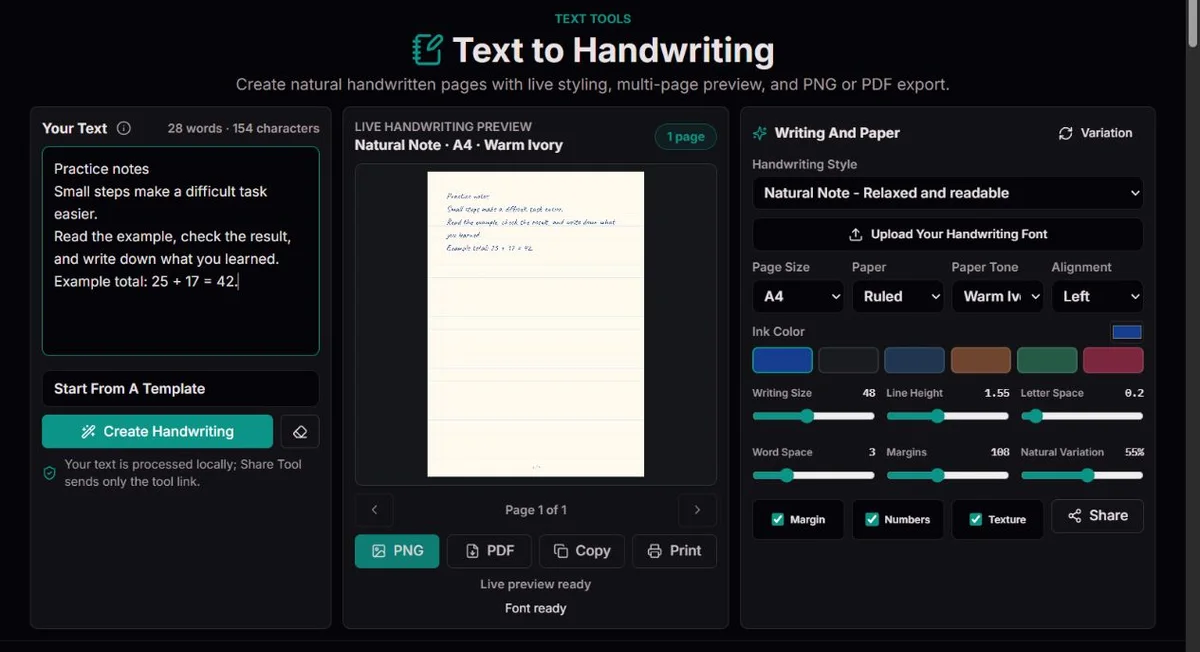
Example: on A5, wider margins and 66-pixel writing leave fewer lines than A4 at 48 pixels. Reduce size or margins before compressing line spacing.
The six built-in choices are styles, not six handwriting generators trained on people. Two use Caveat in regular and heavier weights, one uses Kalam, one Patrick Hand, and two Dancing Script weights. Compare a sentence containing capitals, digits and descenders rather than choosing by the style name alone. An open print style can suit a worksheet; a flowing script may suit a short invitation but make dense technical notes harder to scan.
Writing Size ranges from 34 to 66 in canvas units. It is not a point-size setting for a word processor. The ink palette offers blue, black, blue-black, sepia, green and burgundy, with a custom color choice. Prefer strong contrast for small writing. Pale paper, faint ink and high variation can combine into a page that looks attractive enlarged but becomes tiring when printed.
The W3C font-loading specification explains that downloadable fonts become available asynchronously. Export waits for the selected font before measuring and drawing the captured document. Readiness does not certify that every character exists in that font. Test the actual text, including accents and symbols, and review again after changing a font or uploading a replacement.
A4, US Letter and A5 have different page proportions. Select the size you will actually use before adjusting the writing. Ruled paper follows the baseline spacing; plain removes the pattern; square grid and dotted paper add background guides. The Legal Ruled option is a ruling style, not a US Legal page-size option. White, ivory, recycled-look and blue tones change the background, not the physical material of a printout.
Margins range from 70 to 170 canvas units. Increasing them narrows the line and reduces usable height, so the same paragraph may wrap more often and add a page. Line Height ranges from 1.25 to 2 and multiplies Writing Size: size 48 at 1.55 gives a 74.4-unit baseline step. Space below that baseline is important for g, j, p and y; a tight setting can crowd marks even when lines technically fit.
Letter Space adds 0 to 3 units between drawn grapheme units; Word Space adds 0 to 12 at spaces. These are separate controls: increasing word spacing can separate phrases without opening every letter. Large letter gaps can visibly disconnect a cursive style. Change one value at a time, then inspect the line ends and page count. Left and center alignment are available; there is no justified body-text mode.
Texture, a margin line and page numbers are independent options. The margin line is not drawn on plain paper. Page numbers reserve footer room and help when printed sheets are separated. For a clean letter, turning texture off may simplify the background; for longer notes, keep numbering on and inspect the last line above the footer.
| Task | Suggested setup | Trade-off to inspect |
|---|---|---|
| Study sheet | A4; size 44; height 1.65; margins 100; variation 20% | Readable density versus extra pages |
| Short letter | A5; size 48; height 1.55; margins 100; variation 30% | Cursive joins and space for the closing |
| Large-display note | A4; size 60; height 1.75; margins 110; variation 15% | Fewer words per page |
| Glyph check | Plain paper; low variation; real alphabet sample | Fallback style and missing marks |
Study Notes, Personal Letter, Meeting Notes and Daily Journal are sample-text choices, not verified lesson material or your saved documents. Selecting one replaces the text, so preserve your own writing first. The editor accepts up to 30,000 characters; longer pasted material is truncated. For a long document, split it deliberately and check the ending rather than assuming the whole clipboard reached the page.
The text counter and the 30,000-character input limit count UTF-16 code units, using JavaScript String.length, rather than visible letters or grapheme clusters. An ordinary Latin or Cyrillic letter usually takes one unit; a letter followed by a combining accent takes two, and many emoji use two or more. The ECMAScript string-length definition explains this unit. Grapheme-aware drawing can keep a visible sequence together, but it does not change that input budget. Near the limit, split the text at a sensible paragraph boundary and inspect the final word and accents after pasting; truncation can cut through a multi-unit sequence.
The renderer measures text inside the selected margins and divides wrapped lines into pages. Explicit line breaks remain, including blank lines. Within a paragraph, repeated whitespace is simplified into word separation: pasted tabs and aligned spaces are not a reliable way to create columns. This is a plain-text page layout, not a rich-text editor with tables, inline bold, automatic lists or hand-positioned objects.
A long URL or identifier wider than the writing area is split into chunks without inserting spaces into its source. That keeps it on the page, but a visual line break may still make an address hard to copy from an image. Put important identifiers in the accompanying typed text. Blank lines consume room too; inspect an unexpectedly sparse final page for unnecessary breaks.
Page count is an outcome of geometry and measured glyph widths, not a fixed words-per-page promise. A5 at size 66 with wide margins may need many more pages than A4 at size 44. To reduce pages, first remove accidental blank lines, then consider a slightly smaller size or narrower margins. Do not compress spacing until descenders and accents collide. Review all pages with the navigator, especially transitions between paragraphs and the ending.
The rendering process draws glyphs with small seeded changes in position, tilt and ink opacity. Natural Variation controls positional and angular disturbance; it does not learn your pen movements, choose new spellings or create a signature. Even at low positional variation, ink treatment and the font itself still influence appearance.
A repeatable seed keeps a layout stable for inspection under unchanged settings. The Variation action reshuffles that seed; the update action can also create a new arrangement. Consequently, two deliberately reshuffled images need not match, even when their text and settings are otherwise identical. Check the newly drawn page before exporting rather than assuming that the previous review still applies.
Increase variation only after the lettering is legible. If a capital leans into the margin or a descender appears cramped, lower variation and increase baseline room. A natural-looking page does not establish who wrote it. Use the effect for your own notes, creative layouts and clearly presented educational material; do not represent it as someone else’s handwriting, consent or signature.
Unicode’s text-segmentation guidance explains why a visible character can contain several code points. An accented e may use a base letter plus a combining mark; joined emoji can be longer sequences. The renderer uses grapheme segmentation when available and a conservative fallback otherwise, keeping many of these units together during wrapping and drawing.
Segmentation and font coverage solve different problems. A font may load successfully yet lack a Cyrillic letter, currency sign or symbol. The browser may substitute a system glyph, which preserves readability but can interrupt the visual style. Try the actual alphabet and combinations needed by the document, not a claim that one Latin sample proves multilingual support.
Drawing separate grapheme units is also not a guarantee of full shaping for connected writing systems or bidirectional paragraphs. Joined scripts, ligatures and mixed-direction text need particular care. If joins or ordering are wrong, use a text-layout application that supports the required script instead of assuming that more variation will fix it. Retain an ordinary text version for unambiguous reading.
PNG and image copy contain the current page. PDF and Print prepare all pages, subject to the document limits. PNG preserves a page as pixels and is convenient for slides or a message. Clipboard image support depends on the browser and permissions; a PNG download is the practical fallback. Use the navigator before exporting when you intend to send a page other than the first.
The PDF is an image document: each page contains a raster image, not searchable, selectable paragraph text or a tagged reading structure. Its physical size follows the selected page size, but its lettering will not remain vector-sharp at unlimited enlargement. Keep the source text for editing, accessibility and search. Someone needing an accessible report should receive a suitable text-based document rather than only this PDF.
PDF and print preparation stop above 40 pages or 32 MiB of accumulated image data. The byte limit is not a guaranteed final PDF size, and a device can run out of memory earlier. Cancel stops preparation. Reduce the document into sensible parts when necessary; shrinking everything until it is unreadable is not a useful export strategy.
Print opens a separate view and requires pop-ups. Check paper size, scaling and browser headers or footers in the print dialog. “Fit to page” can change the intended physical size, and an edge-to-edge image can be clipped by a printer’s nonprintable area. Print one representative page first, including a long line and page number, before producing the full set.
Text, page rendering and custom font loading are handled in the browser. Share Tool sends the tool URL, not the note. That is useful for recommending the tool, but it is not a document-sharing or backup mechanism. Keep the typed text elsewhere and export intentionally. Do not rely on a refresh to restore session text or an uploaded font.
Custom uploads accept TTF, OTF, WOFF and WOFF2 files within the 6 MiB limit and require browser font support. Use a font whose licence permits your use and distribution of the resulting document; upload support does not grant rights. The custom font belongs to the current session. A failed load or unsupported character is a reason to try a known suitable font and a short representative sample.
For an export failure, separate the symptoms: font readiness, missing glyph, clipping, clipboard denial or document size. Try one short page with a built-in font first. If that works, reintroduce the text and settings in stages. A useful report names the font, problematic characters, page size, spacing and action taken, without disclosing a private letter or a full classroom roster.
Methodology: Canvas measures grapheme units and lays out lines inside margins with space for descenders and variation. Each export captures one text/settings snapshot and checks font readiness.
Limits: Custom fonts remain session-only. Unsupported glyphs may use system fonts. PDF and print stop above 40 pages or 32 MiB; device memory and printer settings still affect output.
Corrections: For clipped or missing characters, lower variation, increase line height or choose a font covering the text. Report the character, font, page size and spacing without including private notes.
Different fonts have different glyph widths and heights. The same margins and size can therefore produce new wraps. Wait for font readiness, then inspect all pages. Reduce size or margins modestly if needed, while preserving baseline room; the previous page count is not a target the new font must meet.
The renderer draws grapheme units separately, and added letter spacing increases their separation. Lower Letter Space and try another style. It cannot guarantee every font’s ligatures or connected-script shaping, so use a dedicated layout application when correct joins are essential.
No. It selects a paper pattern, not another physical page size. The size choices are A4, US Letter and A5. Select the matching sheet in the printer dialog; changing a ruling style does not change that setting.
The selected font may not contain that glyph, so the browser substitutes a system font. Test a licensed custom font with the necessary coverage. Font-ready status only addresses loading; it does not establish complete coverage of your text.
PNG and Copy Image act on the selected page. Navigate to each page for separate images, or choose PDF for one multipage image document. Print also prepares all pages within the limits. Review the page index before sending a single image.
The export embeds images. It does not include selectable text, search or tagged paragraphs. Send the original typed content alongside it when those functions matter, or use a text-based document workflow. OCR in another application is a separate process and can introduce errors.
First lower variation, then increase line height and inspect margins. Try slightly smaller writing if the page is crowded. Use a sample with capitals, accents and descenders. Compressing Word Space does not solve a glyph that extends below its baseline.
Do not rely on that. The custom font is session-only and there is no editable-project export here. Keep the original text and font file separately, subject to its licence. Sharing the tool URL does not preserve either the note or its settings.
Divide the text into meaningful sections and export them separately. The 40-page and 32-MiB limits apply to preparation; available device memory can impose a lower practical limit. Try one page to distinguish a size problem from font or browser support, and cancel a preparation you no longer need.
No. It uses built-in or uploaded fonts, not image recognition or a personal handwriting model. Variation makes a typographic effect; it does not authenticate authorship or a signature. For a personal message, describe it as a designed handwritten-style page.