Step 1
Paste both versions
limit = 8
     →
limit = 12
Put the earlier text on the left and the revised text on the right. Keep the complete final line.
Compare text by lines, words or characters, choose explicit newline and Unicode normalization, and export an exact unified patch.
Compare text by lines, words or characters, choose explicit newline and Unicode normalization, and export an exact unified patch.
limit = 8
→
limit = 12Put the earlier text on the left and the revised text on the right. Keep the complete final line.
8  ≠  12

CRLF  ≠  LF
Use lines for structure, words for prose or characters for punctuation. Enable ignore rules only when they fit the review.
- limit = 8
+ limit = 12
  retry = true
Inspect removals and additions in split or unified view. Download Diff exports the exact inputs, not the ignored comparison.
Compare a draft announcement with its revision in Words mode, with all ignore rules off. Inspect a changed date or a switch from may to will in its surrounding sentence, then use Characters for punctuation. Split view helps reread each complete version. A high similarity percentage can still contain the one consequential change; approval comes from reviewing the wording.
Use Lines for a small configuration block and keep whitespace significant where indentation or separators matter. If every line changed after moving between systems, try newline normalization separately. Export the raw patch for the review record, then validate the revised file with its own parser or test suite. The checker does not parse YAML, JSON, SQL or executable code.
When two short labels look equal, compare Characters exactly first, then enable NFC alone. If the accent difference disappears, canonical representation was involved. Test line-ending normalization separately for copied multi-line text. Neither switch removes every invisible or confusable character; narrow the example before deciding the display is wrong.
- limit = 8
+ limit = 12
  retry = true
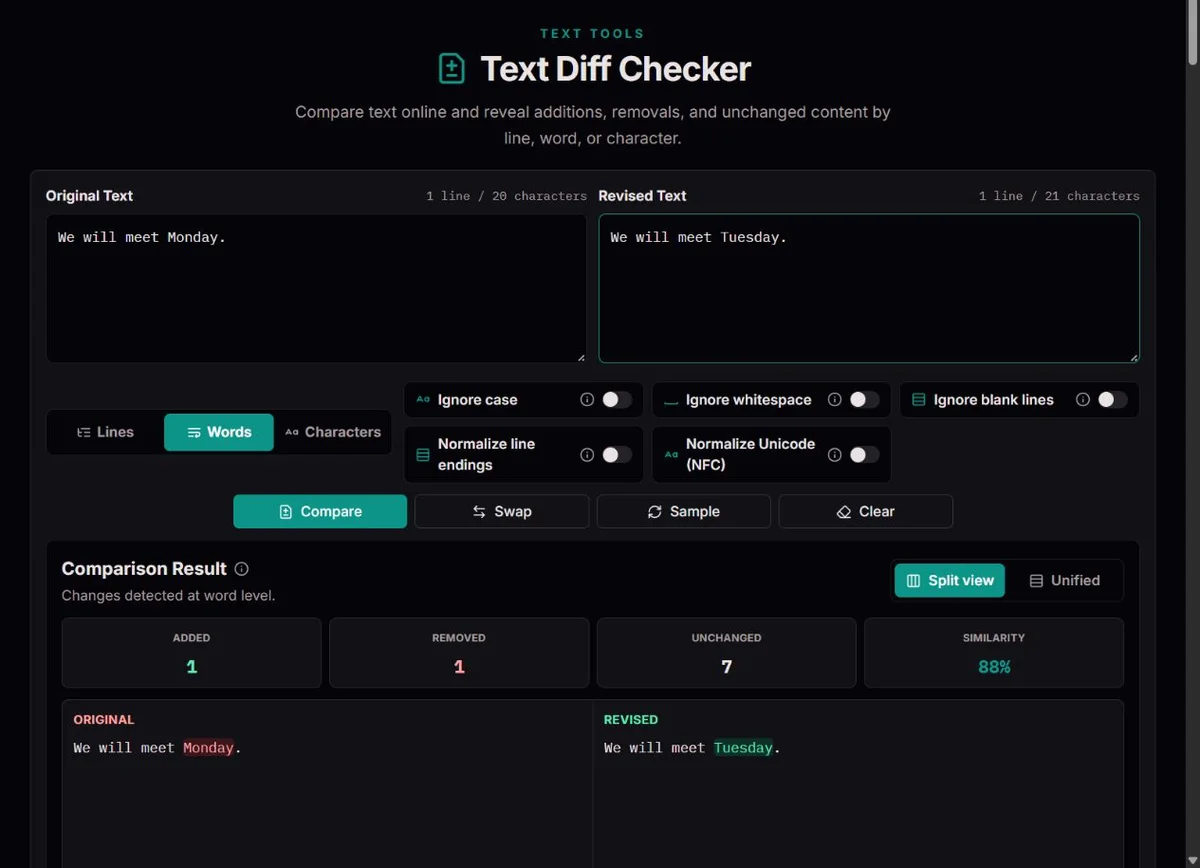
A diff records an edit rather than reproducing two complete documents. GNU’s unified-format documentation describes the compact unified format: changed lines appear with nearby context instead of duplicating all surrounding text.
Context helps a reviewer locate the edit. The downloaded patch names original.txt and revised.txt and includes line-based changes even when the on-screen view compares words or characters.
A repeated line may have more than one plausible alignment. The engine finds an edit sequence; it does not understand author intent. Review surrounding text before treating a moved sentence as a deletion or an addition.
An accented letter can be one code point or a base letter followed by a combining mark. The Unicode normalization specification defines canonical normalization. The optional NFC control compares canonically equivalent sequences without changing the editors.
CRLF and LF are distinct line-ending sequences. Exact comparison keeps that difference; Normalize line endings treats CRLF and lone CR as LF. Ignoring blank lines removes empty separators, including their boundary information.
Similarity is twice the unchanged token count divided by both token totals. Switching token types or ignore rules changes that percentage. It is not a plagiarism score, a semantic similarity model or evidence of correctness.
Line mode treats a complete line, including its ending, as a token. It is good for lists, log excerpts, outlines, subtitles and configuration, but replacing one word can mark the whole line as changed. Word mode follows the comparison engine's tokenization of text, punctuation and significant spacing. Depending on the script and punctuation, a natural word may be split into fragments; the totals count comparison tokens, not linguistic words. Character mode helps inspect a decimal point, URL, identifier or short spelling change.
Start with structure, then narrow the unit for the uncertain edit. A paragraph moved elsewhere can appear as a removal and an addition, not a recognized move. Repeated identical lines allow more than one reasonable alignment, so follow surrounding context. This tool compares two pasted strings; it has no repository history, three-way merge, tracked comments or understanding of why the author revised them.
All ignore and normalization rules start off. Turn one on only after seeing what the exact comparison reports. Ignore case uses lowercase comparison, not a language-aware collation or a rule for equivalent identifiers. Ignore blank lines removes whitespace-only lines and rejoins the remainder with LF; it can therefore also hide line-ending and final-boundary differences. It is not merely a visual collapse of empty rows.
Whitespace behaves differently by unit. In Lines, trimming and collapsing spaces or tabs can hide indentation and even an ending-only change when that rule is enabled. In Words, whitespace runs become single spaces before comparison. In Characters, whitespace is removed altogether: a b and ab can then match. Never enable this rule just to improve the percentage; decide whether the omitted distinctions can affect your task.
| Example | Setting to investigate | Consequence |
|---|---|---|
| LF versus CRLF | Normalize line endings | Maps CRLF and lone CR to LF; leaves the editors untouched. |
é versus e + U+0301 | NFC | Can make canonically equivalent accents compare equally; does not remove accents. |
Label versus label | Ignore case | Hides capitalization, which may matter in code or a proper name. |
a b versus ab | Characters + Ignore whitespace | Hides a separator; an exact comparison is still different. |
The original is on the left and the revision on the right. Minus/red denotes removal; plus/green denotes addition. Neutral content matched under the current rules, not necessarily byte-for-byte. Split view keeps the two sides separate; unified view interleaves the sequence and is convenient for a compact review. Swap reverses the direction, so previous additions become removals. It does not decide which version is better.
For a reproducible example, use Lines with no ignore rules: original limit = 8, revision limit = 12, each followed by a newline and the identical line retry = true with its newline. There is one removed line, one added line and one unchanged line. Similarity is 50%: 2 × 1 / (2 + 2). Word or character mode counts different tokens and yields a different score for the same edit.
Copy Diff and Download Diff both use a unified, line-based patch of the raw inputs. The files are labelled original.txt and revised.txt. Ignore rules, NFC and newline normalization do not rewrite that patch. Thus a normalized screen can show no differences while the export still records a real representation change. Keep the settings alongside the patch if another reviewer needs to understand that distinction.
The header identifies before and after files; a hunk header identifies the affected line ranges. Within a hunk, a leading space is context, a minus is an old line and a plus is a new line. Missing final newlines can be recorded too. A patch is a recipe, not a saved repository commit. Before applying one elsewhere, confirm the destination and baseline in the target tool; this page does not apply patches or resolve conflicts.
A comparison error means the computation did not complete, not that the texts are identical. Each input is limited to 50,000 UTF-16 string units, and difficult edit sequences can exceed the work budget even below that size. Patch generation has its own bounded calculation and can also be unavailable. Split large texts at meaningful section boundaries while retaining enough context to locate the edits; do not judge an error-state percentage as a result.
For invisible differences, verify that both pastes are complete, disable all rules, then compare a short segment in Characters. NFC does not equate straight and curly quotes, ordinary and nonbreaking spaces, or visually similar Latin and Cyrillic letters. Character tokens are code points, not entire emoji or grapheme clusters. For formatting, comments, tables or binary encodings, return to the original document or a file-aware comparison tool rather than expecting pasted text to preserve them.
Comparison runs locally with bounded edit work. Inputs are limited to 50,000 JavaScript string units per editor; difficult comparisons can stop at the work limit. Line mode optionally collapses spaces; word mode can normalize whitespace, and character mode can remove it.
The displayed comparison may omit ignored differences, but patch export always uses raw inputs. Characters are Unicode code points, not necessarily complete visible graphemes. No syntax, meaning or security validation is performed; large edits may exceed the calculation budget.
If a result looks wrong, disable ignore rules, verify both inputs and compare a smaller section. Include a short invented example, token mode and normalization settings when reporting a mismatch.
No. The patch describes the exact original and revised inputs, including changes hidden by comparison rules.
No. Pasted markup is displayed and compared as literal text; it is not executed or rendered as a web page.
Input length and edit-work limits protect responsiveness. Split the documents into smaller relevant sections.
NFC handles canonical Unicode equivalence, not all visual similarity. Confusable letters, zero-width characters, nonbreaking spaces and different quotation marks may remain distinct. Compare a small segment exactly in Characters and inspect it with a code-point-aware editor if necessary. Do not remove invisible characters blindly from code or identifiers.
Yes. A single negation, date, decimal point or permission value can matter more than thousands of unchanged tokens. The score describes the selected token alignment and rules. It is neither a semantic quality measure nor a plagiarism or approval test. Read every change that affects the purpose of the text.
The edit sequence represents insertions and deletions, not a semantic move operation. A relocated paragraph can be removed at one position and added at another. Repeated text may align unexpectedly. Use split view, inspect neighboring paragraphs and review the final order; neither colored block necessarily means newly authored material.
Inputs stay in the current page's memory and are not restored as a saved comparison after reload. Share opens the tool without embedding either pasted text. Export or retain your originals before leaving. A downloaded patch contains their changes, so treat that file with the same care as the reviewed material.
With exact settings, nonempty content on the other side is all added or all removed. Two empty inputs give 100% by convention, not evidence of a successful document review. An ignore rule may erase the only whitespace-only content. Check the actual inputs and calculation state before interpreting an empty-looking result.