Step 1
Choose a note
Create a separate note for each task. A short title and a pin make recurring drafts easier to find.
Write and format browser notes, organize separate drafts, restore a workspace backup, and export TXT or HTML without a note account.
Write and format browser notes, organize separate drafts, restore a workspace backup, and export TXT or HTML without a note account.
Create a separate note for each task. A short title and a pin make recurring drafts easier to find.
Use headings, lists and find-and-replace. Check the local save status before leaving the page.
Download TXT for plain writing, HTML for formatting, or a JSON backup for all notes.
Start a Meeting Notes draft before a call and give it a date and subject. Separate discussion from decisions, then turn agreed actions into a real task list with owners and dates. Pin it while actions are open. Export HTML for a readable record or TXT for another task system; the download is a snapshot, not a live shared document.
Use one note per topic, headings for concepts, a quotation block for attributed excerpts, and a separate list of unanswered questions. Duplicate the note before compressing it into a revision summary. Search the notes panel for a term across titles and bodies. This supports retrieval of your own writing; it does not check sources, mark answers or schedule revision.
Collect a small, non-sensitive command example in a code block and turn wrapping off when reviewing spacing. Keep explanatory prose outside the block. Export TXT before moving the example to a code editor, then check indentation and quotes there. Avoid Clean spacing for code: trimming lines and collapsing tabs or spaces can change their meaning.
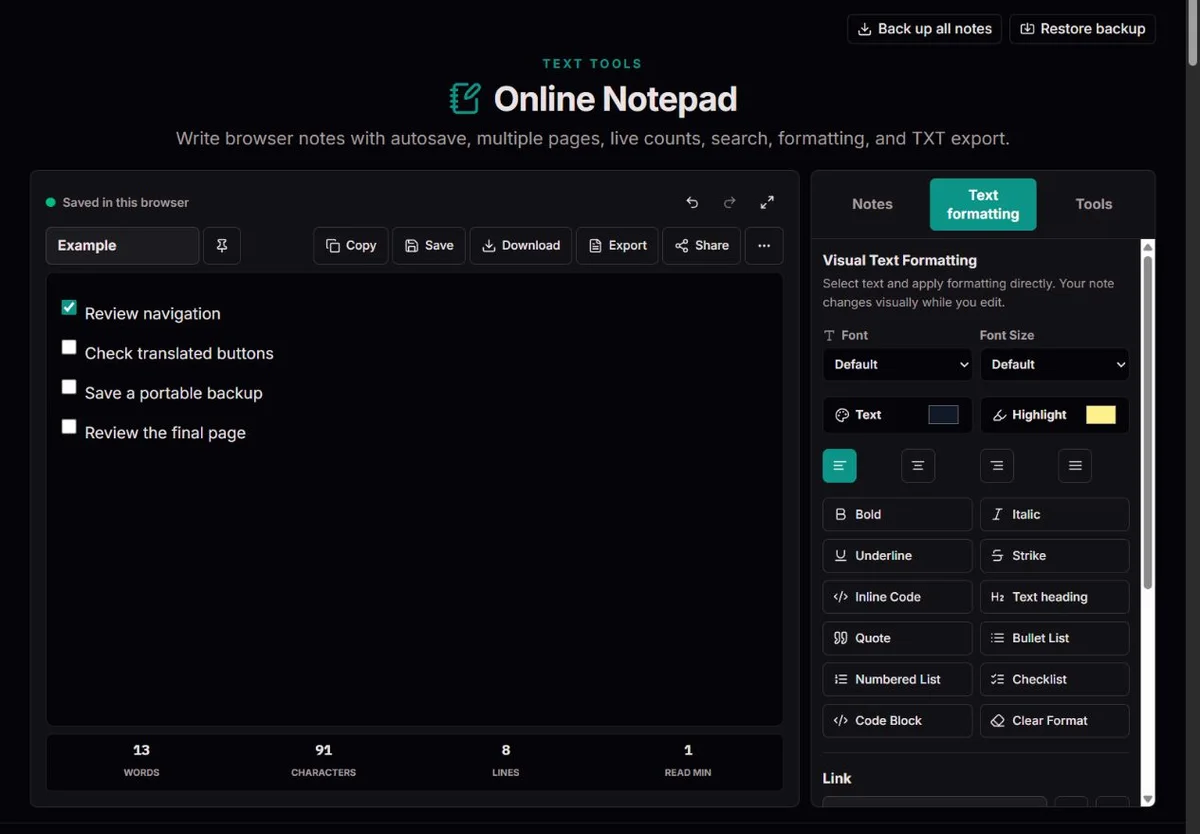
A plain text file stores characters and line breaks. A visual editor also records structure: paragraphs, headings, lists and marks. The HTML editing model distinguishes editable text from rich editing; the two are not interchangeable file formats.
For example, a heading that looks large in the editor becomes ordinary text in TXT. HTML preserves its heading element. Choose the export based on what the next application needs, not simply on the filename.
A pasted Markdown file remains text here; it is not automatically interpreted as a Markdown document. Code blocks preserve readable commands, while paragraph styling is better suited to prose.
Browser persistence makes a scratchpad useful across visits without creating a note account. The Web Storage standard describes shared, origin-scoped storage and warns that there is no locking mechanism across independent browser contexts.
Damaged stored JSON pauses saving instead of being replaced with a blank workspace.
Another tab can also change the workspace. A detected change pauses local saving. This is conflict detection, not collaborative editing or a guarantee against every simultaneous write.
A title should tell you what to reopen, not merely when you started typing. A subject plus a date works better than several notes called Untitled. The notes panel searches both titles and plain body text, without matching case. Pinned notes come first; the remaining order follows recent edits. A pin keeps a reference easy to find but does not make it read-only, archive it or protect it against deletion.
Templates provide starting prompts, not automated workflows. The To-Do template contains ordinary text markers such as [ ]; select the task-list formatting control when you want interactive checkboxes. Duplication makes another editable note, useful before a substantial rewrite. It is not version history. Deletion asks for confirmation and has no workspace recycle bin, so export valuable drafts before tidying the panel.
Use headings to divide a long note, bullets for unordered points, numbering for a sequence and task lists for completion states. Bold is useful for a decision or deadline; highlighting everything removes that signal. Fonts, selected-text size, text color, background highlight and paragraph alignment change presentation. The editor-size slider changes the writing view, while selected-text size is document formatting. Neither is a word-count control.
Wrapping and focus mode are view choices, not separate files. A long line can wrap into several screen lines without gaining line-break characters. Spellcheck is supplied by the browser and its configured language; it is not a factual or grammatical review. Links need a valid destination and should be checked before sharing. For commands, use code formatting rather than typographic quotes or justified paragraphs.
Find searches literal text rather than a regular expression. Match case helps distinguish a specific label from its lowercase use. For an invented draft containing a repeated project label, duplicate the note, find the first occurrence, replace one and inspect its sentence before replacing all. There is no whole-word switch: a short search can also match inside a longer word. The search box in the notes panel finds notes; editor Find operates inside the active note.
Formatting boundaries matter. The editor locates matches within individual text runs, so a phrase split by bold or a link may not be replaceable as one match even if the plain-text count suggests it exists. Search a smaller fragment or edit it manually. Case conversions require a selection; title and sentence case use simple Latin-letter rules, not language-aware editorial rules. Undo can help during editing, but is not a recovery plan after deletion or reload.
Copy offers rich HTML and plain text when the browser supports both; the receiving application decides which representation to use. TXT deliberately removes visual styling but retains useful list markers: bullets, numbering, nested indentation and [x] or [ ] task states. These are text conventions, not interactive checkboxes. HTML retains supported headings, lists, marks and links; it is not a Word file or an exact copy of every editor dimension.
Import TXT or Markdown as a new note, within the 2 MB file limit. Markdown syntax is escaped as text rather than rendered into headings and links. There is no general HTML or Word importer. For device migration, use the all-notes JSON backup instead of individual TXT files; inspect the restored workspace before enabling local saving. Print opens a separate window, so a popup blocker can prevent the print dialog.
Share passes the active note's title and plain export text to the browser's native sharing sheet when available. You choose the receiving app; this is a deliberate transfer of note content, not a private link to a synced workspace. If native sharing is unavailable or fails, the tool falls back to copying. Cancelling the native sheet does not trigger that fallback. Check what will leave the browser before sharing.
| Destination | Useful choice | What to check |
|---|---|---|
| Email or task system | Copy or TXT | Check list markers, indentation and the receiving app's paste format. |
| Formatted standalone record | HTML or Print | Review fonts, links and print pagination; task boxes in exported HTML are disabled. |
| Move all notes to another browser | JSON backup and Restore | Includes titles, bodies, timestamps, pins and active note; restoration replaces, not merges. |
| Safeguard a disputed or damaged workspace | Backup plus preserved stored data | Keep both files before explicitly replacing browser storage. |
Autosave waits briefly after edits; Saved confirms a local browser write, not a cloud copy or a durable file elsewhere. If saving fails, keep the tab open and download the workspace backup first. Storage permissions, full storage, damaged data or another tab's changes can interrupt saving. Reloading before export risks losing the open draft. A successful download should be opened and checked; a button press alone does not prove a file reached a durable destination.
Restore accepts a workspace JSON file up to 10 MB and validates note entries. It replaces the open workspace only after confirmation and leaves local saving paused for inspection. Invalid backups block restoration rather than silently discarding bad entries. When a conflict or damaged storage warning appears, preserve the stored-data download if available, plus a backup of the open notes. Enabling saving explicitly replaces the saved browser workspace; it cannot merge two competing drafts.
Formatting is kept as restricted HTML. Imported TXT and Markdown are escaped as text; exported HTML and print content are sanitized. Word counts split on whitespace; character counts use JavaScript string units, and reading time assumes 200 words per minute.
Notes are not encrypted or synced. Clearing site data, private browsing, device loss, blocked storage and quota limits can remove or prevent local saves. An unlocked shared profile can expose notes. Never use this as a password vault or your only important copy.
For a save problem, download a backup first. Record the browser, export format and a non-sensitive reproduction. Do not send private notes in a bug report; use a small invented example with the same formatting.
In local storage for this browser profile and site, without automatic cloud synchronization. Export before clearing site data.
All note titles, HTML bodies, timestamps, pins and the active note.
Download the preserved raw data when available. Invalid data is not overwritten automatically; external repair may still be needed.
Download an all-notes JSON backup, transfer it using a destination you trust, then Restore in the other browser. Back up its existing notes first: restore replaces them. Inspect the workspace before enabling local saving.
Each browser profile has separate site storage; private sessions do not provide a dependable long-term workspace. Check the original profile and site before assuming deletion. There is no account that can retrieve notes remotely. Once site data has been cleared, recovery depends on a copy you kept elsewhere.
The count examines flattened plain text, whereas replacement works within individual editor text runs. A phrase divided by formatting can cross that boundary. Try shorter fragments and inspect each replacement. Match case and substring matching also affect results; this is not a regex or whole-word search.
Yes. TXT and plain copy include numbering, bullet markers, nested indentation and checked or unchecked text markers. Colors and heading styling disappear. Verify the result in the receiving editor, especially nested lists; the exported markers do not remain interactive and are not automatically parsed when imported again.
Words are separated by whitespace, characters count UTF-16 string units, and lines count text line breaks rather than visible wrapping. A supplementary-plane emoji can contribute two character units. Reading time uses 200 words per minute, rounded up, so it is only a rough planning figure, not a measured reader result.