Step 1
Choose a direction
AB9 / AJAlfa Bravo Niner / Slash / Alfa JuliettEnter AB9 in text mode, or paste Alfa Bravo Niner in code-word mode. Standard code words stay unchanged in every language.
Translate text to standard Alfa–Zulu words or decode code words, check literal punctuation and rehearse with optional browser speech.
Translate text to standard Alfa–Zulu words or decode code words, check literal punctuation and rehearse with optional browser speech.
AB9 / AJAlfa Bravo Niner / Slash / Alfa JuliettEnter AB9 in text mode, or paste Alfa Bravo Niner in code-word mode. Standard code words stay unchanged in every language.
Review unsupported characters, word separators and digits. Literal slash uses [/] when punctuation names are turned off.
nato-phonetic-translation.txtAlfa Bravo Niner / Slash / Alfa JuliettSelect a voice and reading speed for rehearsal, download text or share only the tool page. Ask the receiver for a read-back.
For a telephone exercise, use the invented reference AB9/O0. Keep Radio Numbers and Punctuation on, with slash word separators, and read the result one code word at a time. Oscar represents the letter O; Zero represents the digit 0; Slash is the literal punctuation inside the identifier. Ask the other person to repeat the complete characters and their order, not merely say that the message was heard. Compare that read-back with the original before moving on. The converter cannot check whether the reference exists, belongs to the caller or has the right format for an organization.
Enter a short example such as CAFÉ and inspect the conversion before using it in a call. This tool reduces accented Latin letters to their base letters, so the result spells CAFE rather than preserving É. Agree on that spelling when accents are meaningful, and keep the person's original written name separately. Use the displayed code words as a reading aid, then ask for a letter-by-letter read-back. Do not assume the page language changes the output alphabet or that a valid sequence settles how a name should be recorded.
Use the built-in FLIGHT 27 example as a spelling exercise, not an operational aviation instruction. With Radio Numbers on, the output spells each letter of FLIGHT and then Two Seven after the word boundary. Start browser reading at the default 0.8× rate, choose a suitable available voice and stop if you need to inspect one part. Then read the sequence yourself without playback and compare it with the chart. The rate is relative to a speech voice, not Morse WPM or a certified speaking pace; the app does not interpret a flight level, clearance or frequency.
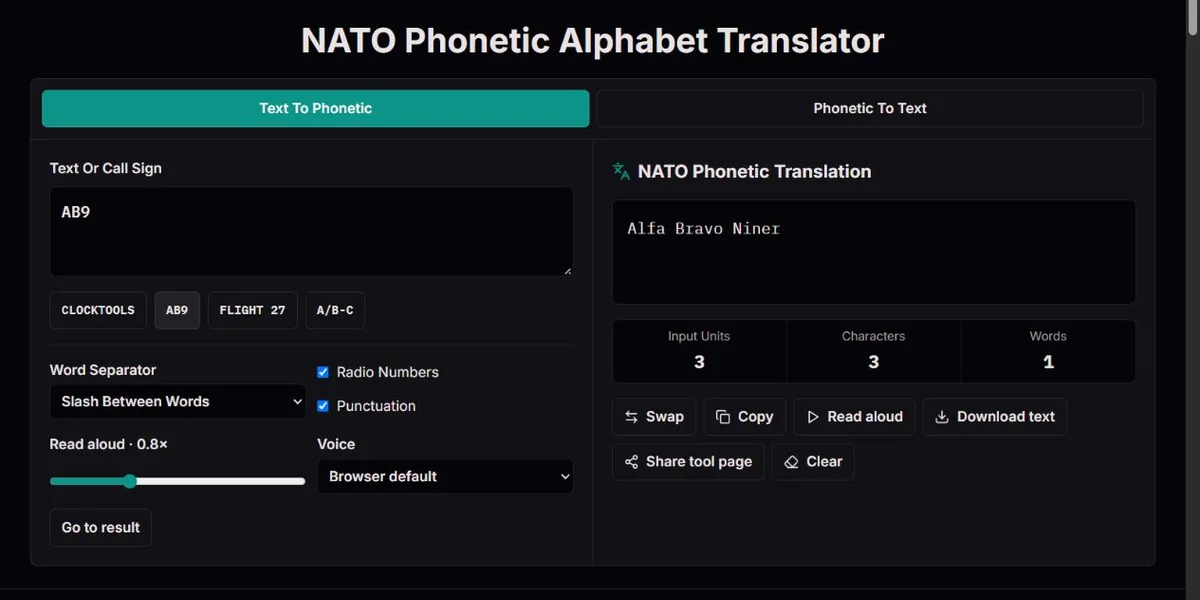
The NATO alphabet assigns a spoken code word to each Latin letter, from Alfa for A to Zulu for Z. It is useful when ordinary letter names are difficult to distinguish over a call. Entering AB does not produce a translation of an abbreviation's meaning: it produces Alfa Bravo, preserving two characters in that order. A spoken word such as Hotel is a label for H here, not a request for accommodation.
The text-to-phonetic direction creates code words from supported text. The phonetic-to-text direction recognizes already written code words and produces characters. Neither is a microphone receiver or speech-recognition system. The optional reading button speaks the current result; it does not listen to a caller or certify that the caller understood it. A receiver's read-back is still needed to check an important sequence.
The code words remain the same on all eight localized pages. Translate the instructions, not Alfa, Juliett or X-ray into a different national spelling alphabet. This is also different from Morse: these are spoken words, while Morse encodes marks and gaps. If your starting material is dots and dashes, use the Morse decoder rather than expecting this page to identify it.
The Word Separator setting chooses / or a new line between source words. It does not turn each code word into a separate original word. AB9 has three emitted code words but remains one source group. A B has two source words, represented as Alfa / Bravo or by Alfa and Bravo on separate lines. Keep those boundaries when copying a phrase to another reader.
Punctuation switches between English convenience names and literal supported symbols. A/B becomes Alfa Slash Bravo with punctuation names on, or Alfa [/] Bravo with them off. The special [/] notation preserves a literal slash without confusing it with / as a word separator. For A/B-C, Dash identifies the hyphen when names are on; with names off the hyphen remains a separate symbol.
Period, Comma, Dash, Slash, Question, Exclamation, Colon and At are the tool's punctuation labels. They are useful for reading a simple identifier, but they are not a complete operational phraseology. For example, saying Period for a displayed full stop is not an automatic choice of the correct way to transmit a radio frequency. Follow the relevant organization's procedure rather than treating a character converter as a validator of its message.
| Input | Chosen settings | Output |
|---|---|---|
| A B | Slash separator | Alfa / Bravo |
| A B | New-line separator | Alfa
Bravo |
| A/B | Punctuation on | Alfa Slash Bravo |
| A/B | Punctuation off | Alfa [/] Bravo |
| A/B-C | Punctuation on | Alfa Slash Bravo Dash Charlie |
With Radio Numbers on, digits use the displayed pronunciation forms: Zero, One, Two, Tree, Fower, Fife, Six, Seven, Ait and Niner. With it off, the same digits remain numeric tokens. Thus AB9 is Alfa Bravo Niner or Alfa Bravo 9. The option changes their displayed reading form, not which digit the source contains.
The number chart helps explain why forms such as Tree and Niner differ from ordinary written English. ICAO’s spelling and pronunciation reference discusses distinctive radiotelephony pronunciation and the broader context of number transmission. The app handles digits one by one: 27 yields Two Seven, not twenty-seven, and it does not decide when hundreds, thousands, decimal notation or another operational convention should be used.
When decoding, enter recognized number words or separate numeric tokens. Two Seven and 2 7 both become 27, while an unseparated token 27 is not a recognized code word. Spaces between code words separate characters; / or a new line separates original words. If a result has the correct digits but the wrong divisions, check separators before changing number pronunciation settings.
| Direction and input | Option | Result |
|---|---|---|
| Encode AB9 | Radio Numbers on | Alfa Bravo Niner |
| Encode AB9 | Radio Numbers off | Alfa Bravo 9 |
| Decode Two Seven | Uppercase output | 27 |
| Decode 2 7 | Uppercase output | 27 |
| Decode 27 | Uppercase output | [27] |
Text encoding supports A-Z, digits and the displayed punctuation. Accented Latin letters are reduced to base letters: CAFÉ becomes Charlie Alfa Foxtrot Echo and decodes to CAFE. This reduction is a deliberate convenience, unlike the separate É mapping in the Morse tools. It is not general transliteration: ß, Ø, ligatures and Cyrillic are not automatically converted to an agreed Latin spelling.
Unsupported text characters are reported and omitted from the output. If part of a name or identifier disappears, the remaining code words can still look valid. Decoding behaves differently: an unknown code word is kept in brackets rather than silently converted into a guessed letter. Alfa Zebrah Bravo becomes A[ZEBRAH]B with uppercase output and lists Zebrah as unknown. Correct the original token or ask for a repeat; do not assume it was meant to be Zulu.
Input Units counts non-space characters after accent normalization while encoding, including unsupported ones. Characters counts emitted tokens, not the total letters in words such as November. Words counts the source groups that produced output. In decoding, Input Units counts non-separator tokens, Characters counts recognized tokens and Words reflects the returned text. A difference between totals can reveal omissions, but matching totals does not prove the intended sequence is correct.
Generated code words use Alfa, Juliett, Whiskey and X-ray. The decoder also accepts Alpha, Juliet, Whisky and Xray as typed variants. Alpha Juliet Whisky Xray therefore becomes AJWX. That convenience is a lookup rule, not an endorsement of rewriting the international output table. Standard spellings are useful because another reader may be following the official reference rather than this decoder's aliases.
Recognized words are looked up without regard to case. A single Latin letter can also be accepted as a character token, but an arbitrary string such as AB9 is not decoded one character at a time in phonetic mode. The output-case selector chooses uppercase or lowercase for the returned text. It does not recover original capitalization that was never carried by the code words.
Commas, periods and semicolons at the end of a written code word are removed for lookup. A leading comma is not removed: ,Alfa stays unknown and returns [,ALFA] with uppercase output. Alfa, Bravo. decodes as AB, not A,B. To retain an intentional comma, use Alfa Comma Bravo or a separate supported comma token. This is a practical distinction when copying a code-word list from prose: punctuation around the list and punctuation inside an identifier are not the same thing.
| Phonetic input | Uppercase result | Reason |
|---|---|---|
| Alpha Juliet Whisky Xray | AJWX | Accepted aliases |
| Alfa, Bravo. | AB | List punctuation stripped for lookup |
| Alfa Comma Bravo | A,B | An intentional punctuation token |
| Alfa Bravo / Niner | AB 9 | A preserved word boundary |
| Alfa Zebrah Bravo | A[ZEBRAH]B | An unknown token retained |
Reading speed ranges from 0.5× to 1.5×, with a default of 0.8×. It is relative to the selected speech voice, not a calibrated word-per-minute setting. The voice menu lists what your browser offers and can change when voices become available. In text-to-phonetic mode, the automatic choice prefers an English voice; a specific selection can override it. A voice speaking a familiar language is not necessarily an accurate model for every international code word.
The Read aloud button speaks the current output and changes to Stop while speech is playing. Editing input, changing direction or settings, hiding the tab or leaving the page cancels the current utterance. There is no microphone check, pronunciation score or resume-at-position feature. If nothing is audible, test a short AB9 result, check device mute and output, then try another available voice. If speech synthesis is unavailable, the text conversion and chart are still useful.
Swap places the current converted output into the opposite direction. By contrast, selecting a direction tab loads that direction's built-in CLOCKTOOLS example. Save your original before either action if spelling, accents or uncertain tokens matter. A round trip checks this mapping but cannot restore lost accents, case or omitted characters. The example buttons also replace the current input; they are starting material, not saved revisions.
Copy puts the current converted output on the clipboard; Download text saves the same output in nato-phonetic-translation.txt. Share sends only the tool-page URL, not your input, output, selected voice or settings. There is no generated WAV download here and no saved session transcript. Conversion is local, but the Web Speech API's description of speech voices allows both local and remote speech voices: that does not justify a promise that every selected voice reads private text offline. For rehearsal, prefer a harmless invented identifier.
The alphabet's international form reflects a listening problem, not just an English vocabulary list. ICAO’s spelling and pronunciation reference describes the difficulties of using earlier English-centred alphabets across language communities and the effort to choose recognizable spoken words. A code word had to work for people who did not share the same habits of pronunciation. Translating the word separately for every reader would undermine that shared reference.
ICAO explains Alfa with f as a way to avoid depending on every speaker reading ph as f, and Juliett with two final t letters as a way to discourage treating the final t as silent in French. These choices explain why the generator uses spellings that may look unusual in ordinary English. The decoder's acceptance of Alpha or Juliet is useful for pasted text, but the standard output remains Alfa and Juliett.
The revisions were also tested and coordinated. The official history describes the 1951 civil-aviation version, subsequent difficulties under poor receiving conditions, and the replacement of five code words for C, M, N, U and X with Charlie, Mike, November, Uniform and X-ray. NATO’s alphabet history records the final alphabet becoming effective for NATO on 1 March 1956. The useful lesson is not to invent a more memorable word for one letter: consistency between speaker and listener matters more than a personal mnemonic.
The spelling alphabet is only one part of a wider communication system. ICAO's account of Annex 10 places it within communication procedures that cover more than converting isolated characters. A browser rehearsal can help you prepare a sequence or compare a read-back, but it cannot select the correct operational phraseology, validate a clearance or certify a voice. Use the official chart to understand the convention and keep the original identifier as the reference for what you intended to say.
AB9 / AJAlfa Bravo Niner / Slash / Alfa JuliettThe 26 generated letter words follow the alphabet documented in NATO’s alphabet history and ICAO’s spelling and pronunciation reference. The decoder accepts the documented typed aliases and preserves unknown tokens in brackets. Digits use either separate numeric tokens or the displayed radio pronunciation forms; punctuation names are convenience labels. Accented Latin letters are reduced to their base letters. The calculations describe characters and groups, not validated operational messages.
This tool spells supported characters; it does not listen to a microphone, translate word meanings, validate identifiers or determine operational phraseology. Unsupported text is reported and omitted; unknown code words are retained for review. Browser speech varies by voice and may use a remote service. No transcript is saved, Share carries only the page URL, and Copy/download carry the current result. Keep the original when case, accents or uncertainty matter.
To report a conversion discrepancy, include the direction, exact input, expected and actual output, and the relevant Radio Numbers, Punctuation, Word Separator or output-case settings. For a speech problem, add the selected voice, reading rate and browser, and say whether the written result is correct. Compare the official letter table before changing an identifier; remove sensitive information from the example you submit.
Alfa is the official international spelling, chosen to avoid relying on ph being pronounced as f across languages. The decoder accepts Alpha as a typed alias, but the generator uses Alfa. Keep the standard output when sharing a spelling reference with another person.
No. The explanations and controls are localized, but Alfa, Juliett, X-ray and the other code words remain unchanged. A chosen speech voice can pronounce them differently; that is a voice characteristic, not a different output alphabet.
Accented Latin letters are reduced to base letters, so CAFÉ becomes CAFE on a round trip. Other characters such as ß or Cyrillic are not generally transliterated and may be omitted with a warning. Agree on the intended spelling and preserve the original name separately.
With Punctuation on, the literal slash is Slash. With it off, it is [/]. A plain / between code-word groups denotes a word boundary instead. Use A/B and A B as a quick comparison before preparing a reference that contains both punctuation and spaces.
The decoder retains an unrecognized token rather than guessing its intended letter. Alfa Zebrah Bravo returns A[ZEBRAH]B in uppercase mode. Check the source spelling or ask the sender to repeat it. Valid neighbouring words do not resolve that uncertainty.
The decoder looks up individual tokens. Enter Two Seven or 2 7 to represent two digits; an unseparated 27 is an unknown token and becomes [27]. If 27 is your ordinary source identifier, use text-to-phonetic mode first.
No. It substitutes the displayed reading form for each digit. It does not interpret decimal values, flight levels, hundreds, thousands or operational instructions. Follow the applicable communication procedure; a character-by-character conversion is only a spelling aid.
The direction tabs load built-in examples for their modes. Swap instead transfers the current converted output into the opposite mode. Keep your source before changing direction when accents, case or unknown material must remain available; neither action is a saved revision history.
No. Available voices, accents and speaking rates vary, and the app does not assess pronunciation or reception. Use speech for rehearsal, compare the official reference and ask for a read-back. A remote speech voice may also need a network service; local text conversion does not prove that every voice is offline.
No. Share sends only this tool page. Copy or download the result deliberately if you need another person to receive it, and review it first. The app saves no transcript or settings for a later session, and it has no WAV export for speech.
Text conversion and the chart do not depend on speech synthesis or native sharing support. Available voices vary by browser and device. Share can open the device's share sheet; when that API is unavailable, it copies the tool-page URL instead, never the identifier. Cancelling a share is not sending it. If copying fails, select the checked result manually. Keep the original spelling and ask for a read-back rather than assuming a phone voice is authoritative.