Step 1
Choose and load a drill
HELLO.... . .-.. .-.. ---Select a practice set and request a new drill. It stops any signal already playing and does not autoplay.
Practice letters, digits and words with repeatable audio, hidden answers and a typed-answer check.
Practice letters, digits and words with repeatable audio, hidden answers and a typed-answer check.
HELLO.... . .-.. .-.. ---Select a practice set and request a new drill. It stops any signal already playing and does not autoplay.
Play the code, keep the answer hidden and enter what you recognize. Replay whenever useful.
.... . .-.. .-.. ---HELLOCheck your typed answer or reveal the reference. A new drill clears the answer and feedback.
The practice page shows the written Morse prompt from the start. Keep the decoded answer hidden, play the signal, then type what you think the prompt says. Check compares your typed decoded text with the fixed prompt after trimming ends, collapsing ordinary whitespace and uppercasing. It is still an exact comparison after that normalization: a changed letter, missing digit or wrong word is wrong. Use this when you want a clear listen-guess-check loop without scores or partial-credit rules.
Start with letters if the chart is still new, move to numbers when five-mark digit patterns need attention, and use words for spacing and repeated-letter practice. Default practice opens on the words set with HELLO, whose two L characters make repeated .-.. easy to inspect. New Drill stops playback, chooses a prompt that is not the immediate previous prompt, clears your guess and hides the decoded answer again. There is no saved streak, adaptive schedule or custom source message on this page.
If Check says wrong, the decoded answer appears even if you had not revealed it. Compare the written groups with your typed text and decide what failed: a pattern, a word gap, a repeated letter or a number. Editing your guess clears the feedback so you can try again. Copy sends the Morse groups to the clipboard, not the decoded answer. If you want to create your own source phrase, use the generator or audio page, then return to practice for built-in drills.
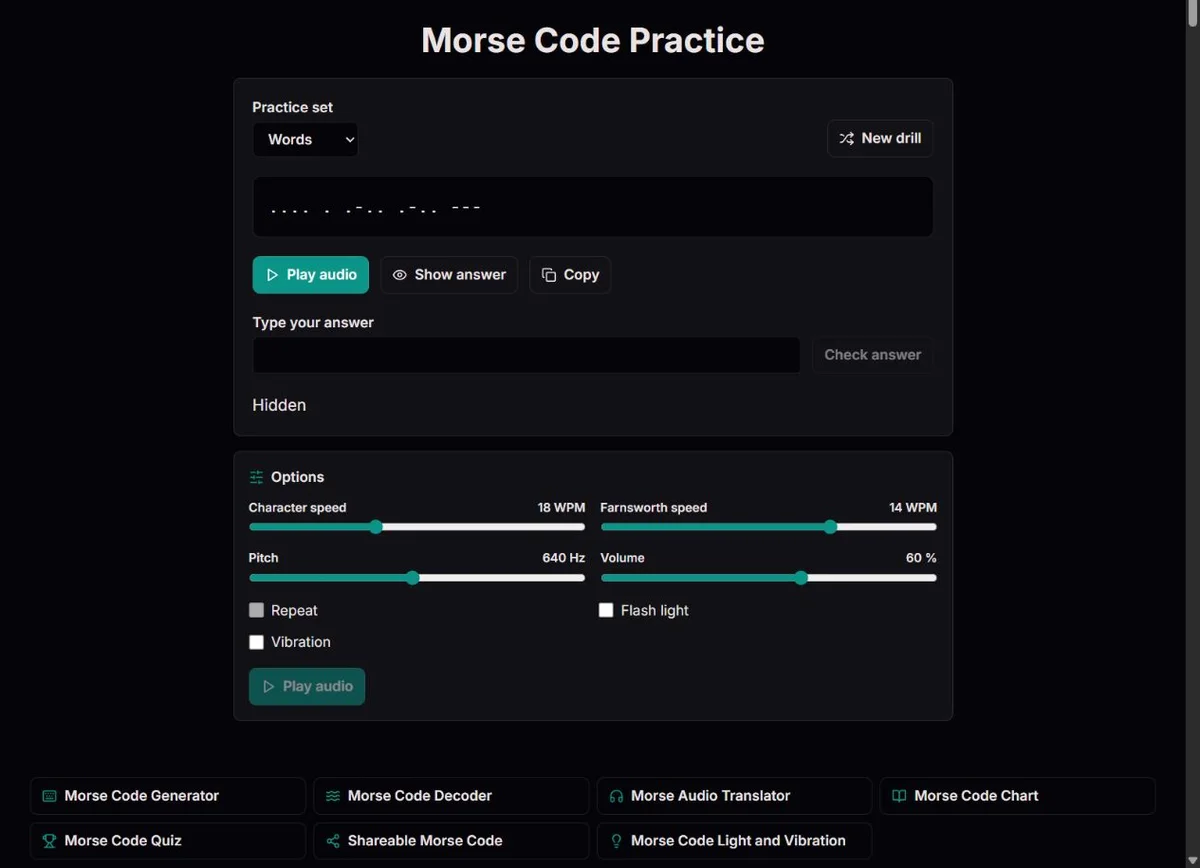
Practice is a typed-answer drill built around visible written Morse. The page shows the current prompt as dot-and-dash groups, lets you play the same code as audio, and hides or reveals only the decoded answer. That distinction matters: this is not a secret-code page where the Morse itself is concealed. It is a drill for turning written and heard Morse into the decoded text.
The available sets are letters, numbers and fixed English words or phrases. The default is words with HELLO as the first prompt. You can request a new drill or switch sets, and either action stops current playback, clears your guess, clears feedback and hides the decoded answer. The next prompt avoids only the immediate previous value. The page does not accept a custom practice phrase, does not save a session and does not keep a score.
Check compares your answer with the prompt in a narrow, predictable way. It trims leading and trailing space, collapses runs of whitespace to one space and uppercases your input. After that, it requires exact equality. hello, HELLO and hello can match HELLO; HELO does not. LEARN CODE can match LEARN CODE; LEARNCODE does not. This makes the feedback simple enough to trust without claiming to diagnose every partial error.
| Feature | Actual behavior | Decision for the learner |
|---|---|---|
| Visible Morse prompt | Always shown | Use it for reading and for checking audio timing |
| Show/Hide | Toggles the decoded answer only | Hide it before guessing; reveal it for review |
| Check | Exact decoded-text match after case and whitespace normalization | After an incorrect answer, inspect the specific differences |
| New Drill | Stops audio and clears guess, feedback and reveal state | Move on after reviewing the old prompt |
| Copy | Copies Morse groups | Use it to move the code, not as an answer-key copy |
Letters are useful when the problem is character shape. They let you isolate E/T, I/M, A/N, U/D, R/K and other small comparisons without the load of a word. Numbers are useful when you need patience with five-mark patterns. Words are useful when spacing and memory enter the exercise: HELLO repeats one letter, SOS is short and famous, and phrases such as TIME TO PRACTICE include a word break.
A practical sequence is not rigid. If words feel too hard, step back to letters for the pattern that caused trouble. If letters feel easy in isolation but words fail, keep character speed stable and lower the Farnsworth speed in WPM so there is more time between letters. If a number prompt fails repeatedly, compare the digit progression on the chart before returning. The page does not schedule those moves for you; it gives enough frictionless drills to make the decisions visible.
The built-in word list is intentionally small and English: SOS, HELLO, CLOCK, TIMER, FOCUS, SIGNAL, RADIO, MORSE, LEARN CODE, TIME TO PRACTICE, GOOD MORNING and KEEP GOING. That makes the page suitable for repeatable beginner drills and group activities, but not for arbitrary vocabulary, call signs or a full copy exercise. Use text to Morse or the audio translator when the source message needs to be yours.
| Set | Best use | Watch for |
|---|---|---|
| Letters | One-character recognition and confusable pairs | No word spacing and no custom subset |
| Numbers | Five-mark digit patience and date-style patterns | Longer prompts than their written digit suggests |
| Words | Repeated letters, spacing and short memory load | Fixed English list only |
| Generator/audio page | Custom message practice | Different page; practice does not import it as a drill |
| Chart | Focused review after an error | Reference lookup, not a typed-answer drill |
The same timing controls apply here as on the converter: character WPM sets the mark speed, Farnsworth WPM expands letter and word gaps when it is lower than character speed, pitch sets tone frequency, and volume sets generated audio level. At equal speeds, International Morse uses one dot unit for a dot, three for a dash, one for an inner gap, three for a letter gap and seven for a word gap ITU-R M.1677-1 International Morse code recommendation. Farnsworth keeps character rhythm and stretches the outer gaps according to a PARIS-based calculation ARRL QEX article on Farnsworth timing.
For a multi-letter typed drill, a useful starting experiment is 18 WPM characters with 10 or 12 WPM spacing. Read the visible code first, then play it and type the decoded answer without revealing. If you can decode visually but miss the audio, keep the drill and adjust spacing before changing the word. A lone letter or digit has no outer gap within its playback, so use character WPM to slow that pattern rather than lowering Farnsworth alone. If the answer feels obvious from the visible code, play once with your eyes away from the prompt, type, then inspect the code after checking.
Do not use setting changes as hidden scoring rules. The practice page does not calculate speed, partial credit or receiving proficiency. It simply gives the same prompt under the current audio settings and tells you whether the decoded text matched. Record your own observations: fewer replays, fewer A/N reversals, better word-gap recognition or more consistent number copying. Those are practical signs for the next session.
You can also compare the visible written prompt with the optional light indicator or vibration cue in the Options panel. For example, watch the dark interval between two letters rather than revealing the decoded answer. Leave flashing off when unsuitable or disabled by reduced motion, and test vibration on the actual device before including it in a lesson. A checked option does not establish physical output. Quiet playback at volume 0 still needs the browser audio engine; these cues are not a separate camera, torch or input-decoding mode.
| Problem | Setting move | Reason |
|---|---|---|
| Cannot identify marks | Lower character WPM | Dot, dash and inner-gap timing all slow down |
| Can identify letters but not words | Lower Farnsworth WPM | More time appears between letters and words |
| Tone is uncomfortable | Change pitch or volume | Comfort supports attention, not correctness |
| Guess is visually right but audio feels lost | Replay same prompt before New Drill | Changing prompts hides the specific timing problem |
| Practice feels like memorizing the word list | Switch set or create custom audio elsewhere | This page has a fixed prompt pool |
An incorrect result means your typed answer did not match the prompt; it does not diagnose the cause of the mistake. The page does not score individual letters, highlight edit distance or explain spelling. When the answer appears, compare it with what you typed and with the Morse groups still on screen. If HELLO became HELO, the repeated L may have disappeared in your reading. If LEARN CODE became LEARNCODE, the word gap was missed. If 8 became 3, the five-mark number progression needs review.
Editing your guess removes the feedback and lets you check again. Use that for a focused retry, not for random guessing. A good cycle is: play, type, check, compare one difference, replay, retype. If you need a reference, open the chart for that one character and return. If you need a different message, use New Drill after the review step. Moving too early can make practice feel smooth while the same error keeps returning.
Copy can help a teacher or puzzle author move the exact Morse groups into another tool, but it copies code rather than the decoded answer. That is useful when a prompt should be pasted into the decoder, audio page or a worksheet. It is not a progress export. The page also does not persist your written guesses, so keep notes outside the tool if you want to track repeated uncertainties across days.
| Typed answer | Prompt answer | Result | Likely review |
|---|---|---|---|
| hello | HELLO | Correct | Case is normalized |
| HELO | HELLO | Wrong | Repeated L was missed |
LEARN CODE | LEARN CODE | Correct | Ordinary whitespace is collapsed |
| LEARNCODE | LEARN CODE | Wrong | Word gap was missed |
| SIGNEL | SIGNAL | Wrong | One letter changed; review the final groups |
A useful plan is a loop, not a prescription. On one day, use letters and write down two confusable pairs. On another, switch to numbers and accept that each digit takes longer. On another, use words and focus on spacing rather than speed. Keep sessions short enough that the final prompts are still attentive. If you notice that every answer needs several replays, slow the spacing or stop and return later.
Pair the practice page with the rest of the Morse tools deliberately. The chart is for exact lookup, the audio page is for custom listening samples, the decoder checks copied groups, and the generator creates messages this practice page cannot create. After a wrong practice answer, choose the smallest helpful tool. A full round trip through every page is unnecessary when the actual problem is one reversed pattern.
Classrooms and clubs can use the same loop. One group listens, one group reads the visible code, one group types the answer, and then everyone compares the result. Rotate roles so learners see that Morse recognition involves sight, sound, spacing and memory. Keep the decoded answer hidden until the group has committed. This preserves the useful challenge without pretending the browser is testing field operating skill.
| Session | Activity | Useful observation |
|---|---|---|
| 1 | Chart and short letters E/T, I/M, S/O | Whether mark count and length are clear |
| 2 | Two-letter custom messages in the generator | Whether the letter boundary is audible |
| 3 | Short words and decoding | Which repeated letter or gap was missed |
| 4 | Quiz, then review one confused pair | First-choice errors versus supported answers |
| 5 | Create and check your own short message | Whether the round trip preserves your intended text |
| 6 | Replay the checked message; raise speed only if comfortable | What changes when timing changes |
| 7 | Unhurried review and notes for the next cycle | One specific question to revisit, not a pass/fail verdict |
Practice matters because Morse is interpreted by people, not because a symbol table has magic force. The Republic and Titanic wireless examples show that real communication depended on trained operators, equipment, procedures and watchkeeping as well as recognizable code 1909 Congressional Record recognition of Jack Binns Science Museum account of Titanic wireless telegraphy. A practice drill can make recognition feel more concrete, but it does not recreate maritime radio conditions or certify that someone can receive under stress.
The Denton example is a different reminder. The National Archives describes Jeremiah Denton's 1966 televised interview, during which the word TORTURE was blinked in Morse National Archives record of Jeremiah Denton's 1966 interview. That history is relevant to practice because it shows human interpretation of a timed visual message, not because this page can analyze video or teach covert signaling. Here, you read or hear generated code and type the decoded prompt.
Use these examples sparingly and accurately. Ask what made the message interpretable: clear timing, shared code, a receiver paying attention and enough context to understand the result. Then return to the drill and look for the same small requirements in a safe classroom or hobby setting: complete marks, correct gaps, and a checked answer.
The earlier practice guide used TIME, SIGNAL, HELP ME and FOCUS to move from short words into word gaps. Those examples are still useful, but not every example is in the built-in drill pool. SIGNAL and FOCUS can appear in the words set. TIME and HELP ME need a custom source in the generator or audio tool; they cannot be entered as new practice prompts here.
For a focused comparison, create TIME at 18 WPM characters and 10 WPM spacing, listen once, then inspect its four groups. Next use HELP ME at the same settings and locate the slash and the longer word pause. Treat this as a separate custom-message exercise, not a promise that New Drill will select it. Keep the source and answer key beside your notes so a missed word boundary can be distinguished from a missed letter.
| Source | Morse | Where to use it | What to inspect |
|---|---|---|---|
| TIME | - .. -- . | Custom generator/audio input | Four short letter groups |
| SIGNAL | ... .. --. -. .- .-.. | Built-in words set or custom input | Mixed dot-dash order |
| HELP ME | .... . .-.. .--. / -- . | Custom generator/audio input | Slash and the longer word gap |
| FOCUS | ..-. --- -.-. ..- ... | Built-in words set or custom input | A five-letter listening sequence |
HELLO.... . .-.. .-.. ---Practice shows written Morse for a built-in prompt and optionally plays it using ITU-R M.1677-1 International Morse code recommendation timing and ARRL QEX article on Farnsworth timing. Check trims the guess, collapses whitespace and uppercases it before exact comparison with the decoded prompt. It does not score individual characters or infer the cause of an error. Show reveals the decoded answer, while Copy copies the Morse groups. New Drill clears the guess and feedback and avoids the immediately previous prompt.
Prompts come from A-Z, digits 0-9 and the fixed English word list; they are not translated or customizable. There is no score, saved session, audio-input decoding, keying assessment, WAV export or message-share control in the practice exercise. The written prompt stays visible, so this is not unaided hidden-source reception. Repeat is disabled, playback is manual, and the browser audio API must be available. New drills, setting changes, hidden tabs and navigation stop output.
To report a discrepancy, include the route, exact input, expected result and relevant settings. For timing issues, state both character and Farnsworth speeds. Compare the relevant official table before changing an identifier; remove private information from reports.
No. The written Morse prompt is always visible. Show and Hide control only the decoded answer, so use this page when you want to read or hear the code and then type what it says, not when you need a hidden-Morse puzzle.
It compares your typed decoded answer with the current prompt after trimming ends, collapsing whitespace and uppercasing. hello matches HELLO, but HELO does not; LEARN CODE matches LEARN CODE, but LEARNCODE does not because the word space is missing.
No. Practice gives feedback for the current prompt only. Track progress by your own observations, such as needing fewer replays or missing fewer word gaps, because the page has no score, streak, session history or saved progress record.
No. This page uses built-in letters, numbers and fixed words, and it has no custom subset editor. Use the generator or audio page when you need a custom source message, then come back here for the fixed drills.
Editing clears the previous check result so the next Check applies to your current guess. That lets you compare the shown answer, correct one suspected mistake, and retry without the old status misleading you.
It copies the current Morse groups, not the decoded answer and not a progress record. That is useful for pasting the prompt into the decoder, a worksheet or the audio tool, but it will not export your guesses.
No. New Drill stops any current sound, loads another prompt, clears your guess and feedback, hides the decoded answer again, and waits for you to press Play. That makes each drill a deliberate attempt rather than background playback.
The practice check collapses extra whitespace but does not insert missing word spaces. LEARN CODE is accepted because the extra gap becomes one space; LEARNCODE is wrong because it removes the word boundary that the prompt contains.
Use letters when individual patterns are uncertain, numbers when five-mark digit patterns need attention, and words when you are ready to practice spacing and short memory. If words become guesswork, step back to the letter or digit family that caused the mistake.
No. It is a browser drill with controlled prompts, visible written code and generated audio. It can help you notice recognition problems, but it does not test noise, live sending, hidden-source copy, fatigue or operational procedure.
HELLO repeats L, so you can compare whether the same .-.. shape appears twice in the written code and whether you hear the repeated character in audio. If you type HELO, the feedback points to that missing repeated letter rather than giving partial credit.
Reveal before checking when you are reviewing or teaching. For recall practice, keep it hidden, type your answer, check it, and then compare the displayed correct answer with the visible Morse groups to find the specific difference.