Step 1
Start with output off
<SOS>...---...Review the flashing warning before choosing light. Vibration is enabled only when the browser exposes that API.
Compare Morse audio with an optional small screen signal and supported vibration, using explicit consent and reduced-motion safeguards.
Compare Morse audio with an optional small screen signal and supported vibration, using explicit consent and reduced-motion safeguards.
<SOS>...---...Review the flashing warning before choosing light. Vibration is enabled only when the browser exposes that API.
Use written code or audio if flashes are uncomfortable. Reduced-motion mode disables flashing.
...---...<SOS>Press Play yourself. Stop cancels the sound, pending screen updates and vibration; hiding the tab also stops playback.
Set WPM and Farnsworth to 5/5, set volume to 0, enable Flash light, and play TIME only after confirming the room is comfortable with flashes. The dot lasts about 0.24 seconds and the dash about 0.72 seconds, so the slow marks are visible enough to discuss. The written code remains the reference; the screen indicator is a teaching cue scheduled by the same browser player.
Ask before using flashes, keep the indicator small, and compare SOS with <SOS> at the same settings. Have learners count marks, then ask what disappears when the three letters become one joined token. If anyone is sensitive to flashing or reduced motion is enabled, use written Morse, audio at a comfortable volume or a non-flashing activity instead.
Use vibration only as an optional local cue. The checkbox is disabled when the browser lacks navigator.vibrate, and a vibration request does not prove the hardware moved. Test on the actual phone or tablet, keep messages short, and treat the written code as the stable reference while screen and audio output remain useful only when the current browser and device run them.
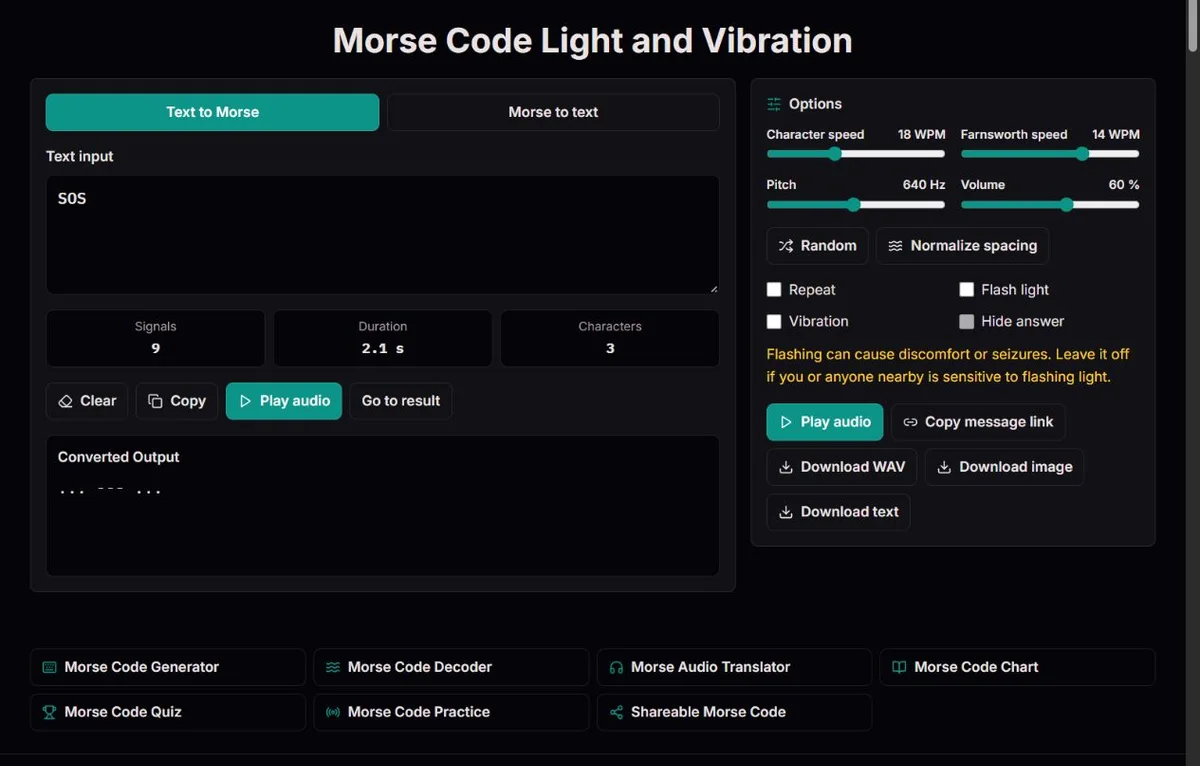
The light page uses the same converter and player as the other non-exercise Morse pages. The Flash light checkbox controls a small on-page indicator that changes color during marks. It does not access the camera, LED torch, flashlight hardware or full-screen strobe. The route name describes the learning mode, not a promise of distance signalling.
Light starts off even on the light route. A received share link also opens with light and vibration off. That opt-in behavior matters because flashing can be unsuitable for some viewers, especially in a shared room. The warning should be read as a practical boundary: leave flashing off when anyone nearby may be sensitive to it.
Reduced-motion preference disables the light checkbox and stops output when the preference changes. That safeguard does not make flashing universally safe or WCAG-conformant; W3C's guidance on flashes and thresholds explains that frequency, area and luminance all matter. The tool's small indicator, consent step and reduced-motion handling reduce surprise, but they do not certify suitability for every viewer.
A common setup is a quiet demonstration: set volume to 0, enable Flash light and play a short message. This can be useful when a group should watch timing without hearing tones, but quiet does not mean the player has become independent from audio. The player still requires the browser Web Audio API to create and run the timeline. If AudioContext is unavailable or cannot resume, the page reports audio unavailable and the visual output will not run.
Vibration has a separate limitation. The browser may not expose the vibration API, the device may ignore requests, system settings may suppress it, and some platforms limit duration or background behavior. The page disables the checkbox when support is absent, but a checked box is still only a request. It is not evidence that a person felt the exact pattern.
Stop cancels the sound, pending screen updates and vibration. Editing input, changing settings, toggling light or vibration, starting a new playback, hiding the tab or leaving the page also cancels the current output. This makes the tool manageable for demonstrations, but it also means it is not a background beacon, wake-lock system or closed-tab signal.
Dots and dashes are durations. At a deliberate 5/5 WPM, a dot lasts about 0.24 seconds and a dash about 0.72 seconds. The pause inside a character is one dot unit, the pause between letters is three units and a word gap is seven units, so the dark spaces are part of the code. Farnsworth spacing can stretch the letter and word gaps while keeping the marks themselves at the selected character speed.
That distinction is easier to see with short examples. Ordinary SOS is ... --- ...: three letters with character gaps between S, O and S. Joined <SOS> is ...---...: the same nine marks without the separate-letter gaps, so it completes sooner at the same settings. LIGHT is useful after a class has seen shorter patterns because it mixes one-mark, two-mark, three-mark and four-mark letters; TIME is shorter and easier to replay.
Watch the dark pauses as deliberately as the lit marks. A learner who counts only flashes may miss where letters end. For a controlled demo, show the written code first, play once with light, then ask what changed when you switch the source text from EE to E E, or the token from SOS to <SOS>. That comparison teaches timing consequences rather than just showing a blinking rectangle.
| Example | Written code | Useful lesson |
|---|---|---|
| SOS | ... --- ... | Three separate letters; notice character gaps |
| <SOS> | ...---... | Joined signal; same marks with shorter internal timing |
| TIME | - .. -- . | Short classroom word with varied mark counts |
| LIGHT | .-.. .. --. .... - | Longer themed word; useful only after shorter examples are clear |
A slow comparison can make the order of marks and pauses visible without pretending that the screen is a calibrated measuring device. At 5/5 WPM, the calculated dot is 0.24 seconds, the dash is 0.72 seconds, the inner-character gap is 0.24 seconds, the letter gap is 0.72 seconds and the word gap is 1.68 seconds. These are the written-code timing values used to schedule playback, not measurements taken from a physical display.
Use this table when a learner is mixing up repeated E marks. The source text EE and E E both contain two dots after conversion, but the first is one two-letter word and the second is two one-letter words. In a compact visual lesson, play EE, then play E E, and ask the learner to describe the dark interval before naming the text.
| Item | Calculated duration | What to watch |
|---|---|---|
| Dot | 0.24 s | A short lit mark |
| Dash | 0.72 s | Three dot units lit |
| Inner-character gap | 0.24 s | Small dark gap inside one letter |
| Letter gap | 0.72 s | Larger dark gap between letters |
| Word gap | 1.68 s | Longest dark gap between words |
| EE | 1.20 s | Two E letters separated by a letter gap |
| E E | 2.16 s | Two one-letter words separated by a word gap |
Screen updates are scheduled from the calculated Morse timeline, but browsers are not laboratory timing equipment. Rendering can lag, inactive tabs are stopped, battery saver modes may throttle work and a sleeping device will not keep demonstrating a signal. Audio and screen output can therefore drift in ways that do not appear in the written code, and vibration adds another device-specific request layer.
Repeat is available for non-exercise live playback, with a between-cycle pause based on the word gap or at least 500 ms. The repeat flag can be stored in a share URL, so a receiver may open a link with repeat selected, but light and vibration still reset off and WAV export contains one audio pass. Turn repeat off before asking someone to make one independent attempt, otherwise the message may become memorized as a loop.
Every live playback and WAV export has a 90-second signal boundary. If a visual lesson hits that limit, shorten the text or split it at a phrase boundary rather than deleting separators. Removing spaces or slashes may make the URL or signal shorter, but it changes the code that learners are trying to read.
Do not use this page as rescue equipment or distance communication. Brightness, viewing angle, ambient light, reduced-motion settings, API availability, hidden tabs and device sleep all affect whether a person can perceive the signal. For a lesson, the written code and a checked answer key are the durable artifacts. For real safety communication, use appropriate equipment and procedures rather than a browser indicator.
Morse is often introduced through sound, but timed visual signals have also carried meaning. The National Archives' Jeremiah Denton record documents Jeremiah Denton's May 2, 1966 television interview, where the visual record was recognized as blinking the word TORTURE. The relevant lesson is not that this page can read a face or analyze archival video; it is that a deliberate visual timing pattern can carry a message when a human observer knows Morse well enough to recognize it.
That example also separates three different tasks. First, a source event creates a signal: in Denton's case, blinks captured on television; in this tool, a generated screen indicator. Second, a person or system transcribes what happened into dots, dashes and gaps. Third, someone interprets that code as text. ClockTools handles the generated-demo side by scheduling written code as audio and a small visual indicator. It does not authenticate a source, judge whether a real-world blink was intentional, or recover timing from video.
The carrier can change without changing the code. A dot-dash pattern may be heard as tone, seen as light, felt as vibration where supported, read as written groups or described in a transcript. The same code still depends on separators, timing and a receiver who understands the convention. That is why the written code remains the reference for lessons, while screen and audio are demonstrations of the same planned pattern.
Maritime history gives another useful contrast. The 1909 Congressional Record on Jack Binns and the Science Museum's Titanic wireless account show why Morse mattered when trained operators, watches, equipment and context were present. A browser light demo can help students see dots, dashes and gaps, but it does not supply identity, position, acknowledgement or receiving discipline. Keep history in the lesson as context, not as a dramatic claim about what the page can do.
<SOS>...---...Light and vibration playback use the same validated Morse timeline as audio. The page schedules sound through the browser audio API, then optionally mirrors each mark to a small on-screen indicator and requests vibration where the browser exposes that API. Dots, dashes and gaps follow the selected character speed and Farnsworth spacing. Reduced-motion preference disables flashing, and every playback requires a manual Play action.
The light feature is not a camera flash, torch, full-screen strobe, wake lock, background signal or emergency transmitter. Volume 0 can make the tone silent, but Web Audio must still be available for the timeline to run. Vibration support varies and a request does not prove hardware output. Stop, edits, setting changes, new playback, hidden tabs and navigation cancel pending output. Screen and vibration timing can lag, repeat is not exported, and flashing may be unsuitable even with a small opt-in indicator.
To report a discrepancy, include the route, exact input, expected result and relevant settings. For timing issues, state both character and Farnsworth speeds. Compare the relevant official table before changing an identifier; remove private information from reports.
No. It changes a small on-page indicator. The page does not access the camera, LED flash, torch hardware or full-screen strobe mode.
Only if the browser audio engine is still available. Setting volume to 0 can silence the tone, but the player still needs Web Audio to schedule the light timeline.
Reduced-motion preference disables flashing. Use written Morse, audio at a comfortable volume or another non-flashing activity instead of trying to bypass that setting.
No. Light starts off and must be enabled deliberately. Shared links also open with light and vibration off.
The browser may not expose vibration, the device may ignore requests, system settings may block it or the page may be in a context where vibration is limited. Treat the checkbox as an available request path, then test the actual device before using it in an activity.
SOS plays three separate letters with character gaps. <SOS> plays one joined nine-mark signal without those separate-letter gaps, so the visual timing is shorter even though the marks are the same.
Pressing Stop cancels current and pending output. Editing the message, changing settings, starting new playback, hiding the tab or leaving the page also cancels it.
No. It is a learning and demonstration tool. Screen brightness, browser timing, device sleep, hidden tabs, viewing conditions and API support make it unsuitable as rescue equipment.
Repeat is a live playback option and its flag can be stored in a share link, but WAV export contains one audio pass and shared links do not restore light or vibration output.
Pauses separate marks, letters and words. At 5/5 WPM, EE takes about 1.20 seconds while E E takes about 2.16 seconds, so the dark interval changes the text even when the two dots look alike.