Step 1
Choose text or Morse
E E. / .Enter a short message and inspect the conversion before playing. This page generates sound; it does not decode audio.
Play checked Morse with adjustable character speed, Farnsworth spacing, pitch and volume, or export the same timing as WAV.
Play checked Morse with adjustable character speed, Farnsworth spacing, pitch and volume, or export the same timing as WAV.
E E. / .Enter a short message and inspect the conversion before playing. This page generates sound; it does not decode audio.
Character speed controls marks and their inner gaps. A lower Farnsworth speed adds time between letters and words.
clocktools-morse-code.wav. / .Start audio yourself, stop whenever needed and download WAV for an offline comparison. Zero volume is silent.
Set character speed to 20 WPM and Farnsworth spacing to 10 WPM, choose a comfortable tone around 640 Hz and start at a modest volume. Enter A N rather than a long paragraph. Listen to the short-long order of A and long-short order of N, then try AN as two letters in one word. Keep the pitch and character speed fixed while bringing spacing towards 20 WPM. If the letters themselves remain indistinct, lower character speed instead. This is a controlled comparison: a successful repeated AN is not evidence that you can recognize either letter in an unfamiliar sentence.
Generate RADIO or TIME, inspect the code and export a single WAV at 18/10 WPM with repeat off. Keep a separate answer key that names both speeds and the source phrase. Play the saved file on the classroom device before the lesson; device mute, volume and playback software can differ from your browser setup. Ask listeners to mark perceived word boundaries or repeated characters before showing the written code. Include a second short phrase so they must recognize the patterns rather than remember the first sample. Do not present generated samples as archival recordings.
Generate MEET AT 9 at 18/10 WPM, then listen without watching the output. The final digit has five marks and needs more attention than a single-dot E. If the clue runs too long or feels exhausting, shorten the wording or divide it into deliberate excerpts rather than deleting gaps. Supply replay opportunities and explain the chart convention to novice solvers. After exporting, decode the written source for the answer key and play the WAV in the intended game or presentation. Repeat mode is useful while preparing but is not included in that file.
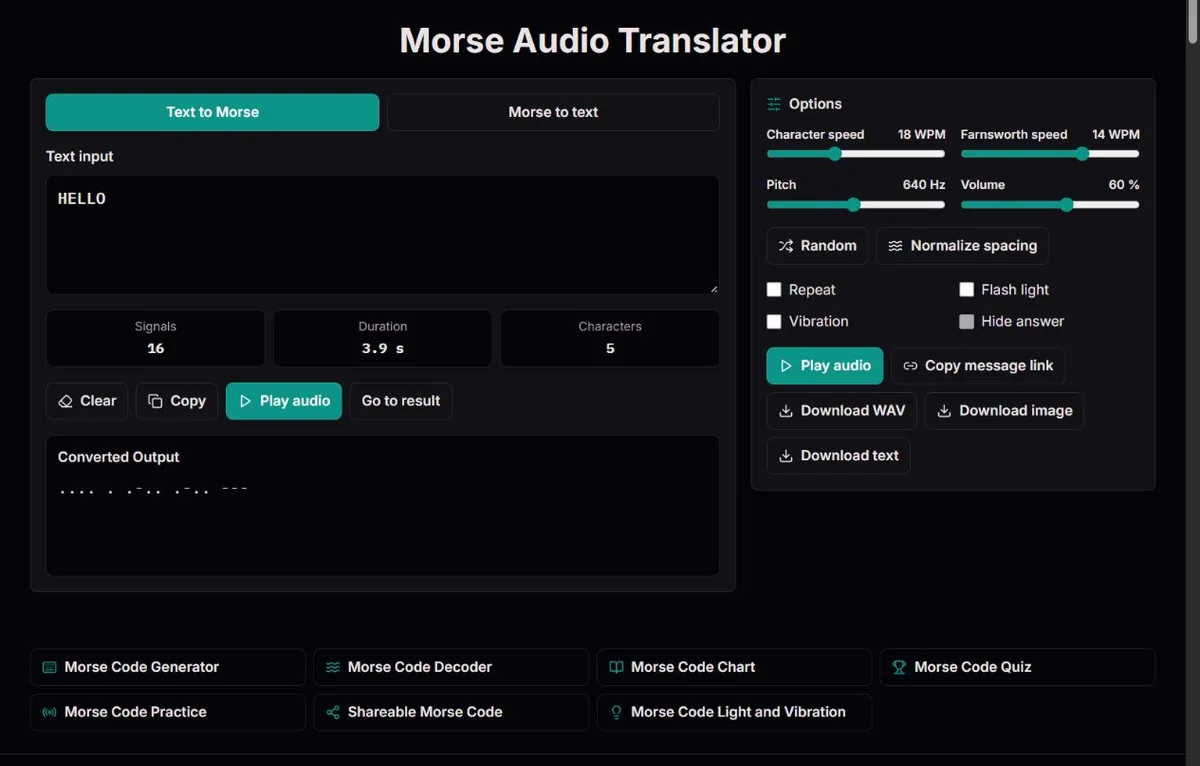
Choose text input for a known phrase or Morse input for already separated groups. The page converts the input, builds its timeline and plays tones only after you press Play. It does not upload or decode a recording and does not use a microphone. If your aim is to find the words in a recorded signal, a manually prepared transcription can be checked here, but the listening and boundary identification remain yours.
Inspect warnings before listening. Unsupported characters in text mode are reported and omitted; the remaining valid output can play. In Morse mode an unknown group stays visible as [?] in the transcript and prevents a valid timeline. A reassuring sequence of beeps can therefore represent an incomplete text input, and a readable partial transcript is not enough for full playback. Check the exact source, not only whether sound is available.
The character, signal and duration displays measure different aspects of input. A signal is an individual dot or dash. Duration is the calculated span from the first mark to the last, excluding a final word gap and repeat pauses. It is not a recording of speaker latency, screen delay or successful reception. Very short timings are rounded in the display, so use the worked examples below for understanding ratios rather than treating the visible decimal as a precision measurement.
In ordinary spacing, the dot defines one unit of time. A dash lasts three units; marks inside a character are separated by one unit of silence, letters by three and words by seven. ITU-R M.1677-1 specifies these ratios. The dot and dash use the same selected pitch. Their duration and order carry the information; a higher note is not used to mean dash.
At 20 WPM the dot unit is 1.2 / 20 = 0.06 s. A dash lasts 0.18 s and a one-unit inner gap 0.06 s. With spacing speed also 20, a letter gap is 0.18 s and a word gap 0.42 s. A is a 0.06 s dot, a 0.06 s pause and a 0.18 s dash: 0.30 s in all. N reverses the mark order but has the same total duration. Listen to both before assuming equal duration means equal character.
The difference between EE and E E is silence, not marks. At 20/20, EE has one dot, a three-unit letter gap and another dot, totalling 0.30 s. E E substitutes a seven-unit word gap and totals 0.54 s. There is no extra letter gap added on either side of that word gap. This comparison is a useful diagnostic when another application or your manual transcription seems to use unusually long spaces.
| Input | Written code | Calculated duration |
|---|---|---|
| A | .- | 0.30 s; five units |
| N | -. | 0.30 s; reversed order |
| EE | . . | 0.30 s; one letter gap |
| E E | . / . | 0.54 s; one word gap |
| SOS | ... --- ... | 1.62 s; three letters |
| <SOS> | ...---... | 1.38 s; one joined group |
| 123 | .---- ..--- ...-- | 3.06 s; three five-mark digits |
Character speed ranges from 5 to 40 WPM and controls marks and the one-unit gaps between them within a character. Farnsworth spacing ranges from 5 WPM to the current character speed and controls the longer gaps between characters and words. The default is 18 WPM characters with 14 WPM spacing. If the character rhythm is clear but the next letter arrives before you can identify it, reducing spacing speed provides more time without stretching the character itself.
The WPM reference is the 50-unit word PARIS, including its following word gap. It contains 31 units of marks and inner gaps, plus 19 spacing units: four letter gaps of three units and a final word gap of seven. With Farnsworth timing, the 31 units stay at character speed and the 19 are stretched to achieve the selected reference rate. ARRL’s Farnsworth timing calculation gives the derivation; this is a calibration convention, not a claim that every five-letter word takes the same time.
For character speed c and spacing speed f, this engine uses dot = 1.2/c seconds and spacing unit = (60/f - 31 × dot)/19, never less than a dot. At 20/10, the dot remains 0.06 s but the spacing unit becomes about 0.218 s. The letter gap is then about 0.654 s and the word gap 1.525 s. Lowering spacing is not a general slowdown of every element: A still lasts 0.30 s.
PARIS by itself ends at the last mark here, so at 20/20 its displayed duration is 2.58 s, not 3 s. The missing 0.42 s is the final word gap used in WPM calibration. Do not divide an arbitrary clip's word count by its duration and expect the control value to match. Digits, punctuation and unusually short or long character patterns all change a real message's duration.
| Farnsworth WPM | Letter gap | Word gap | E E duration |
|---|---|---|---|
| 20 | 0.180 s | 0.420 s | 0.540 s |
| 14 | about 0.383 s | about 0.894 s | about 1.014 s |
| 10 | about 0.654 s | about 1.525 s | about 1.645 s |
Pitch ranges from 300 to 1000 Hz and volume from 0 to 100. Choose a tone that is comfortable on your actual speakers or headphones; there is no universally best pitch implied by the default 640 Hz. Changing pitch does not change code, speed or gaps. Page volume is separate from system and device volume, and zero is silent even if playback appears to be running.
Repeat starts another copy of the same signal after a pause of at least half a second or the selected word gap, whichever is longer. That pause is not part of the duration display and is not exported. For a comparison, first hear one pass with repeat off, then use repeat to focus on an uncertain character. Stop before changing text or settings; the page also stops automatically on those changes to avoid overlapping output.
A practical listening sequence is three or four known characters, a short word using them, then an unfamiliar combination. Keep one setting fixed while changing another. If you always replay HELLO, the repeated L is useful initially, but you may learn the phrase's melody. A second word helps you test whether L is recognizable outside that sequence. The chart provides an isolated reference, while quiz and practice supply other prompts; none guarantees a particular training outcome.
The WAV download uses the same selected character and Farnsworth timing as playback, with the chosen pitch and volume. It contains mono, 44.1 kHz, 16-bit PCM audio for one signal. It does not include repeat, light, vibration, an answer narration or the original text as a spoken introduction. Export at the final settings and test the saved file, rather than assuming a previous preview proves that the new file sounds right.
Both live playback and WAV generation reject signals longer than 90 seconds. This is calculated duration, not a character-count allowance. Lower Farnsworth speeds, digits and punctuation can make a short-looking message unexpectedly long. Split a lesson into labelled excerpts at sensible word boundaries. Removing gaps to fit the limit would change what the reader or listener has to interpret, not merely compress a recording.
Keep the text answer and both speeds beside the WAV in your own lesson notes. If a player changes playback speed, it changes timing and may also change pitch depending on that player; the original WPM settings then no longer describe what the class hears. Compare other generators using their reference conventions and trailing silence as well as their labels. Agreement on the marks alone does not establish equal spacing.
If there is no sound, start with the simple checks: nonzero page volume, unmuted tab and device, selected output device and a deliberate Play press. Try a short valid E at comfortable volume before investigating a long clue. Browser audio support is required; a blocked or unavailable audio API cannot be repaired by changing Morse punctuation. A generated WAV can be tested separately in a media player to distinguish page playback from the rest of the audio path.
If playback stops, check whether you edited the message, changed a control, selected a new chart entry or hid the tab. Those actions cancel the previous playback. There is no resume-at-position feature; restart the signal deliberately. Long signals can fail the duration limit, and invalid written groups can prevent playback altogether. Read the notice and the unknown-group warning instead of repeatedly raising volume.
Optional light follows a screen indicator, not a camera torch. Vibration depends on browser and device support. Neither is embedded in WAV, and their timing can lag audio. Flashing may be unsuitable for some people, so use it only deliberately and respect reduced-motion settings. For a timing lesson, the diagram and written examples remain useful without motion. No combination of these options establishes a reliable closed-tab alarm or emergency signalling system.
The Smithsonian's telegraph sounder describes a receiver whose electromagnets moved a lever to produce audible clicks. This is not the smooth sine tone generated by the page, but it shows why listening became a practical way to receive marks. A chart tells you a character's pattern; a timed signal makes you distinguish its duration and boundary before the next character arrives.
The Farnsworth approach addresses that gap between knowing a printed pattern and recognizing it quickly. The ARRL paper explains keeping a character's shape while allowing longer pauses for recognition and writing. Its historical training standard used an 18 WPM character rate, but the method itself is not tied to that number. The controls here let you compare other supported rates without claiming that a certain setting is a tested curriculum for every learner.
Maritime stories add context when used carefully. The 1909 Congressional Record on Jack Binns records Binns's CQD calls from Republic in 1909, and the Science Museum's account of Titanic wireless discusses the 1912 distress traffic and attentive reception aboard Carpathia. Sound mattered because people were listening to messages with context. Generated SOS is useful for hearing short and long marks, but it is not an authentic recording of either event and should not be labelled as one.
E E. / .Letters A–Z, digits and standard punctuation follow ITU-R M.1677-1. Five additional punctuation patterns are explicitly marked in the chart. Explicit <AR>, <AS>, <SK> and <SOS> tokens are sent as joined signals; the decoder can prefer prosigns where punctuation overlaps. Timing uses 1/3/7 units. Farnsworth stretches only letter and word gaps, calibrated to the 50-unit PARIS convention. Playback, duration and WAV export share the same timeline.
No microphone, radio receiver, camera or torch is used. Unsupported text is reported and omitted from encoded output; invalid Morse groups remain visible as [?] and cannot be played. Sound needs a working browser audio API. Screen and vibration timing can lag; sleeping or backgrounded devices are not reliable signalling equipment. Playback stops when the tab is hidden. Sessions are not saved. Sharing places the complete message in the URL, not in encrypted storage. Accented É is supported, including decomposed Unicode input. Multiplication × uses the X signal and therefore decodes as X: the signal alone cannot distinguish them. Percentage signs and other operational number formats are not expanded automatically.
To report a discrepancy, include the route, exact input, expected result and relevant settings. For timing issues, state both character and Farnsworth speeds. Compare the relevant official table before changing an identifier; remove private information from reports.
Try lowering the Farnsworth speed (the WPM value) while keeping character speed fixed. That lengthens the gaps between characters and words, not each character's shape. If the character itself is unclear, reduce character speed instead. Test with a different short phrase after adjusting so you are not relying only on memory.
The 50-unit WPM reference includes a final word gap. This generator ends at the last mark, so isolated PARIS has 43 units and lasts 2.58 seconds at 20/20. The excluded seven-unit gap is 0.42 seconds. This is different from measuring every word as a three-second clip.
No. Pitch sets the tone frequency; character speed sets dot and dash durations. Dashes are three dot units at any supported pitch. Keep speed and spacing unchanged when comparing two pitches, and choose a comfortable level on your actual playback device.
The display describes one signal from its first mark to its last. Repeat adds further copies and a separate pause between cycles. It is not a total session-duration counter. Turn repeat off when testing a one-pass listening question or comparing the preview with a downloaded WAV.
The WAV export contains one pass, not the live repeat cycle. You can replay that file in a media player or arrange copies in your own lesson editor, preserving intentional gaps. Keep the original single-pass file and its settings as a reference rather than assuming an edited loop has the same duration.
Changing any playback setting cancels the current run so the old and new settings do not overlap. Press Play again to hear the revised signal. Hiding the tab also stops output. There is no resume-from-position behaviour, so short practice samples are easier to compare.
No. It generates sound from text or written Morse groups. There is no audio upload or microphone analysis. For a recording, transcribe it separately and preserve uncertain marks and gaps; the written decoder can then check only the groups you supplied.
The 90-second limit concerns calculated duration. Digits and punctuation contain many marks, and a low Farnsworth WPM value adds long pauses. Check both speeds, shorten the phrase or split it into sensible excerpts. Do not remove word gaps just to make the timeline fit.
They use the same planned marks but rely on device scheduling and may lag or be unsupported. Light is a screen indicator, not a torch; vibration is optional. For numerical timing comparisons, use the calculated examples and WAV rather than treating a visible flash or vibration as a precision measurement.
Compare character speed, Farnsworth spacing, word-gap rules, trailing silence and tone. WPM alone is not enough when one generator stretches gaps or uses a different convention. Use a short fixed phrase and inspect its code first. A longer clip may also include lead-in or ending silence absent here.