Step 1
Enter temperature
90°F
Choose °C or °F. The supported temperature range is 40 to 112°F.
Match the temperature and humidity to the same observation, preferably in shade.
Match the temperature and humidity to the same observation, preferably in shade.
90°F
Choose °C or °F. The supported temperature range is 40 to 112°F.
70%
Use relative humidity from 0 to 100%; fractional percentages are accepted.
105.9°F
Read the estimate and method together. A simple estimate and a high-heat regression are different calculation branches.
For a delivery route or a walk, compare paired hourly forecasts instead of selecting the daily maximum temperature and maximum humidity independently. A fixed 86°F/70% example gives about 95.1°F; 95°F/40% gives about 99.0°F. Lower afternoon humidity does not necessarily mean lower apparent heat.
Keep each hour's readings together and note how much of the route is actually shaded. The comparison can help choose a time to investigate, but changing shade, radiant surfaces and local alerts still need checking.
For a shaded event, calculate conditions for setup as well as the event's start. The team moving equipment may face different exposure from seated guests. Save the input pairs so a change in the forecast can be compared with the original plan.
Shade is an assumption of the index, not a measured property of a tent or venue. Check that the intended shade exists throughout the activity. The calculator does not determine permitted work, sports participation or a safe duration.
To understand a humid day, hold temperature at 90°F and compare 40% with 70% relative humidity. The estimate rises from about 90.7°F to 105.9°F even though the thermometer is unchanged.
This is a controlled comparison, not evidence that the day's moisture actually changed that way. For a classroom exercise, change one variable at a time; for an outdoor plan, return to paired observations because humidity and temperature usually evolve together.
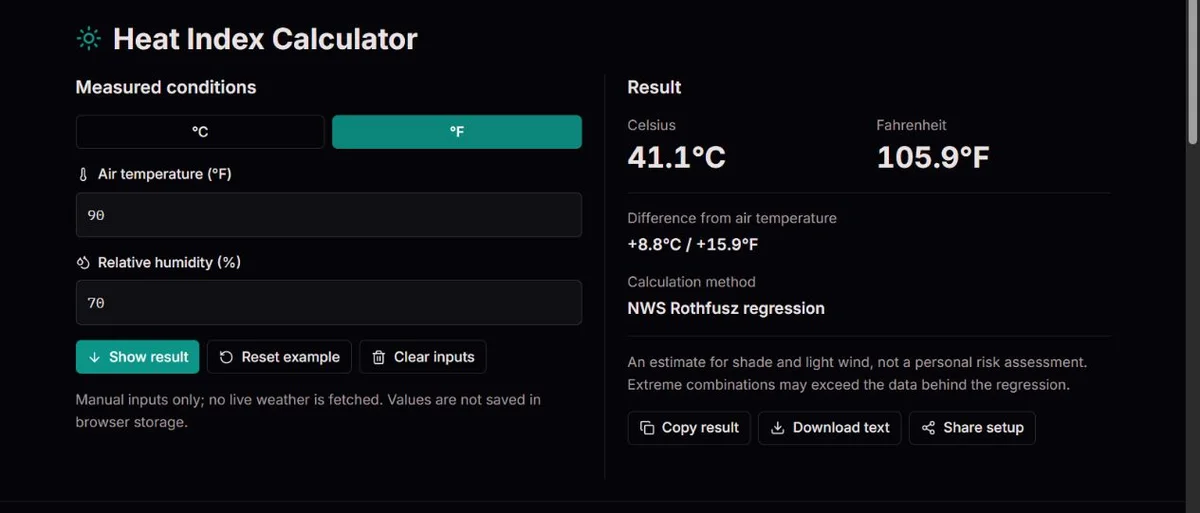
The temperature box needs air temperature, not the heat index supplied by another app. The humidity box needs relative humidity in percent: enter 70 for 70%, not 0.70 and not a dew-point temperature. A hygrometer's reading belongs with the temperature at its location and at the same time.
A morning humidity maximum paired with an afternoon temperature maximum can create a dramatic number for a combination that never occurred. For an hourly comparison, copy both values from each forecast hour. For a room or shaded outdoor observation, allow the sensors to settle after moving them and avoid combining a sun-heated thermometer with humidity from a shaded station.
Choose °C or °F before entering a new observation, or let the selector convert the existing value. A selector change preserves the physical temperature; typing the same numeral into the new unit does not. Decimal humidity is accepted, but extra digits in a sensor reading do not establish extra accuracy.
Heat index compresses many assumptions into two inputs. Steadman’s work considered clothing, activity and exchanges of heat and moisture. Rothfusz’s July 1990 technical attachment fitted a polynomial to that model’s tabulated values; it was not a universal law for every person or climate.
This engineering shortcut explains both the convenience and the limits. A number can be computed rapidly from a thermometer and a hygrometer, but protective clothing, heavy exercise and radiant heat are not customized by this calculator. The original attachment is useful for understanding what has been held constant. Rothfusz’s original NWS technical attachment.
The NWS procedure first computes a simple estimate and averages it with air temperature. If that preliminary value is below 80°F, it remains the result. Otherwise the full regression is used, with separate adjustments for very low or high humidity in specified temperature bands.
For a fixed example, 90°F and 70% humidity produce about 105.9°F (41.1°C). The same inputs in Celsius must give the same physical result. An output to one decimal place is a convenient display, not evidence that a sensor or the model is accurate to a tenth of a degree. NWS/WPC branch procedure and humidity adjustments.
The primary result is an apparent-temperature estimate. The difference is result minus air temperature: at 90°F and 70%, it is about +15.9°F, equivalent to +8.8°C. It does not mean the air, pavement or your body has become 15.9 degrees hotter. A negative difference in dry or milder conditions is possible and is not automatically an error.
The method label explains how the number was obtained. At 70°F and 50%, the preliminary averaged simple estimate is about 69.5°F and stays on that branch. The 80°F test concerns the preliminary estimate, not an unconditional switch at 80°F air temperature. This prevents inappropriate use of the polynomial in milder conditions.
The dry adjustment is subtracted below 13% humidity at 80–112°F. The humid adjustment is added above 85% at 80–87°F. These are separate formula conditions, not user-selectable corrections. At exactly 13% or 85%, the respective adjustment is not applied. The worked cases below make the labels easier to interpret than a formula alone. NWS/WPC calculation procedure and adjustment bands.
| Air / humidity | Heat index | Method |
|---|---|---|
| 70°F / 50% | 69.5°F | Averaged simple estimate |
| 90°F / 40% | 90.7°F | Rothfusz; no adjustment |
| 90°F / 70% | 105.9°F | Rothfusz; no adjustment |
| 100°F / 10% | 94.1°F | Rothfusz; dry adjustment |
| 85°F / 90% | 101.8°F | Rothfusz; humid adjustment |
Rounded engine examples. Accepted inputs and a computed value do not validate every extreme combination.
Heat index answers a temperature-and-humidity question for shade and light wind. It does not measure the radiant heat from direct sun, a hot wall or machinery. Moving an event into shade can change the exposure, but this page cannot quantify that change because it has no radiation or wind input.
For active outdoor work or sport, wet-bulb globe temperature (WBGT) addresses additional environmental factors. It is not the same as the wet-bulb temperature of a wetted thermometer, and neither can be obtained by renaming this heat-index result. NWS explains the distinction between heat index, WBGT and broader heat forecasts. Use the measure required by the relevant activity guidance rather than substituting the easiest available number.
An hourly estimate also says little about several days of heat or a warm night with little relief. Keep duration and forecast changes in the plan. The index can organize comparisons, but it does not issue an alert or decide whether a particular person can continue an activity. NWS comparison of heat index, WBGT and heat forecast tools.
For a blank or rejected result, check for missing fields, unit suffixes and humidity outside 0–100%. The page accepts air temperature only from 40 to 112°F, approximately 4.44 to 44.44°C. That is an input boundary, not evidence that all corners of the temperature/humidity box were validated. Do not extend the equation beyond it by changing units.
If a printed chart differs by a degree, start with the unrounded readings and the method label. Charts use discrete rows and columns; apps may use another apparent-temperature model or a different forecast hour. Comparing 90°F/70% with a nearby grid cell is not a test of identical inputs.
Changing a value updates the result; Show result moves to the panel. Clear inputs empties the readings, and Reset example restores a demonstration, not current weather. Copy result and Download text preserve a report; Share setup preserves the inputs in a URL. Add the forecast hour and observation source yourself. Nothing here automatically fetches weather or stores your input history.
Calculations use Fahrenheit and relative humidity in percent. The preliminary averaged estimate selects the simple or Rothfusz branch at 80°F; low-humidity and high-humidity adjustments follow the NWS conditions. Output converts back to Celsius without intermediate display rounding.
HIₛ = 0.5[T + 61 + 1.2(T − 68) + 0.094RH]; HIₚ = (HIₛ + T)/2
The tool accepts 40–112°F and 0–100% humidity, but this box is not a validated domain for every extreme combination. NWS warns against extrapolating beyond the underlying data. Heat index assumes shade and light wind; it is not WBGT, a medical assessment or a local warning.
Testing methodologyReport the temperature unit, humidity, displayed method and any humidity adjustment with the reference you used. A chart may round to whole degrees. Check that readings describe the same hour before comparing results.
Corrections policyIt is accepted as a mathematical boundary for this calculation. It is not a typical outdoor observation, and an extreme combination is not automatically validated by the regression.
No. The heat index is for shade and light wind. Radiation, wind and activity need other assessment; NWS distinguishes heat index from WBGT for active outdoor settings.
Yes. For example, the averaged simple branch gives about 69.5°F at 70°F and 50% humidity, and the dry-adjusted regression gives about 94.1°F at 100°F and 10%. Check the method as well as the number. A lower index is not a finding that strenuous activity is safe.
The decision uses the simple estimate after averaging it with air temperature. It does not test air temperature alone. Two humidity values at the same air temperature can therefore select different branches. Compare full input pairs and the visible method before treating a change as a calculation defect.
No fixed addition is calculated here. NWS notes that full sun can increase apparent heat, but that is not a universal correction for every surface, hour and person. Use appropriate radiation-aware guidance for the setting and keep this shade-based estimate identified as such.
Not in this calculator. Relative humidity and dew point describe moisture differently and have different units. Use the percentage associated with the air-temperature reading. Entering a dew point such as 20°C in a percent field produces a plausible-looking but unrelated calculation.
Not necessarily. A weather service may combine wind, radiation or a different model under that label. Check its method, time and location. The ClockTools method label identifies the NWS branch; agreement should be assessed only after those definitions and the input readings match.
No. There is no activity, clothing, acclimatization or exposure-duration input, and no interval recommendation. Use the assessment required by the organization or local guidance, which may involve WBGT and other factors. A shared report can document conditions, but it is not authorization to continue.