Step 1
Match the recorded information
Fixed example
2023-02-280 / 1 / 0Choose completed years, years/months/days, or a total calendar-day count. Do not invent missing age parts.
Reconstruct a possible Gregorian birth date or range from recorded age or a total day count. Compare leap-day rules and export the result.
Reconstruct a possible Gregorian birth date or range from recorded age or a total day count. Compare leap-day rules and export the result.
Fixed example
2023-02-280 / 1 / 0Choose completed years, years/months/days, or a total calendar-day count. Do not invent missing age parts.
Fixed example
2023-01-282023-01-292023-01-302023-01-31Use the date on which the age was recorded, not automatically today. Choose the same leap-day rule as the original calculation.
Fixed example
01-28 / 29 / 30 / 312023-02-28A result can contain one date or several possibilities. Keep the reference date and method when copying or downloading.
A fictional record dated 2026-06-15 says only 25 years old. Choose Completed years only and enter that date, rather than leaving Today or filling missing months and days with zeros. Under the ordinary birthday rule, the matching window is 2000-06-16 through 2001-06-15, with both endpoints included. A later letter may narrow that window, but the age statement itself does not identify one birthday. Keep the record date alongside the range so someone reviewing the evidence can reproduce what the statement actually implies.
For a date-field test crossing leap day, choose Total calendar days, reference 2024-03-01 and count 1. The reconstructed date is 2024-02-29. Count 0 gives 2024-03-01, while count 2 gives 2024-02-28. These neighboring cases expose inclusive-count and leap-year bugs without using a real person's details. Save the count and reference with the generated fixture; changing the reference to Today later would produce different test data even though the day count had not changed.
A fictional note gives one month exactly on 2023-02-28. Enter 0 years, 1 month and 0 days with that reference. The four matching birth dates, January 28 through January 31, each reproduce the age after month-end clamping. Check each in the age calculator with the same rule rather than selecting January 28 because it is first. If another record says the birth occurred after January 29, you can narrow the candidates using that evidence; the calculator itself does not rank the dates by likelihood.
A date of birth calculation is not always a single subtraction. Calendar months have different lengths, month-end additions can clamp, and a years-only age describes a whole set of possible birthdays.
This tool has three modes: years, months and days; completed years only; and total calendar days. The first two modes use the same forward age rule as the age calculator, while total calendar days subtracts an integer day count from the reference date.
For full age inputs, the engine enumerates plausible candidate dates and keeps only dates that reproduce the entered age. This follows the civil-date model described in the Temporal.PlainDate documentation instead of pretending that every month can be inverted cleanly.
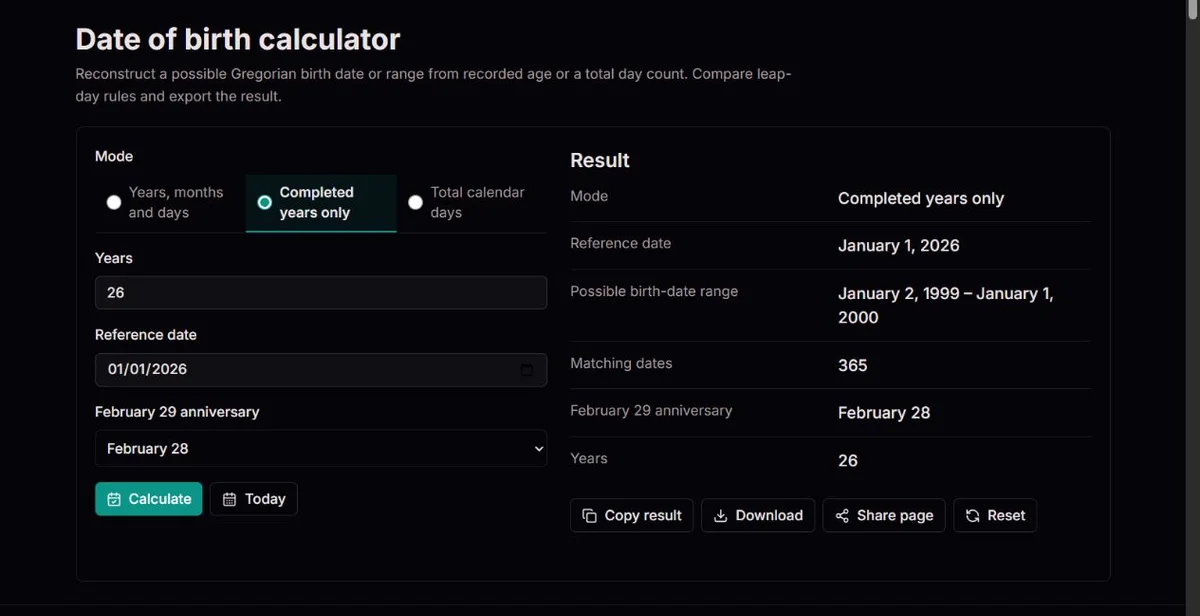
The result area shows the mode, reference date, reconstructed date or possible range, and candidate count. Exact-age mode lists ISO candidate dates when several dates match; years-only mode summarizes the matching span because a completed age in years naturally covers many dates.
01-28 / 29 / 30 / 312023-02-28Use the mode that matches the evidence you actually have. Adding guessed months or days makes the output look more precise without making the source record more precise.
Years, months and days mode is for a full age statement such as 25 years, 4 months and 6 days on a known reference date. Completed years only is for ordinary statements such as 25 years old. Total calendar days is for an exact day-count convention.
The February 29 anniversary selector appears for the two age-based modes because it changes how forward ages are checked. Total calendar days mode does not use that selector because subtracting a day count is a different operation.
| Mode | Inputs shown | What the result can honestly say |
|---|---|---|
| Years, months and days | Years, months, days, reference date and February 29 rule. | One date or a list of matching dates that reproduce the full age. |
| Completed years only | Years, reference date and February 29 rule. | A possible birth-date range and candidate count for that completed age. |
| Total calendar days | Total day count and reference date. | One reconstructed date if the day count is valid within the supported range. |
Subtraction can erase information near month ends. Instead of subtracting a displayed age once and trusting that single answer, the engine checks every plausible birth date in the relevant year span.
Each candidate is sent through the same forward age calculation used by the age calculator. If the years, months and days match the input, the candidate is kept; if not, it is discarded.
This is why some inputs produce several matches and some produce no match. A no-match result is not just an error message; it can reveal an impossible combination such as a day count or month/day pair that the forward rule never produces for that reference date.
| Outcome | What the page shows | What to do next |
|---|---|---|
| One match | Reconstructed birth date and weekday. | Cross-check it in the age calculator if the result matters. |
| Several exact-age matches | Range, candidate count and ISO candidate dates. | Keep all candidates unless another record narrows the birthday. |
| Years-only matches | Possible range and candidate count. | Treat the range endpoints as included and do not infer every source was exact. |
| No match | No birth date matches these inputs under the selected rule. | Check the reference date, mode, rounded age and February 29 convention. |
Use reference date 2023-02-28 and age 0 years, 1 month, 0 days. Under the forward month-end rule, January 28, January 29, January 30 and January 31 can all reach February 28 after one completed month in 2023.
If a tool simply subtracts one month from February 28, it may return only January 28. That answer is not wrong as one possible date, but it is incomplete for this forward-checking rule.
This is the main reason the page can show a candidate list. It protects the user from a false exact date when the calendar operation has collapsed several starts into one observed age.
| Candidate birth date | Reference date | Forward result |
|---|---|---|
2023-01-28 | 2023-02-28 | 0 years, 1 month, 0 days |
2023-01-29 | 2023-02-28 | 0 years, 1 month, 0 days |
2023-01-30 | 2023-02-28 | 0 years, 1 month, 0 days |
2023-01-31 | 2023-02-28 | 0 years, 1 month, 0 days |
The calculator uses Gregorian civil dates throughout the supported range. The US Naval Observatory calendar overview explains the Gregorian leap rule and why century years such as 1900 are common while 2000 is leap.
A recorded age is evidence to interpret, not a guarantee that a birth date can be recovered. The original note may be rounded, estimated, transcribed from another calendar or measured with a different February 29 convention.
Reference dates are limited to today or earlier because the tool reconstructs a birth date from an existing record. Whole years must be 0-130, months 0-11, days 0-31, and total calendar days 0-60,000.
Copy and download include the displayed summary, and a full-age result with multiple matches includes its actual candidate list. Share sends only the clean page URL, not the evidence or inputs. Keep your source note separately: a reconstructed summary is not a replacement for the record from which the age was taken.
For a completed age of 25 on 2026-06-15, the latest ordinary birthday is 2001-06-15: that person turns 25 on the reference date. The earliest is 2000-06-16: that person will turn 26 the following day. Someone born on 2000-06-15 is already 26 and is excluded. This is why simply subtracting 25 from the reference year gives only one edge of the answer, not a reconstructed birthday.
A years-only range need not contain exactly 365 dates. For one completed year on 2021-02-28, the February 28 rule includes 2019-03-01 through 2020-02-29, or 366 candidates. The March 1 rule excludes the leap-day birthday at the upper end, leaving 365. The count comes from matching actual dates under the selected rule, not from assuming a standard-length year.
Total calendar days is a different kind of evidence. With reference 2024-03-01, counts 0, 1 and 2 produce 2024-03-01, 2024-02-29 and 2024-02-28 respectively. Each result is unique because moving an integer number of civil days back from a known date has one endpoint. The February 29 anniversary selector is not needed for that operation; the leap day is still counted as a calendar date.
Check the original counting convention before entering a total. If a source calls the birth date day 1 and the next date day 2, its inclusive label of 2 corresponds to a one-day difference here. Subtract one only when the source explicitly uses that convention. Do not convert a rounded age, a number of completed weeks or elapsed hours into an exact total-day input and expect the uncertainty to disappear.
| Inputs | Result | What changes the interpretation |
|---|---|---|
25 completed years on 2026-06-15 | 2000-06-16 through 2001-06-15 | Both boundaries are candidates; the birthday is not singled out. |
1 completed year on 2021-02-28; February 28 rule | 2019-03-01 through 2020-02-29; 366 candidates | The leap-day birth has already reached its substitute anniversary. |
1 completed year on 2021-02-28; March 1 rule | 2019-03-01 through 2020-02-28; 365 candidates | The leap-day birth has not yet completed a year. |
1 total day before 2024-03-01 | 2024-02-29 | One calendar-date step, not an elapsed-hours estimate. |
A precise-looking number is only as precise as the record behind it. A form field that says age 25 may have been entered after a birthday, before a birthday or from memory; the calculator can only model the statement you enter.
If the record says about 25, entering exactly 25 does not carry the word about into the math. Keep that uncertainty in your notes and avoid replacing an authoritative record with a reconstructed date.
When two records disagree, calculate their implications separately using each record's own date. Their overlapping candidate dates may be useful leads, but overlap is not proof that either age was accurately recorded. Do not average two reconstructed endpoints to manufacture a birthday. Look for a better source, a transcription error, a different calendar or an anniversary convention before narrowing the evidence.
| Record wording | Calculator mode | Responsible interpretation |
|---|---|---|
| 25 years old | Completed years only | A possible birthday range, not one exact date. |
| 25 years, 4 months, 6 days | Years, months and days | One or more candidates that reproduce the full age. |
| 10,000 days old | Total calendar days | One civil date if the count is exclusive and the reference date is known. |
| About 25 | No exact mode fits the uncertainty. | Use a scenario only, and keep the word about in your notes. |
The US Naval Observatory leap-year rule states the Gregorian exception for century years: divisible by 100 is not enough unless the year is also divisible by 400. That is why 1900 and 2100 are not leap years while 2000 is.
For February 29 births, the non-leap-year anniversary setting can change whether a candidate has already completed a year near the end of February or the start of March.
When the original convention is unknown, compare both February 28 and March 1. A one-day boundary difference can change the reconstructed range even when the reference date and age text are unchanged.
The calendar system behind an old record also matters. This calculator consistently applies Gregorian rules to every supported year; it does not identify regional calendar adoption or translate a Julian label. Preserve the original date text and any documented conversion before doing the reconstruction. Otherwise a result can be internally consistent while answering a question about the wrong civil date.
| Situation | Why it matters | Check |
|---|---|---|
| Birth may be February 29 | The selected non-leap-year anniversary changes forward age matching. | Run both February 28 and March 1 rules. |
| Record is near February or March | A leap-day convention can move the range boundary. | Keep the rule beside the exported result. |
| Year is a century year | The every-four-years shortcut can be wrong. | Apply the Gregorian 100/400 exception. |
A validation warning and a no-match result mean different things. Blank or fractional age fields are not valid whole-number inputs; months must be 0-11 and days 0-31, even if a source writes a duration as 14 months. Do not silently reduce that source to one year and two months without knowing its age convention. A validly entered combination can still have no match under the forward rule.
For example, 0 years, 0 months and 31 days on 2023-03-01 has no match here. A January start far enough back to accumulate 31 days already completes a clamped calendar month by the reference. The warning is asking you to inspect the age statement, not to pick the nearest plausible birthday. In total-days mode, subtraction before 0001-01-01 likewise has no supported result.
Copy and Download keep the mode, reference date, result, count and relevant inputs. When full-age mode has several candidates, its exported summary also includes the ISO candidate list. Review that list, not only the earliest and latest dates, before discussing a possible birthday. The file clocktools-birth-date.txt is a labeled text summary, not a certificate or an automatic database update.
Share page sends only the link, with query string and fragment removed. It does not restore your source record or current calculation for another person, and there is no saved history. If clipboard or download access is blocked, manually record the candidate list and its assumptions. A failed guide load can be retried without resetting the calculator; it does not imply that the mathematical result failed.
The calculator parses a valid Gregorian reference date that cannot be in the future. In years, months and days mode, it validates whole years 0-130, months 0-11 and days 0-31, then enumerates plausible birth dates and keeps candidates whose forward age exactly matches the input under the selected February 29 rule. In completed-years mode, it uses the same forward check and returns the full matching span and count. In total-calendar-days mode, it validates an integer from 0 through 60,000 and subtracts that many civil days from the reference date. The result reports one reconstructed date, a possible range or no match.
The tool reconstructs mathematical candidates under one Gregorian rule; it does not verify identity, replace an authoritative birth record or model words such as about, circa or estimated. Years-only input normally produces a range. Full age input can still produce multiple dates near month ends. The reference date must be valid and not in the future, and all supported dates remain inside years 0001 through 9999. Total days are calendar days, not hours divided by 24.
For a reproducible issue, provide the mode, reference date, entered years, months, days or total days, selected February 29 rule, expected candidate dates and observed candidate dates. Use fictional inputs unless the real record is necessary. Before reporting a defect, check whether the source age was rounded, whether the reference date is correct, whether endpoints are meant to be inclusive and whether a different leap-day convention explains the difference.