Stopwatch
Millisecond Stopwatch Online: What Does .000 Really Mean?
A measurement-first reality check for millisecond stopwatch displays, with an uncertainty ledger, format selector, rehearsal, and honest result card.
By Vigneshwaran Vijayakumar, Developer and Publisher | | Reviewed under the ClockTools editorial policy
Table of contents
A millisecond stopwatch online is useful when you need to see subsecond differences, but three decimal places do not prove that a result is accurate to one millisecond. Use ClockTools' .000 view only when the event boundaries are clear, the same method can be repeated, and a subsecond distinction will change your decision. For casual manual timing, the honest choice is often a coarser display.
Our August 27, 2026 check of the live ClockTools stopwatch found four selectable formats: 00:00.000, 00:00.00, 00:00.0, and 00:00. Starting in the millisecond format exposed Pause and Lap; pausing preserved the reading and made Reset available. Those observations establish what the interface displays. They are not a calibration or an accuracy claim.
What do three decimal places actually promise?
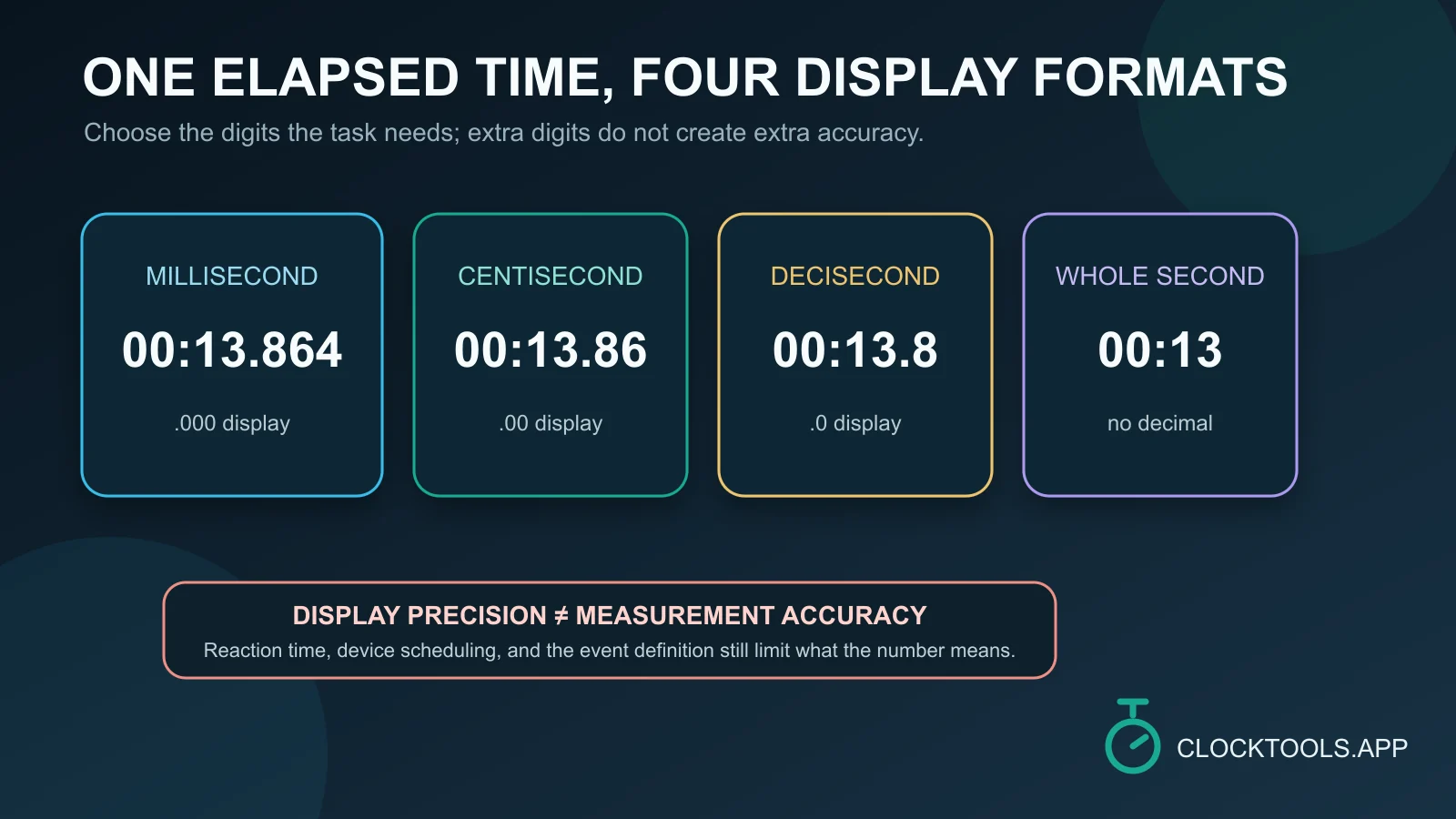
The last three digits in 00:00.000 represent thousandths of a second. In a timing display, that is resolution: the smallest interval the display can show. NIST's stopwatch and timer calibration guide makes the distinction explicit by treating resolution as the smallest displayed interval and discussing accuracy and measurement uncertainty separately.
That distinction changes how a result should be described. 12.483 seconds was displayed is a defensible observation. The event took exactly 12.483 seconds makes a much stronger claim about the clock, the triggering method, the event boundaries, and the reference used to check the measurement.
| ClockTools format | Smallest displayed increment | What the format lets you read |
|---|---|---|
00:00.000 | 0.001 s | Thousandths of a second |
00:00.00 | 0.01 s | Hundredths of a second |
00:00.0 | 0.1 s | Tenths of a second |
00:00 | 1 s | Whole seconds |
More digits can expose smaller displayed differences. They cannot, by themselves, show that those differences came from the activity rather than the way the timing was started and stopped.
Audit four sources of uncertainty
Before collecting a result, write down the possible weak points. This compact uncertainty ledger is the article's working artifact; it prevents the precision menu from becoming the measurement plan.
| Layer | Question to answer | What to document or change |
|---|---|---|
| Event boundary | What observable event starts and ends the interval? | Use a rule another person could apply, such as first visible frame to final visible frame. |
| Trigger | Who or what presses Start, Lap, or Pause? | Record whether the trigger is manual. If possible, keep the same operator and method. |
| Display | What is the smallest difference the decision needs? | Select only enough digits to resolve that difference. Do not add significance after the fact. |
| Reference and environment | Has this browser-and-device setup been checked against a suitable reference? | Name the device, browser, date, and reference check. If none was performed, say so. |
Manual triggering deserves its own line because the tap is part of the measurement system. NIST's calibration guidance notes that operator start/stop reaction contributes to uncertainty in direct comparisons. You do not need to guess a reaction-time number for your own session; you do need to avoid pretending the operator contribution vanished because the display gained another digit.
Select an increment from the question, not the screen
Start with the smallest difference that would change the conclusion. Then choose the coarsest format that can still show it.
| Decision you need to make | Sensible display starting point | Reporting guardrail |
|---|---|---|
| Did an activity cross a whole-second threshold? | Whole seconds | Fractions would not change the answer. |
| Are two intervals separated by several tenths? | Tenths | Repeat the method before attributing a small difference to the activity. |
| Do hundredths affect the stated result? | Hundredths | Keep the same event definition and trigger method across trials. |
| Must you inspect a three-decimal display? | Milliseconds | Treat .000 as displayed resolution unless the full setup has been validated. |
If the real question is How long does this open-ended task take?, a stopwatch is the right direction. If the question is How much of a fixed allowance remains?, move to a countdown timer. The separate stopwatch-versus-timer guide follows that choice without mixing it into the precision decision.
Rehearse one event without collecting data
Run a control rehearsal before the result matters. The goal is not to obtain a fast number; it is to find ambiguity.
- Say the start event aloud in one sentence.
- Say the stop event aloud in one sentence.
- Perform the activity once without saving the reading.
- Note whether either boundary forced you to make an improvised judgment.
- Tighten the definition and rehearse again.
Consider this hypothetical example: someone manually times two versions of a short interface animation and sees different .000 readings. The difference might come from the animations, the manual taps, the chosen visual boundary, the device, or several of those together. The screen alone cannot separate those causes. A repeatable automated event log or video-frame method may fit that question better than a hand-operated browser stopwatch.
The readiness test is simple: if another operator cannot identify the same start and stop events, the method is not ready merely because the display looks precise.
Turn the paused display into an honest record
In our live check, Pause held the elapsed value on screen and exposed Reset. Use that paused state as a review point. Copy the context before clearing it.
| Record field | Example of an honest entry |
|---|---|
| Measurement question | How long from the first visible frame to the final visible frame? |
| Boundary rule | First pixel change to the frame with no further movement |
| ClockTools format | 00:00.000 |
| Trigger | Manual Start and Pause by one operator |
| Environment | Browser and device named; no calibration performed |
| Displayed result | Value copied from the paused display |
| Limitation | Manual boundary selection can vary between trials |
For several checkpoints within one continuous run, Lap can preserve a cumulative reading and a plus-prefixed segment. Read the lap-time and split-time explanation before assigning meaning to those two columns. Do not Reset until the values and their labels have been reviewed.
Draw the boundary around browser timing
A browser stopwatch is a convenient observation tool, not automatically a calibrated instrument. The W3C High Resolution Time specification distinguishes browser clock concepts, duration calculations, and time coarsening. This editorial check did not inspect ClockTools' internal timing API, benchmark it against a traceable reference, or test behavior across browsers, sleeping devices, background tabs, and operating systems.
Use specialized equipment and an appropriate calibration process when the result will support a regulated measurement, a safety decision, a competitive record, a scientific claim, or another consequence-heavy conclusion. In those settings, the method needs an uncertainty analysis and reference traceability that a visual .000 option cannot supply.
For everyday work, the useful outcome is narrower: select a display that fits the question, define the event boundaries, rehearse the trigger, pause to preserve the reading, and report only what the setup can support. That produces a more credible result than adding digits after the measurement is over.
Frequently Asked Questions
Does .000 mean the stopwatch is accurate to one millisecond?
No. The .000 format shows thousandths of a second on the display. Accuracy also depends on the clock, event boundaries, trigger method, device, environment, and any reference check used.
Should I select milliseconds or centiseconds?
Choose the coarsest format that can still distinguish the outcome your decision needs. Use milliseconds only when thousandths are meaningful and the rest of the method can support that detail.
Can I compare millisecond readings from two different devices?
Only with careful qualifications. Keep the event definition and trigger method consistent, record both environments, repeat the procedure, and use a suitable reference when the conclusion depends on cross-device agreement.
Why can repeated manual trials show different values?
A person may identify or tap the start and stop boundaries differently on each trial. Activity variation, device conditions, and display resolution can add further differences.
Should I use Lap for repeated millisecond measurements?
Use Lap when the checkpoints belong to one continuous run. Record which event produced every lap, then distinguish the cumulative reading from the segment split before comparing intervals.
When is a browser millisecond stopwatch not enough?
Use appropriate calibrated equipment and a documented uncertainty method for regulated, scientific, safety-critical, competitive-record, or other consequence-heavy measurements. A visual three-decimal format is not traceability.

About The Author
Vigneshwaran Vijayakumar
Founder, Developer and Publisher of ClockTools | Digital Marketing Manager | India
Vigneshwaran is an engineer with decades of technical experience, including professional work as a Digital Marketing Manager in Dubai. His work connects data analysis, search engine optimization, conversion-rate optimization, content systems, visual production, and applied AI and machine learning. At ClockTools, he turns that multidisciplinary experience into focused browser utilities and practical, source-aware guides.