Stopwatch
Lap Time vs Split Time: What Is The Difference?
Lap time measures one segment. Split time measures total elapsed time at a checkpoint. Here is how both work and how to track them with ClockTools.
By Vigneshwaran Vijayakumar, Developer and Publisher | | Reviewed under the ClockTools editorial policy
Table of contents
Lap time and split time sound similar, but they answer different timing questions. If you use an online stopwatch for workouts, studying, sports, practice sessions, classroom activities, or repeated tasks, understanding this difference helps you read your lap records correctly.
In this guide, we explain lap time and split time in plain English, show real examples, and explain how ClockTools.app keeps lap and split timing simple without making the stopwatch feel complicated.
What Is Lap Time?
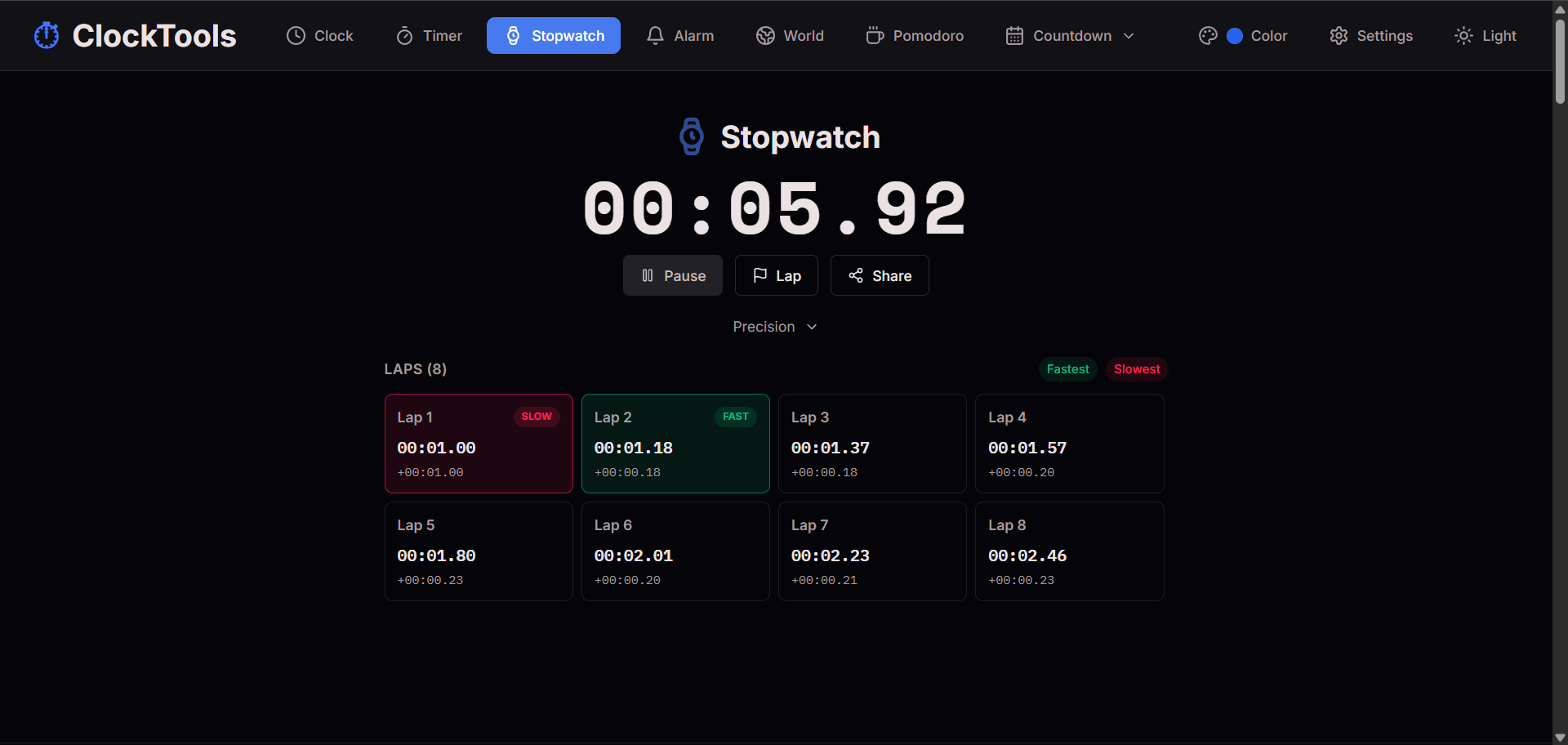
Lap time is the time taken for one individual segment of an activity. If you are running around a track, one lap time tells you how long that single lap took. If you are doing workout rounds, one lap time tells you how long one round took. If you are practicing a speech, one lap can measure one section of the presentation.
The key idea is that lap time resets the segment mentally, even though the stopwatch itself keeps running. Each lap is its own interval. That makes lap time extremely useful when you want to compare repeated attempts, rounds, sections, or stages.
For example, imagine a runner completing four laps. If lap one takes 1 minute 52 seconds, lap two takes 1 minute 49 seconds, lap three takes 1 minute 55 seconds, and lap four takes 1 minute 51 seconds, those four values are lap times. They show the performance of each individual lap.
Lap time is useful because it answers a practical question: how long did this specific part take?
What Is Split Time?
Split time is the total elapsed time at a checkpoint. Instead of asking how long one section took, split time asks what the stopwatch showed when you reached a certain point.
Using the same running example, the split after lap one might be 1:52. The split after lap two might be 3:41. The split after lap three might be 5:36. The split after lap four might be 7:27. Each split shows total elapsed time from the start to that checkpoint.
Split time is useful because it answers a different question: what was the total time when this checkpoint happened?
That difference matters. Lap time helps you compare sections. Split time helps you understand overall progress. Both are valuable, but they are not the same thing.
What Is The Difference Between Lap Time And Split Time?
The simplest difference is this:
- Lap time measures one segment.
- Split time measures total elapsed time at a checkpoint.
If a stopwatch starts at zero and you press lap after each round, the lap time tells you how long the latest round took. The split time tells you the full running total at that moment.
Here is a simple way to remember it. Lap time is local. Split time is cumulative. Lap time is about the piece. Split time is about the whole.
This is why both numbers are useful. If you only know the final total, you may know that the task took 20 minutes, but you do not know which part was slow. If you only know individual laps, you may understand each segment, but you may still want to know the total progress at each checkpoint. Together, lap and split timing gives a clearer picture.
Why Do People Mix Up Lap Times And Split Times?
People mix them up because many stopwatch interfaces show both values near each other, and some apps use the words loosely. A basic stopwatch may show a list of recorded times but not explain whether those values are lap times, split times, or both.
Another reason is that in casual conversation, people sometimes say “split” when they mean “lap.” Runners, swimmers, cyclists, coaches, and event timers may use the terms carefully, but everyday users often just want to record checkpoints quickly.
At ClockTools.app, we try to make this easier by keeping the stopwatch readable and practical. Our goal is not to make users study timing terminology before they can use the tool. We want the stopwatch to feel obvious first, then useful in detail when you start reviewing laps.
How Do Lap Times Work In Real Examples?
Lap times are best for comparing repeated parts of a task. Think about a workout circuit with five rounds. If each round has push-ups, squats, and rest, you may want to know which round was fastest and which round slowed down.
In that case, lap time helps you see the rhythm of the session. Maybe round one was slow because you were warming up. Maybe round three was fastest because you found your pace. Maybe round five was slowest because fatigue started to show. The total time matters, but the lap times reveal the story inside the total.
Lap timing is also useful for studying. If you are answering practice questions in blocks, each lap can represent one block. You can compare how long each block took and notice whether your pace improved.
Teachers can use lap times for classroom activities. A lap can represent each group activity, reading round, quiz section, or classroom drill. The benefit is that the stopwatch continues running while still giving you separate timing markers.
How Do Split Times Work In Real Examples?
Split times are best for checkpoints. Imagine you are trying to finish a 10 km run under 60 minutes. You may check your split at every kilometer. At kilometer one, your split tells you your total elapsed time so far. At kilometer five, your split shows whether you are on pace halfway through.
Split time is also useful in presentations. If a presentation should finish in 20 minutes, you may want to know the total elapsed time after the introduction, after the main explanation, and before the final summary. Those checkpoints are splits.
For work tasks, split times can help you understand progress through a longer session. For example, if you are testing a workflow with five stages, split times show when each stage finished in the total run.
The practical value is pacing. Split time tells you whether the whole activity is moving too fast, too slow, or just right.
When Should You Track Lap Time?
Track lap time when the individual segment matters. Lap time is the better choice when you want to compare repeated attempts, rounds, intervals, or sections.
Good lap-time use cases include:
- running laps around a track
- swimming lengths in a pool
- workout circuits
- study blocks
- speech practice sections
- cooking stages
- classroom rounds
- repeated software tests
- game rounds
- speed drills
Lap time is especially useful when you want to find consistency. If every lap is close to the same duration, your pace is stable. If one lap is much faster or slower, that lap deserves attention.
When Should You Track Split Time?
Track split time when total progress matters. Split time is the better choice when you want to know where you were at a specific checkpoint in the overall session.
Good split-time use cases include:
- race checkpoints
- project stages
- presentation milestones
- exam section progress
- cooking process checkpoints
- production workflow timing
- event timing
- rehearsal timing
- travel or route timing
Split time is especially useful when you have a target finish time. It helps you understand whether you are ahead, behind, or on pace.
How Does ClockTools.app Help You Track Laps And Splits?
Our online stopwatch is built for people who want a simple stopwatch first and useful timing details next. You can start quickly, record laps, review lap differences, and see fastest and slowest lap highlights without moving into a complicated dashboard.
ClockTools.app is designed to be clean on both desktop and mobile. That matters because many stopwatch sessions happen away from a desk. You might be timing a workout, a classroom activity, a practice test, a cooking process, or a quick work task from your phone.
The stopwatch also supports precision controls. Sometimes seconds are enough. Sometimes you want tenths, hundredths, or milliseconds. Our precision options let you choose the display that matches the task instead of forcing one format for every situation.
The fastest and slowest lap highlights are especially helpful. When you record several laps, you should not have to manually scan every row to find the best and worst segments. Our stopwatch makes those values easier to notice.
What Is The Best Way To Use Our Online Stopwatch?
Start by opening the ClockTools online stopwatch. Press Start when the activity begins. Whenever you reach a checkpoint, press Lap. Continue until the session is done, then review the recorded lap information.
For repeated segments, focus on lap times. Ask which lap was fastest, which lap was slowest, and whether the pace stayed consistent.
For progress checkpoints, focus on the total elapsed time at each recorded point. Ask whether the session was on pace and how the total time changed across the activity.
If you are timing a focus session instead of a count-up activity, you may prefer our online timer or Pomodoro timer. A stopwatch counts upward, while a timer counts down from a chosen duration. Choosing the right tool makes the workflow cleaner.
What Should You Remember?
Lap time and split time are closely related, but they answer different questions. Lap time tells you how long one segment took. Split time tells you the total elapsed time at a checkpoint.
If you want to compare parts, use lap time. If you want to track overall progress, use split time. If you want the clearest picture, use both.
ClockTools.app keeps this workflow simple. Our stopwatch is free, fast, mobile-friendly, and designed for real timing situations where clarity matters.
Frequently Asked Questions
What Is The Main Difference Between Lap Time And Split Time?
Lap time measures one individual segment, while split time measures the total elapsed time at a checkpoint. Lap time is local to one section; split time is cumulative from the start.
Is Lap Time The Same As Split Time?
No. They are related, but they are not the same. A lap time shows how long a single lap or interval took. A split time shows the running total when that lap or checkpoint was reached.
When Should I Use Lap Time?
Use lap time when you want to compare individual rounds, intervals, sections, workout sets, study blocks, or repeated attempts.
When Should I Use Split Time?
Use split time when you want to track total progress at checkpoints, such as race distances, presentation sections, project stages, or exam milestones.
Can I Track Lap Times With ClockTools.app?
Yes. The ClockTools online stopwatch lets you record laps, review timing differences, and identify fastest and slowest laps in a clean browser-based interface.

About The Author
Vigneshwaran Vijayakumar
Founder, Developer and Publisher of ClockTools | Digital Marketing Manager | India
Vigneshwaran is an engineer with decades of technical experience, including professional work as a Digital Marketing Manager in Dubai. His work connects data analysis, search engine optimization, conversion-rate optimization, content systems, visual production, and applied AI and machine learning. At ClockTools, he turns that multidisciplinary experience into focused browser utilities and practical, source-aware guides.