Stopwatch
Stopwatch vs Timer: Which One Fits Your Timing Question?
A verb-based selector for stopwatch, timer, and alarm jobs, with hypothetical question flips, a wrong-tool rescue card, and verified ClockTools controls.
By Vigneshwaran Vijayakumar, Developer and Publisher | | Reviewed under the ClockTools editorial policy
Table of contents
Use a stopwatch when you want to discover how long an activity takes. Use a timer when you decide how long an activity may last and want a countdown to zero. If the target is a clock time such as 3:30 PM, neither is the cleanest match; use an alarm.
That is the practical answer to stopwatch vs timer. In our August 27, 2026 interface check, the ClockTools stopwatch counted up from 00:00.00 and changed from Start to Pause and Lap while running. The timer accepted minutes and seconds, and choosing the 5 min preset prepared 05:00 without starting it. The two screens support different questions, even when the activity itself is identical.
Name the job with one verb
Do not choose from the noun. Workout, presentation, recipe, and study session can all use different time tools. Choose from the verb in the instruction.
| Verb in the job | The question underneath it | Matching tool |
|---|---|---|
| Measure | How much time elapsed before the activity ended? | Stopwatch |
| Limit | How much of a chosen duration remains? | Timer |
| Remind | At what clock time should something happen? | Alarm clock |
NIST's guide to stopwatch and timer calibrations treats both devices as ways to measure a time interval rather than time of day. The everyday control direction is the useful separator here: a stopwatch accumulates elapsed time from a start event, while a countdown timer begins with a preset interval and approaches zero.
The branching map starts with one sentence
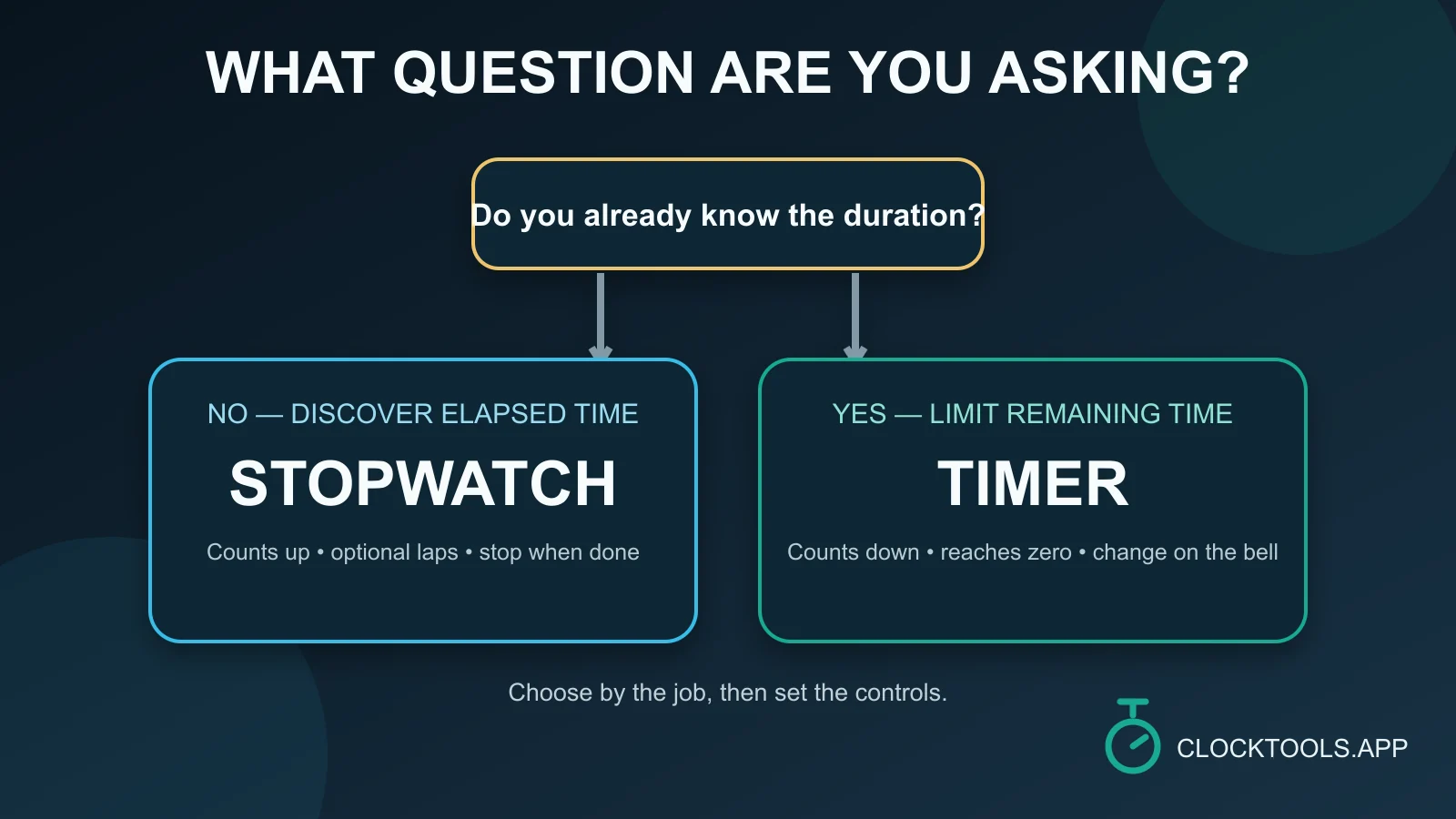
Complete this sentence before opening a tool:
I need to __________ until __________.
The missing words expose the job:
measure from the first movement until the final movementpoints to a stopwatch.allow ten minutes until work must stoppoints to a timer.be reminded at 4:15 PMpoints to an alarm clock.
An unknown endpoint does not mean the event never ends. It means the duration is not chosen in advance. You press Stop or Pause when the real endpoint occurs. A known duration does not mean you already know what the activity will accomplish. It means the time allowance is chosen before Start.
One activity can create three timing questions
The following rows are hypothetical question flips, not measured ClockTools sessions. They show why activity lists are a poor selector.
| Activity | Question asked | Tool | Why the answer changes |
|---|---|---|---|
| Presentation practice | How long is my natural run-through? | Stopwatch | The ending determines the duration. |
| Presentation practice | Can I stop when an eight-minute allowance ends? | Timer | Eight minutes is selected before the run. |
| Presentation practice | Can I begin at 2:00 PM? | Alarm | The target is a time of day. |
| Shelf reset | How long does this shelf actually take? | Stopwatch | The result is elapsed time. |
| Shelf reset | Work on this shelf for no more than ten minutes. | Timer | The limit is the controlling fact. |
| Quiz rehearsal | How long until I finish every question? | Stopwatch | Completion is the endpoint. |
| Quiz rehearsal | End the attempt after twenty minutes. | Timer | The cutoff is fixed in advance. |
The same noun can legitimately move between tools as the question changes. That is also why stopwatch for workouts and timer for workouts are not interchangeable phrases: one can record an open-ended round, while the other enforces a preset interval.
A wrong-tool rescue card
Picking the wrong direction is usually recoverable if the needed values are still visible. Do the arithmetic once, label it, and avoid pretending the switch was seamless.
| What happened | Salvage action | What cannot be recovered |
|---|---|---|
| A stopwatch was started, but the task had a fixed limit | Pause, copy elapsed time, subtract it from the original allowance, then set a timer for the remainder. | The switch itself consumes time and breaks a continuous countdown record. |
| A timer was started, but elapsed time was the real result | Subtract the visible remaining time from the original preset while both values are known. | A reset, unknown starting value, or completed repeat can make reconstruction impossible. |
| A countdown was set, but the instruction named a clock time | Replace it with an alarm for that clock time. | A relative countdown may drift from the intended schedule if the start was delayed. |
Here is a hypothetical rescue calculation. A ten-minute limit was mistakenly tracked with a stopwatch. The paused stopwatch reads 03:40, so the remaining allowance is 10:00 - 03:40 = 06:20. Set the timer to six minutes and twenty seconds, and note that the tool switch interrupted the session. If the original limit was never written down, do not invent it afterward.
The two ClockTools screens diverge at setup
The live controls make the conceptual difference visible.
| ClockTools observation on August 27, 2026 | What it supports |
|---|---|
The stopwatch opened at 00:00.00 with Start, Share, and Precision. | The starting value is zero; the duration is discovered after Start. |
| Starting the stopwatch exposed Pause and Lap. | The endpoint and any checkpoints are recorded while time accumulates. |
| Pausing preserved the reading and exposed Reset. | The elapsed result can be reviewed before the session is cleared. |
| The timer exposed Timer Name, Minutes, Seconds, Set, Start, and Reset. | The allowance can be defined before the countdown begins. |
Selecting 5 min changed the prepared display to 05:00 while Start remained available. | Choosing a preset and beginning the countdown are separate actions. |
If your sentence begins find out how long, open the stopwatch and define the endpoint. If it begins give this exactly, open the timer, set the allowance, and confirm the prepared display before Start. A product feature such as precision or repeat mode should refine a sound choice, not decide the underlying job.
Cases beyond the binary
Some instructions contain more structure than one open-ended interval or one countdown.
- A recurring focus-and-break sequence is easier to express with a Pomodoro timer than by rebuilding alternating countdowns.
- An open-ended session with internal checkpoints still belongs on the stopwatch; Lap can mark boundaries without ending the full run.
- A schedule tied to a wall-clock moment belongs on the alarm clock, even if you could calculate a temporary countdown from now.
- A consequence-heavy task should not rely on one browser tab as its only safeguard. Use the procedure and equipment appropriate to the consequence.
This is not a feature contest. It is a control-model choice. Stopwatch, timer, alarm, and Pomodoro pages can all be well designed and still be wrong for a particular instruction.
Write one instruction before opening either page
Use one of these lines as a preflight note:
Measure elapsed time from __________ until __________.Allow __________ minutes and __________ seconds, then stop or change activity.Remind me at __________ local time.
If you cannot fill the blanks, the timing question is still underspecified. Clarify the endpoint, allowance, or clock time first. Once the sentence is complete, the tool choice is no longer a guess: count up to discover a duration, count down to enforce one, or use an alarm for a time-of-day instruction.
Frequently Asked Questions
What is the main difference between a stopwatch and a timer?
A stopwatch counts elapsed time upward from a start event. A timer counts remaining time downward from a duration chosen before the activity begins.
Should I use a stopwatch or timer for a presentation?
Use a stopwatch to discover the presentation's natural duration. Use a timer when the presentation must stop or change at a preset allowance. The question, not the presentation itself, decides.
Can I use a countdown timer to calculate elapsed time?
You can subtract visible remaining time from the known starting duration, but that is a reconstruction. A stopwatch is clearer when elapsed time is the primary result.
Which tool fits an activity with no known duration?
Use a stopwatch when the real endpoint will decide the duration. Define that endpoint before Start so the elapsed reading answers a specific question.
What if I need both a fixed limit and the final elapsed time?
Decide which outcome controls the session. Use a timer for a hard cutoff; separately record elapsed time only if the procedure genuinely requires it and the extra control will not create confusion.
Should I use a timer for an exact clock-time reminder?
An alarm is clearer when the instruction names a time of day. A countdown expresses a relative wait, which can become wrong if its intended start is delayed.

About The Author
Vigneshwaran Vijayakumar
Founder, Developer and Publisher of ClockTools | Digital Marketing Manager | India
Vigneshwaran is an engineer with decades of technical experience, including professional work as a Digital Marketing Manager in Dubai. His work connects data analysis, search engine optimization, conversion-rate optimization, content systems, visual production, and applied AI and machine learning. At ClockTools, he turns that multidisciplinary experience into focused browser utilities and practical, source-aware guides.