IP Address Tools
Is My IP Public or Private?
Learn which IP a website sees, which addresses stay inside your network, and why your device, router, VPN, and ISP can show different results.
By Vigneshwaran Vijayakumar, Developer and Publisher | | Reviewed under the ClockTools editorial policy
Table of contents
The IP address shown by a website is normally your public IP address: the address visible at the internet side of your connection. A private IP address is used inside a home, office, phone hotspot, virtual network, or other local environment. Your device can have both at the same time, and that is normal.
The fastest check is to open What Is My IP Address?. ClockTools reads the address attached to the current web request, identifies IPv4 or IPv6, and displays available connection details. Compare that result with the address shown in your device or router settings to understand which side of the network each address belongs to.
Is my IP public or private?
Start with where you found it. If ClockTools or another external website reports the address, it is the address that reached that website and is public-facing for that request. It may belong directly to your router, to your ISP's shared translation system, or to a VPN or proxy service. It is not automatically the same address assigned to your phone or laptop on the local network.
If the address appears in Wi-Fi details and starts with 10., 192.168., or an eligible part of 172.16. through 172.31., it is private IPv4. Private addresses can be reused by unrelated networks because internet routers do not carry them as globally reachable destinations.
| Where the address appears | What it usually represents |
|---|---|
| ClockTools What Is My IP result | Public-facing source address of the web request |
| Device Wi-Fi or Ethernet settings | Local address assigned to that device |
| Router LAN or DHCP page | Private addresses inside the local network |
| Router WAN or Internet page | ISP-facing address, which may be public or shared CGNAT space |
| VPN application | A tunnel address locally and a VPN exit address publicly |
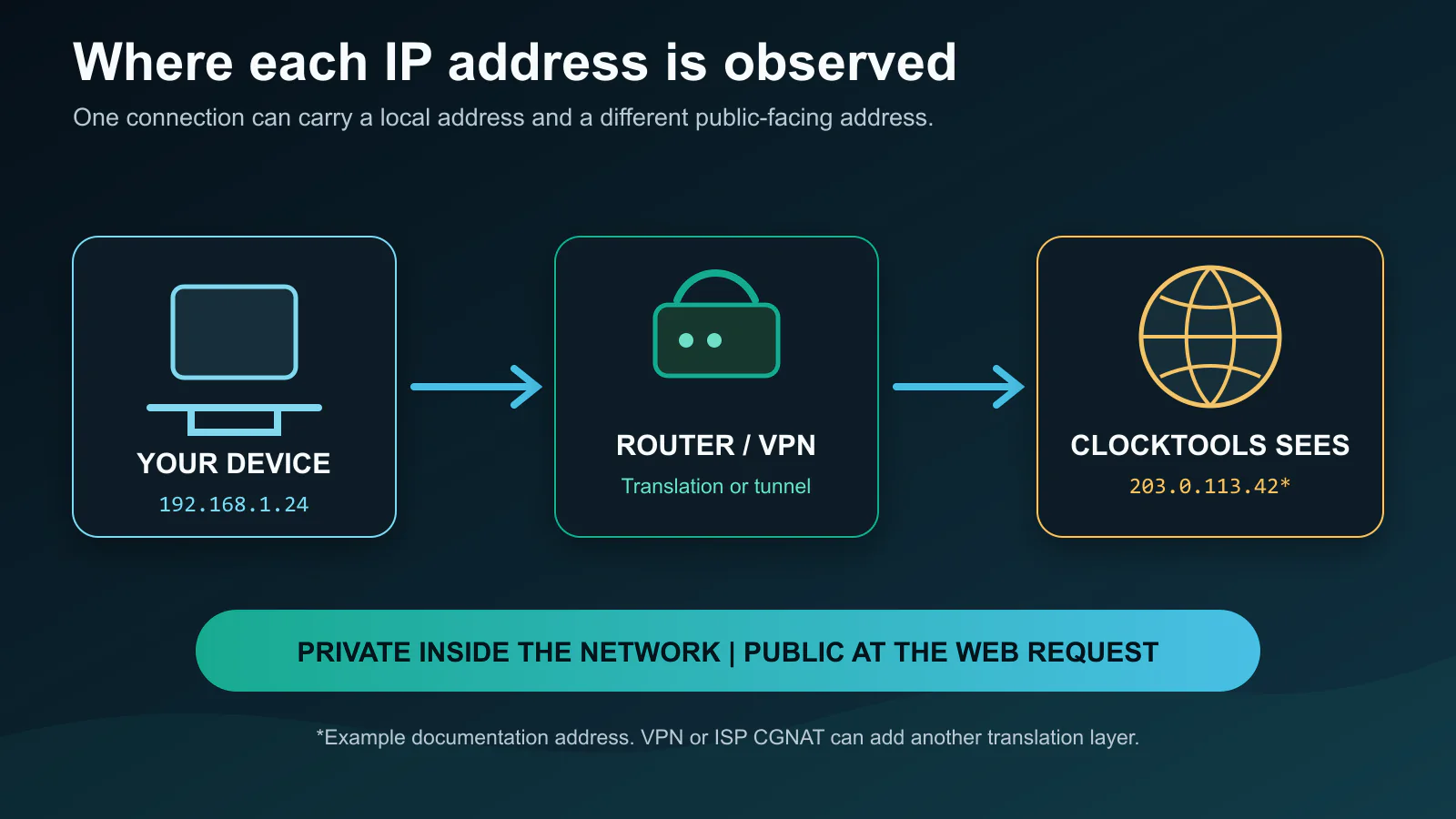
The diagram explains why two screens can show different addresses without either one being wrong. They are observing different points along the same route.
What are the private IPv4 ranges?
RFC 1918 reserves three IPv4 blocks for private internets. The IANA private-address guide lists the same ranges.
| Private block | Address range | CIDR prefix |
|---|---|---|
| 24-bit block | 10.0.0.0 to 10.255.255.255 | 10.0.0.0/8 |
| 20-bit block | 172.16.0.0 to 172.31.255.255 | 172.16.0.0/12 |
| 16-bit block | 192.168.0.0 to 192.168.255.255 | 192.168.0.0/16 |
The middle range is the one most often misclassified. 172.20.4.8 is private, but 172.15.4.8 and 172.32.4.8 are not in the RFC 1918 block. Looking only at the first octet is not enough.
Private is also different from special-purpose. Loopback (127.0.0.0/8), link-local (169.254.0.0/16), documentation ranges, multicast, and other reserved blocks are not ordinary public addresses, but they are not RFC 1918 private space either. The IANA IPv4 Special-Purpose Address Registry is the authoritative place to classify those edge cases.
Why does my device have more than one IP address?
A modern device can have one private IPv4 address, one or more IPv6 addresses, a loopback address, and separate addresses for VPN or virtual adapters. Each network interface has its own role. Wi-Fi and Ethernet can even be active at the same time.
Most home IPv4 connections use network address translation, or NAT. Your router assigns private addresses to local devices, then translates their outbound traffic so multiple devices can share one public-facing IPv4 address. The return traffic is mapped back to the device that started the connection.
This means a phone at 192.168.1.24 and a laptop at 192.168.1.37 may both appear to ClockTools as one public IPv4 address. A mobile-data connection may take a different path and show a different address. Switching Wi-Fi off is therefore a simple way to confirm whether two public results belong to two different network exits.
How can I check my public IP?
Open the ClockTools IP checker from the exact browser and connection you want to test. The large result is the source address visible to the ClockTools edge. The page also labels the address family so you can tell whether that request arrived over IPv4 or IPv6.
For a useful comparison:
- Record the visible IP while connected normally.
- Turn a VPN on, reload, and see whether the public result changes to the VPN exit.
- Compare Wi-Fi with mobile data.
- Check the router's WAN page if you control the network.
- If the WAN address is private or in shared space while the website shows another public address, translation is happening upstream.
ClockTools also shows request-derived network, location, browser, protocol, and Cloudflare edge details when available. These clues help diagnose a surprising route, but they do not turn an IP lookup into precise physical tracking.
How can I identify a private IP?
For a single IPv4 address, compare it with the three RFC 1918 ranges. For a network and prefix, the IP Subnet Calculator can show the network address, usable range, broadcast address, mask, and CIDR details. That is more reliable than visually guessing whether two addresses belong to the same subnet.
On Windows, ipconfig displays interface addresses. On macOS and Linux, network settings or commands such as ip address can show local assignments. Phones list the local address in the connected Wi-Fi network details. These are device-side observations, while a What Is My IP page is an internet-side observation.
Do not paste a password, router admin credential, or private configuration export into an IP checker. An address alone is enough for classification.
What changes with IPv6?
IPv6 does not use the RFC 1918 IPv4 ranges. RFC 4193 defines unique local addresses under fc00::/7; currently generated local prefixes commonly begin with fd. They serve a private-network-like purpose but have their own IPv6 rules and terminology.
IPv6 link-local addresses use fe80::/10 and operate only on the local link. ::1 is loopback. A globally scoped IPv6 address can be assigned directly to a device, so the public/private path does not always look like home IPv4 NAT. A firewall can still control unsolicited inbound traffic even when the address is globally scoped.
Privacy extensions can give a device temporary IPv6 addresses, and a browser may prefer IPv6 for one request and IPv4 for another. That is why an IP checker should state the detected family instead of promising that one result represents every connection the device can make.
What are CGNAT, VPN, and proxy addresses?
Carrier-grade NAT lets an ISP share public IPv4 addresses among multiple customers. RFC 6598 reserves 100.64.0.0/10 as shared address space for this purpose. That block is not RFC 1918 private space, and it is not normally a globally reachable customer address.
If your router WAN page shows 100.64.x.x through 100.127.x.x while ClockTools shows a different public IPv4 address, your ISP may be using CGNAT. Port forwarding can be difficult in that arrangement because translation happens both at your router and within the provider network. The Port Scanner can test only what is reachable from the outside; it cannot remove an ISP translation layer.
A VPN or forward proxy changes the public-facing source seen by the destination. ClockTools will usually report the VPN or proxy exit address, not the ordinary ISP exit. Split tunneling can produce different results across apps because only selected traffic enters the tunnel.
Does a public IP mean my device is exposed?
No. Public addressing, reachability, and authorization are separate questions. A public IP means the address can participate in internet routing. Whether an unsolicited connection reaches a service depends on firewalls, NAT rules, router configuration, service bindings, provider filtering, and the device itself.
Likewise, a private address does not make a device automatically safe from other devices on the same network. Use operating-system updates, strong router settings, service authentication, and a firewall regardless of the address category. Never treat an IP classification as a security scan.
When diagnosing a path rather than a port, the online traceroute tool can show responding hops from the ClockTools edge perspective. Some routers intentionally do not answer trace probes, so missing hops are not proof of a broken route.
What can an IP lookup reveal?
An IP lookup can often associate an address with an ISP or network organization, an autonomous system number, an approximate country or region, and an internet-routing location. Accuracy varies by provider and address. Mobile networks, corporate gateways, satellite links, VPN exits, and recently reassigned blocks can appear far from the user.
ClockTools labels its geolocation as connection-derived context, not GPS. Websites can see the public source address when a browser requests a page; that is normal internet operation. Hiding the result on screen does not change what was already present in the network request.
For privacy checks, compare the reported timezone and language region with your actual settings, and run the optional WebRTC check if you use a VPN. A difference is a clue to investigate, not proof of identity or wrongdoing. The most reliable conclusion from the main result is simply: this is the IP address ClockTools saw for this request.
Frequently Asked Questions
Does an IP checker show my public or private IP?
A web-based IP checker normally shows the public-facing source address attached to the request. Your device's private local address usually stays behind the router or another translation layer.
What IPv4 addresses are private?
RFC 1918 private IPv4 space is 10.0.0.0/8, 172.16.0.0/12, and 192.168.0.0/16. Addresses outside those blocks may still be special-purpose, but they are not RFC 1918 private addresses.
Is every 172 address private?
No. Only 172.16.0.0 through 172.31.255.255 is private. For example, 172.20.1.1 is private, while 172.15.1.1 and 172.32.1.1 are outside the private block.
Why is my router IP different from my public IP?
Your router may be showing a local gateway address, an ISP-facing WAN address, or a CGNAT address. A website shows the source address that reached it after any router, ISP, VPN, or proxy translation.
Does a VPN change my public IP address?
Usually, yes. Websites normally see the VPN exit address when browser traffic uses the tunnel. Split tunneling can route selected apps outside the VPN, so results may differ by app.
Is a public IP address unsafe?
A public IP is not automatically unsafe or directly reachable. Firewalls, NAT rules, service configuration, provider filtering, authentication, and software updates determine the actual exposure.

About The Author
Vigneshwaran Vijayakumar
Founder, Developer and Publisher of ClockTools | Digital Marketing Manager | India
Vigneshwaran is an engineer with decades of technical experience, including professional work as a Digital Marketing Manager in Dubai. His work connects data analysis, search engine optimization, conversion-rate optimization, content systems, visual production, and applied AI and machine learning. At ClockTools, he turns that multidisciplinary experience into focused browser utilities and practical, source-aware guides.