Text Tools
How Is Typing Speed Calculated? WPM, Raw WPM, and Accuracy
Correct WPM uses matched graphemes, raw WPM uses all committed attempts, and accuracy measures correct attempts. See the formulas in a real result.
By Vigneshwaran Vijayakumar, Developer and Publisher | | Reviewed under the ClockTools editorial policy
Table of contents
Typing speed is calculated with a standardized unit, not by counting the dictionary words on the screen. Correct WPM equals correctly matched graphemes in their expected positions, divided by five, divided by active minutes. Raw WPM uses every committed grapheme attempt, including mistakes and corrected retyping. Accuracy is the percentage of committed attempts that were correct.
That distinction explains why three numbers from the same run can differ. In the controlled ClockTools result used for this guide, the score was 52.5 correct WPM, 52.8 raw WPM, and 99.4% accuracy. One wrong attempt was corrected, so the finished passage had no remaining error—but the earlier attempt still counted.
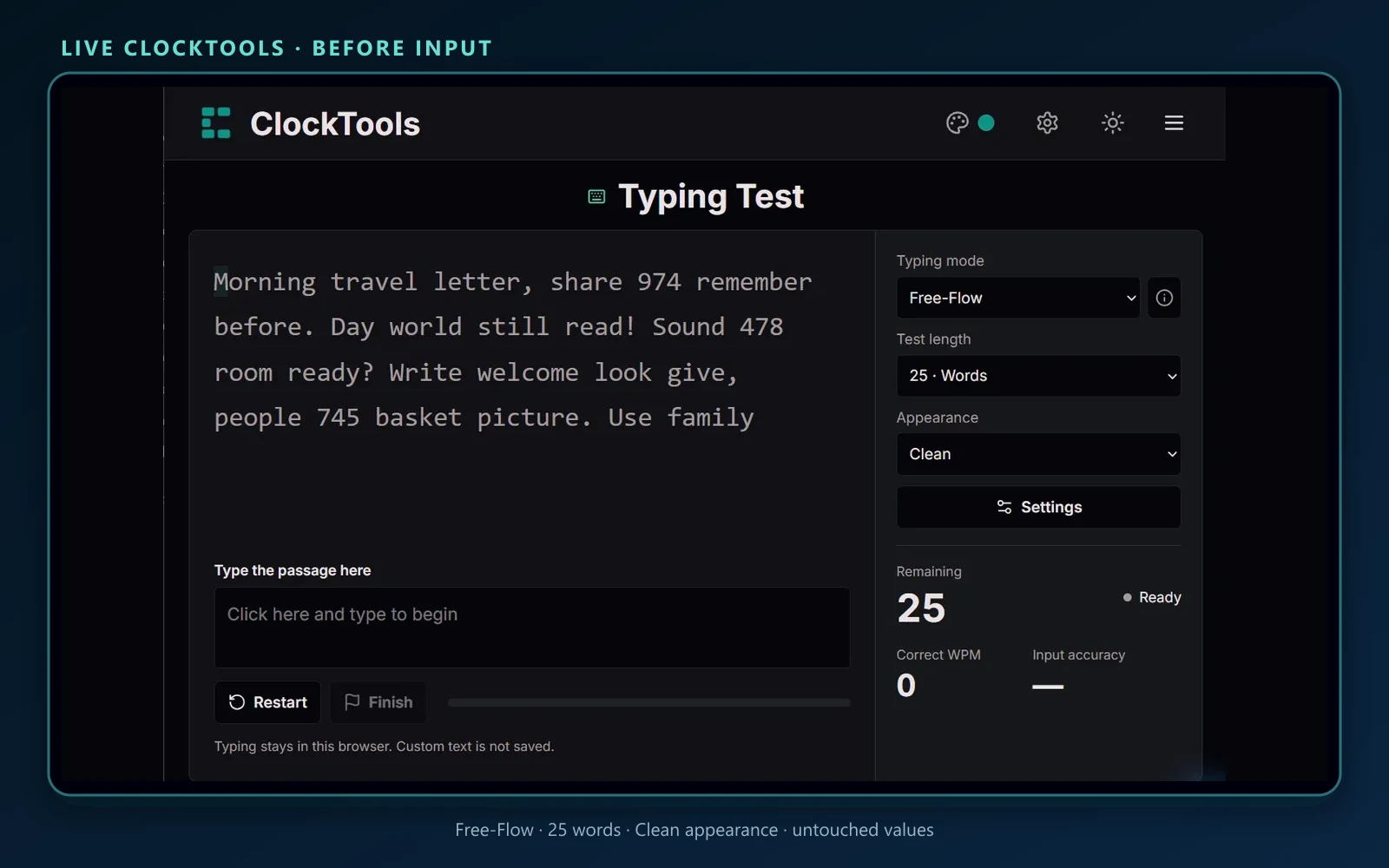
Open the ClockTools Typing Test and choose a consistent mode, language, content type, and length before comparing results. The setup below uses Free-Flow mode and a 25-word limit.
What do WPM, raw WPM, and accuracy measure?
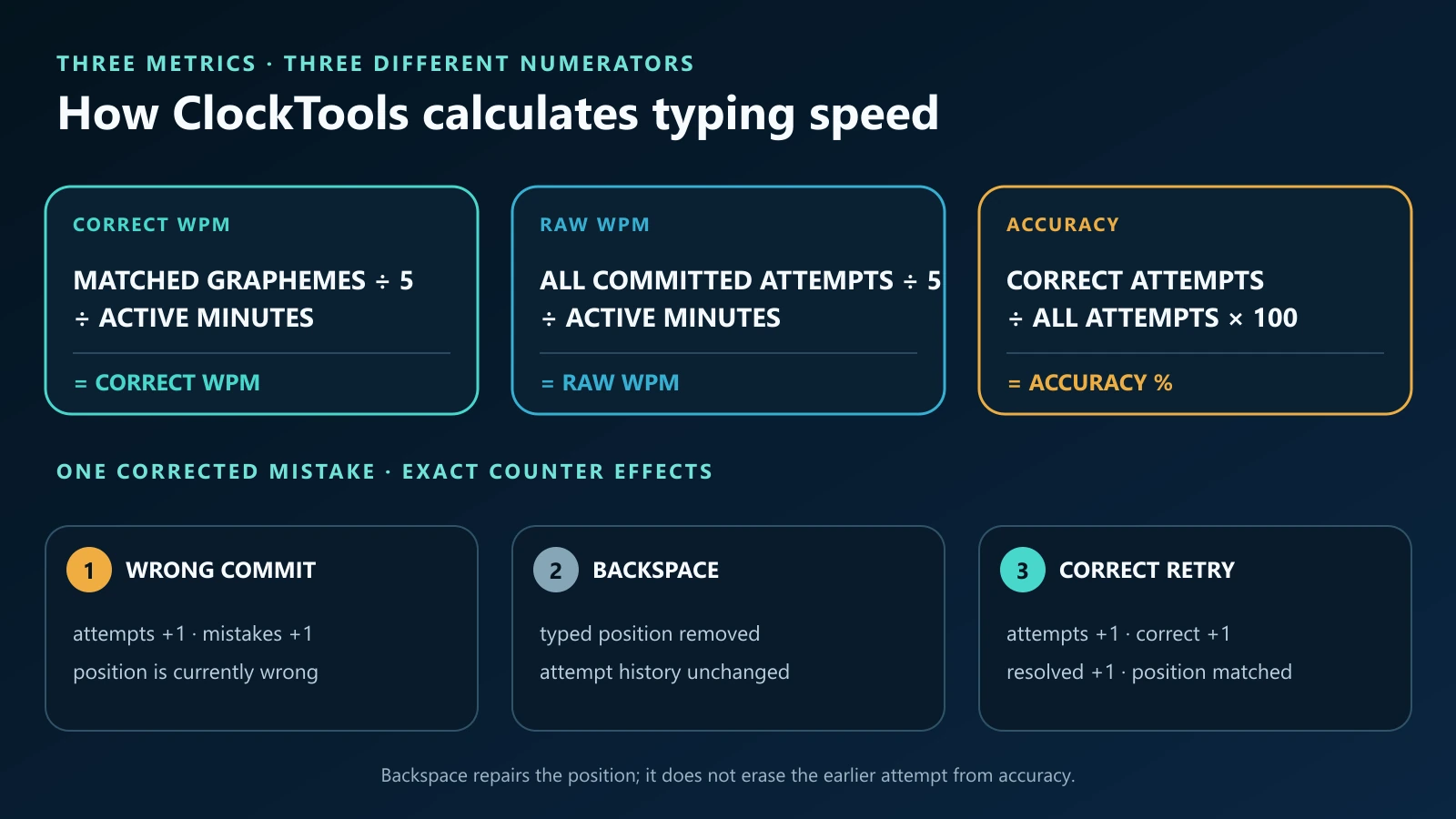
Each metric answers a different question:
| Metric | ClockTools calculation | What it tells you |
|---|---|---|
| Correct WPM | correctly matched graphemes ÷ 5 ÷ active minutes | How quickly the final typed positions match the passage |
| Raw WPM | all committed grapheme attempts ÷ 5 ÷ active minutes | How fast input was committed before the accuracy penalty is considered |
| Accuracy | correct attempts ÷ all attempts × 100 | How often a committed attempt matched the expected position |
| Correct characters/min | correctly matched graphemes ÷ active minutes | The ungrouped correct-character rate behind correct WPM |
“Raw” does not mean every physical keydown. Modifier keys do not become text, and an input method can use several keystrokes to compose one committed grapheme. The engine receives committed text; it then compares each grapheme with the expected grapheme at that position.
Correct WPM is also not raw WPM multiplied by accuracy. Those quantities are related, but they use different counters. Correct WPM examines what remains correctly aligned in the typed passage, while accuracy remembers the history of correct and wrong attempts.
How did the controlled 25-word result score?
For this article, a 25-word ClockTools passage was completed in Free-Flow mode. The run deliberately included one wrong committed character, followed by Backspace and the correct character. The live result panel reported:
| Result | Displayed value | Interpretation |
|---|---|---|
| Correct WPM | 52.5 | Correctly matched graphemes grouped into five-character units per minute |
| Raw WPM | 52.8 | All committed attempts, including the extra wrong attempt |
| Input accuracy | 99.4% | All but one committed attempt matched on the first try |
| Correct characters/min | 262.5 | Five times the correct-WPM value |
| Wrong attempts | 1 | The deliberate mismatch |
| Resolved mistakes | 1 | The wrong position was later corrected |
| Remaining errors | 0 | The completed passage ended with every position matched |
The displayed values are rounded. Their relationship is still visible: 262.5 correct characters per minute divided by the standard five-character word equals 52.5 correct WPM. Raw WPM is slightly higher because it includes the one extra attempt.
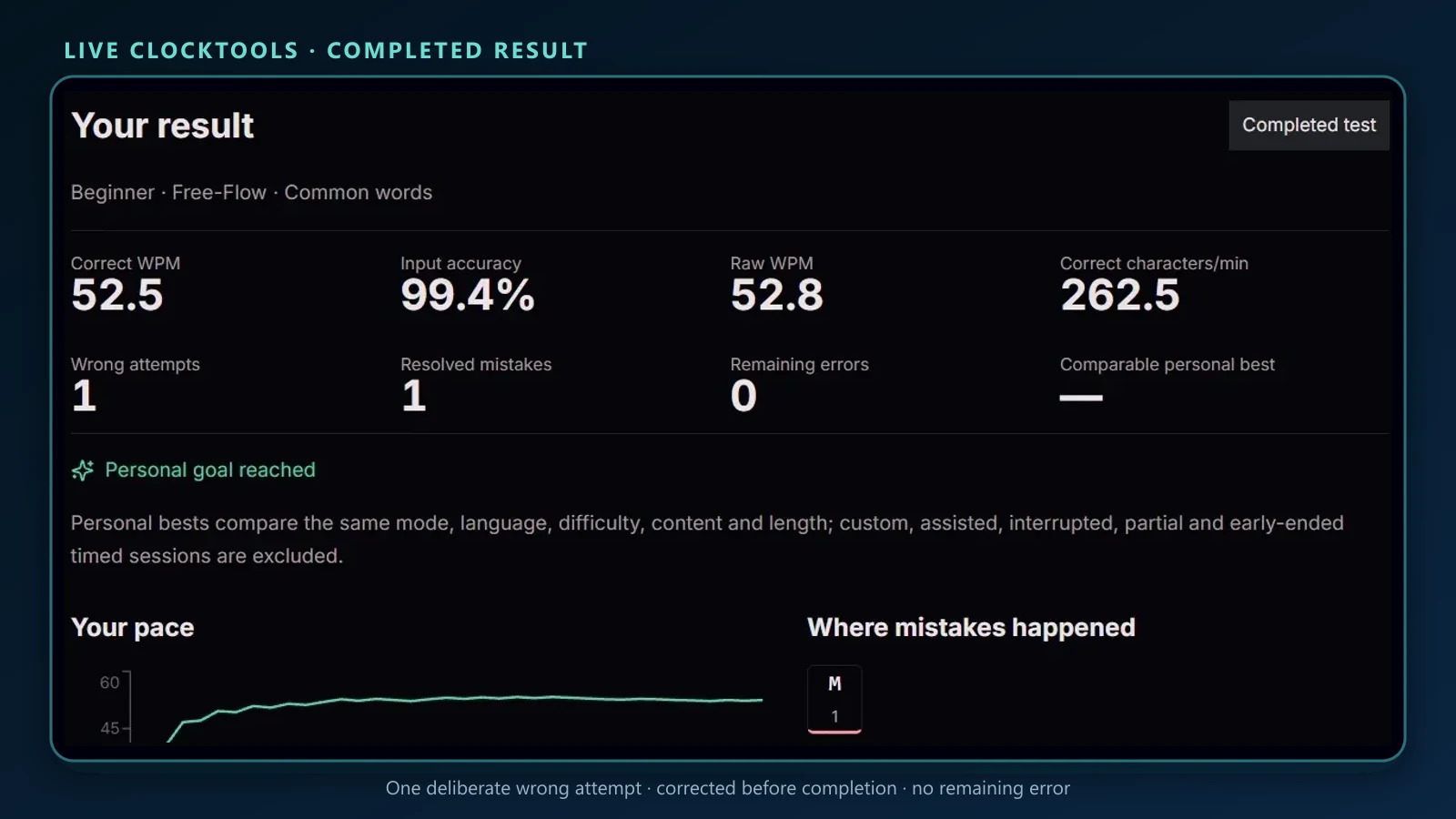
This is a controlled demonstration, not a population benchmark and not a claim about a particular person's normal speed. Its purpose is to make the counters observable in one reproducible result.
Does Backspace remove a typing mistake?
Backspace can repair the text position, but it does not erase the attempt history. ClockTools separates those two ideas deliberately.
Suppose the passage expects the letter M:
- A wrong committed character adds one attempt and one mistake.
- Backspace removes the last typed position. It does not subtract the earlier attempt or mistake.
- Entering M adds another attempt and one correct attempt.
- When the corrected position is accepted, the mistake is recorded as resolved.
The final text can therefore have zero remaining errors while accuracy stays below 100%. This makes accuracy useful: it reflects how cleanly the passage was entered, not merely whether it looked correct at the end.
The two error modes behave differently. Free-Flow advances after either a correct or wrong character, so an uncorrected mismatch can remain in the passage. Accuracy Focus holds the position until the expected character arrives, but wrong attempts are still recorded. Accuracy Focus prevents a mismatch from advancing the cursor; it does not prevent the mistake from being counted.
Why does one word equal five characters?
In WPM scoring, “word” is a measurement unit of five characters, including spaces and punctuation when they are part of the passage. It is not a count of visible language words. A short word such as “a” and a long word such as “measurement” would distort comparisons if each were always treated as one equal unit.
The five-character convention normalizes passages with different vocabulary. If a run produces 250 correct characters in exactly one active minute, its correct speed is:
250 ÷ 5 ÷ 1 = 50 WPM
If those same 250 characters take two active minutes, the score is 25 WPM. If ten extra wrong attempts were committed during that run, raw WPM and accuracy would change even if the final 250 positions were corrected.
This convention is why a word-limited test and a time-limited test can both report WPM. The content boundary determines when the session ends; the same character-based rate calculation supplies the score.
What counts as a character in the test?
ClockTools counts Unicode grapheme clusters—roughly, user-perceived characters—rather than blindly counting UTF-16 code units. The passage and committed input are normalized to Unicode NFC and segmented with JavaScript's Intl.Segmenter at grapheme granularity.
That matters for accents and emoji. A decomposed e plus a combining acute accent is normalized to é, and a joined emoji sequence can be treated as one grapheme rather than several unrelated code points. The Unicode text-segmentation standard explains why a user-perceived character can contain multiple code points; MDN's Intl.Segmenter reference documents the browser API used for grapheme segmentation.
Spaces and punctuation count when they appear in the target passage. Matching is case-sensitive and symbol-sensitive, so A and a are different attempts. Passage whitespace is normalized: line endings are made consistent, repeated whitespace collapses to one space, and leading or trailing whitespace is removed.
For input methods that compose text, ClockTools waits for composition to finish before sending the committed grapheme to the scoring engine. That is more accurate than treating every intermediate keystroke as a visible character. Paste and drag-and-drop are blocked, while browser-detected replacement or reconciled input can mark a result as assisted.
When does the timer run?
The timer starts on the first committed grapheme—even if that first attempt is wrong. Merely focusing the input does not start it. ClockTools uses the browser's monotonic high-resolution timer; MDN explains that performance.now() does not move backward with system-clock corrections.
In a timed test, input at or after the deadline is rejected against the exact deadline rather than counted until the next visual refresh. The pace chart samples the cumulative correct-WPM rate during the session, so it shows how the rate settles rather than adding a different scoring formula.
Test sessions cannot be paused. Practice sessions can be paused, and their paused duration is removed from active time. That is appropriate for practice, but it is also why a practice result should not be treated as interchangeable with an uninterrupted test result.
A timed passage that runs out of text before the requested duration uses the actual elapsed time for its displayed metrics, but it is excluded from a full timed personal-best comparison. Custom, assisted, interrupted, partial, paused, and early-ended timed sessions are also excluded from comparable personal bests.
How can you compare typing tests fairly?
Keep the comparison key stable. ClockTools separates personal-best groups by:
- Free-Flow or Accuracy Focus mode;
- Test or Practice session;
- time limit or word limit, including its length;
- passage language and content type;
- difficulty;
- punctuation and number settings; and
- typing-engine version.
A 60-second English common-words test is not the same task as a 25-word code test. Neither is inherently more valid, but the scores answer different questions. Code adds symbols and exact casing. Paragraphs introduce longer context. Numbers measure a different movement pattern. A custom passage may be useful for training, but it is not accepted as a comparable benchmark.
For a useful trend, choose one repeatable configuration and record several sessions across different days. Compare the median or the shape of the results rather than treating one personal best as your permanent speed. Accuracy should remain visible beside WPM: a faster raw rate with a large correction burden may not improve real writing or data-entry work.
If you want to prepare a non-sensitive practice passage before using Custom mode, draft it in the ClockTools Online Notepad. Do not paste passwords, private messages, customer data, or other secrets into a typing exercise.
How can you run your own typing-speed audit?
Use this compact protocol:
- Open the Typing Test, select Test, then choose one mode, language, content type, difficulty, and fixed length.
- Complete the passage normally. Do not reload, switch tabs, paste, or change settings during the run.
- Read correct WPM, raw WPM, and accuracy together. Then note wrong attempts, resolved mistakes, remaining errors, and whether the result qualified for the same personal-best group.
Repeat the same configuration at least three times when you want a baseline. If raw WPM rises but correct WPM and accuracy fall, slow slightly and work on clean input. If all three improve together, the gain is more likely to represent useful speed.
The Typing Test methodology and privacy notes describe the local measurement model, limitations, and what the page keeps in the browser. The score is a personal practice measurement, not an official employment certificate or accessibility assessment.
Frequently Asked Questions
How is WPM calculated in a typing test?
ClockTools divides correctly matched graphemes by five, then divides by active minutes. The five-character unit standardizes passages with different word lengths.
What is the difference between WPM and raw WPM?
Correct WPM uses characters that remain matched in the expected positions. Raw WPM uses every committed character attempt, including mistakes and corrected retyping, over the same active time.
Does Backspace restore 100% typing accuracy?
No. Backspace can remove a wrong typed position, but the earlier attempt remains in the history. The final passage may have no remaining errors while accuracy stays below 100%.
Do spaces and punctuation count toward WPM?
Yes, when they appear in the target passage. ClockTools compares normalized grapheme clusters at each position, including spaces, punctuation, case, and symbols.
When does the typing-test timer start?
It starts on the first committed grapheme, even if that first attempt is wrong. Focusing the input without committing text does not start the timer.
Can typing scores from different tests be compared directly?
Only with caution. Keep mode, session, limit, length, language, content, difficulty, punctuation, and number settings the same for a meaningful comparison.

About The Author
Vigneshwaran Vijayakumar
Founder, Developer and Publisher of ClockTools | Digital Marketing Manager | India
Vigneshwaran is an engineer with decades of technical experience, including professional work as a Digital Marketing Manager in Dubai. His work connects data analysis, search engine optimization, conversion-rate optimization, content systems, visual production, and applied AI and machine learning. At ClockTools, he turns that multidisciplinary experience into focused browser utilities and practical, source-aware guides.