Family plans that everyone can see
Keep school dates, appointments and shared plans on one monthly page. Writing lines leave room for changes by hand; dated notes keep the important details in the accompanying list.
Make your printable calendar for 2026: yearly, monthly, quarterly or half-year layouts, regional holidays, dated notes, A4 or Letter, PDF, PNG and calendar export.
A good calendar should leave you with a clear plan, not another complicated task. Choose the dates you need, check the paper preview, and take your calendar with you.
Start with any year from 1900 to 2100. Show all twelve months, one month, a quarter or half a year. The selected month decides which quarter or half-year you see.
Choose Monday or Sunday first, a holiday region, and the actual or observed dates you want. Add a title or dated notes, then choose paper size, orientation and writing lines.
Review the preview and dated list. Print it, choose Save as PDF in the browser dialog, download a PNG, or export the visible holidays and notes as an iCalendar file.
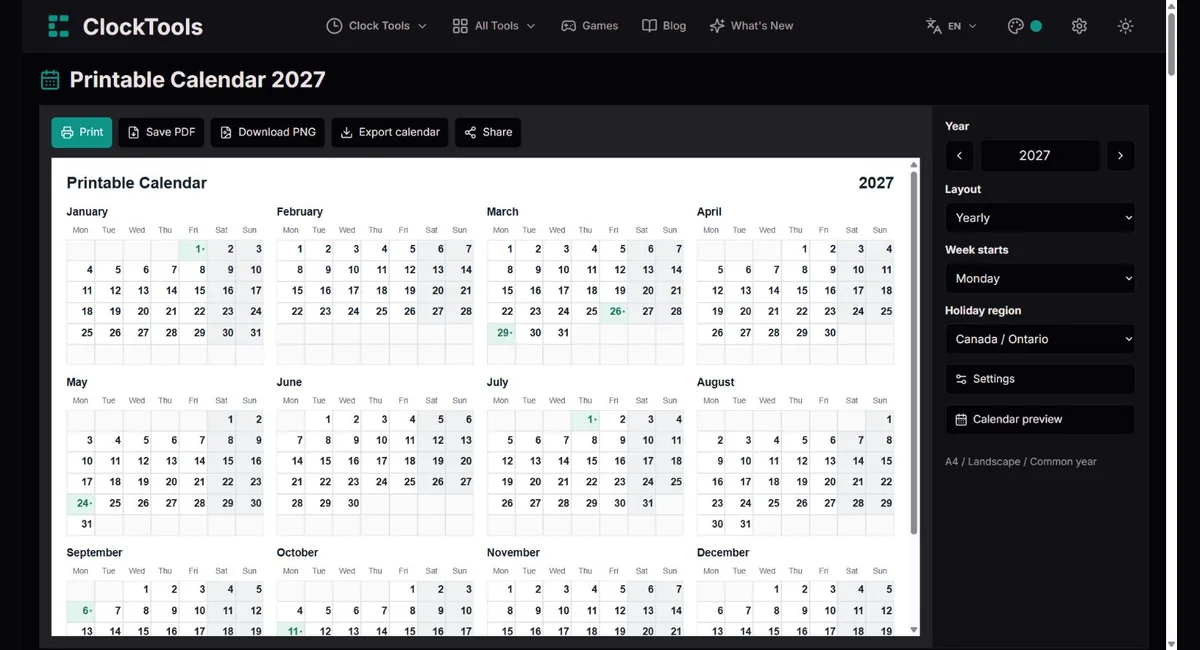
Keep school dates, appointments and shared plans on one monthly page. Writing lines leave room for changes by hand; dated notes keep the important details in the accompanying list.
Print a month for reading goals or a quarter for term planning. Add your school’s own dates rather than treating public holidays as a complete school calendar.
Use a yearly overview to see project milestones together. A quarter gives more room for planning; ISO week numbers help when your team already works with numbered weeks.
Compare actual holidays with substitute days before planning a trip. Choose the specific regional calendar, and confirm closures with your employer, school or destination.
Yearly gives an overview; monthly gives each date more space. Quarterly shows the three-month block containing your chosen month, and half-year shows January–June or July–December.
Monday and Sunday starts rearrange the grid without changing any dates. ISO weeks always run Monday–Sunday; on a Sunday-start calendar the row label refers to the Monday in that row.
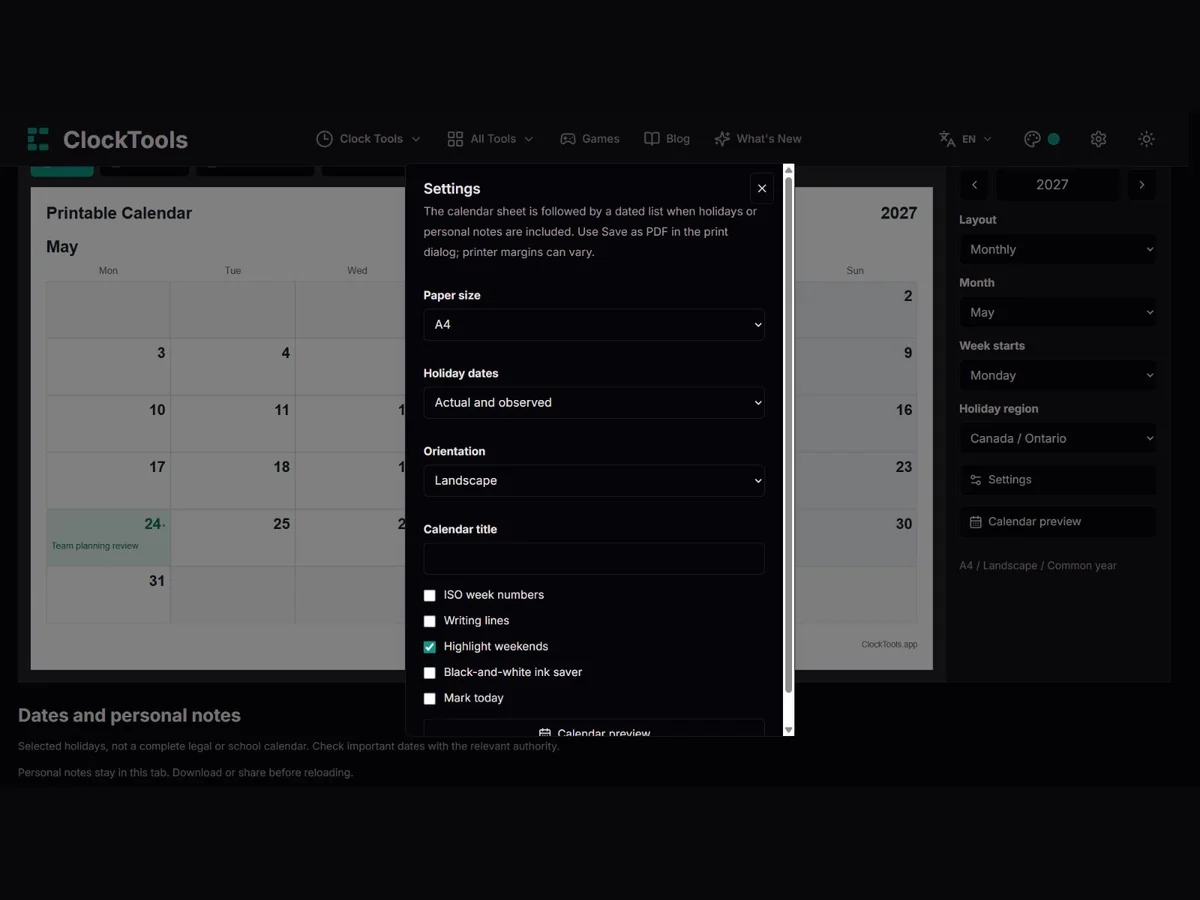
Choose from 21 selected regional calendars. Actual dates show the holiday itself; observed days show substitute days where the rules provide them. Both includes each separately, with a dated list so a coloured mark is not your only clue.
A4 and Letter have different proportions. Choose portrait or landscape before printing: the printed grid is laid out for that paper rather than copied from the screen. Browser and printer margins can still change the final result.
Writing lines are optional, including in monthly view. Weekend shading follows Saturday and Sunday, not every region’s working week. Today uses your device’s local date and appears only when you enable it.
A title can contain up to 60 characters. Add up to 50 notes of 160 characters each, one per date; adding the same date updates its note. The month view shows a short extract and the dated list preserves the full text. Notes remain in this tab, not an account.
Print and Save PDF open your browser’s print dialog. PNG exports the calendar with its dated list and ClockTools branding. Calendar export contains the selected months’ holidays and notes as all-day events; it does not export empty days or create reminder notifications.
Black-and-white mode removes colour from the preview and exports, not just shadows. Share preserves the year, view, month, region and other options. The link also contains your title and notes, so check it before sharing private plans.
The calendar follows the solar year, but the Earth does not finish an orbit in exactly 365 days. Whole-day pages must account for that fraction. The Gregorian calendar, introduced in 1582, refines the older Julian system so seasonal dates drift much more slowly. It was not adopted everywhere at once.
Our calendar uses Gregorian arithmetic throughout 1900–2100. That makes it useful for modern planning and date checking, but not a reconstruction of every country’s historical calendar during its transition. A printed date is a convention for organising time, not a measurement of the Earth’s position.
A year divisible by four is normally a leap year. A century year is an exception unless it is also divisible by 400. That is why February 2000 has 29 days, while February 1900 and 2100 have 28. There are 97 leap years in a 400-year Gregorian cycle, giving a calculated average of 365.2425 days per year.
Changing the selected year therefore changes more than the heading. It changes February’s length, weekday positions, and the rows needed in each month. Our preview, printout and image use the same date model so these differences stay consistent.
ISO week 1 is the week containing the year’s first Thursday, equivalently 4 January. Weeks start on Monday. Consequently, 1 January 2027 belongs to ISO week 53 of 2026, while Monday 4 January starts week 1 of 2027. The week-year and calendar year can legitimately differ.
A Sunday-first page cannot turn ISO into a Sunday-first numbering system. We label each row by its Monday and explain that convention. For schedules exchanged between teams, include the year as well as the week number near New Year to avoid assigning work to the wrong week.
A yearly sheet helps you notice clusters of commitments; a monthly sheet helps you put a particular action on a particular date. Writing a deadline in a box does not automatically remind you, and adding many notes does not make the year grid larger: detailed notes follow the calendar as a separate dated list.
An iCalendar export carries those selected events into a compatible app as all-day dates. It does not represent a meeting time, timezone conversion or alarm. This keeps an appointment note from moving a day merely because you import it in another timezone. Check the imported events and set any reminders in your calendar app.
Year. We calculate the Gregorian day grid and ISO weeks using UTC date arithmetic, so daylight-saving changes do not shift the calendar. Selected holiday records come from date-holidays 3.37.0 and are generated for 2026–2031. Actual dates and linked substitute dates are kept separate. The browser preview, print sheet and PNG share the same settings and selected date model; iCalendar uses all-day dates and exclusive end dates under RFC 5545.
This is a planning aid, not an official legal, payroll or school calendar. Our holiday selection is not exhaustive, and regions, local exceptions and future rules can differ. Blank calendars work for 1900–2100; holidays are limited to the published data range. Notes stay in the current tab unless you download or share them. PDF saving depends on the browser print dialog and physical printer margins can differ.
Yes. Yearly view prints all twelve months on one calendar sheet. Landscape uses a four-by-three grid and portrait a three-by-four grid. Holidays and personal notes, when included, follow as a separate dated list.
Choose Save PDF, then Save as PDF in your browser’s print dialog. Check that the selected A4 or Letter paper and orientation match the preview. There is no signup or separate PDF service.
There are 21 selected regional calendars, including separate UK nations and specific regions for Canada, Australia and Germany. The dropdown names the region precisely. They are selections of public holidays, not complete official calendars.
The holiday’s actual date and its observed or substitute day can differ. For example, England and Wales observe Christmas 2027 on 27 December because 25 December is a Saturday. Choose actual dates, observed days or both.
Yes. Choose Monthly, turn holidays off, and leave Writing lines unchecked. Notes do not appear unless you add them. You can also switch off weekend shading and today’s marker.
Notes stay in this browser tab and are lost on an ordinary reload unless you saved a shared setup or downloaded them. A shared link includes the title and dated notes, so do not use it to share confidential plans.
The ICS file contains holidays and dated notes in the selected year and visible months. It uses all-day events. Empty calendar dates, page styling and reminder notifications are not included.
Yes. Blank calendars work from 1900 through 2100. Outside the published holiday-data range, the tool tells you that holiday dates are unavailable instead of guessing historical or future rules.
Tell us the year, month, holiday region, week start and whether the problem is in the preview, printout, PNG or calendar file. For a holiday correction, include an official source and say whether you mean the actual date or substitute day. Do not send private notes; a blank setup, screenshot and browser details are usually enough.
Report a problem