Choose your units and activity
Select km/h, mph, knots or m/s. Walking gives the dial a 30 km/h equivalent range; cycling uses 80 km/h. Passenger mode keeps the wider theme range. These change the display, not your measured speed.
Our GPS speedometer gives your device’s motion a clear, readable display. Choose an activity, press Start GPS and allow location access when your browser asks. You can keep the classic dial, switch to a digital display or try one of our themed dashboards without clearing your trip.
Start with the display you like, then let the browser ask for location access. You do not need an account or an installation. Keep the phone safely mounted or ask a passenger to watch the readings; understanding a journey should not distract from it.
Select km/h, mph, knots or m/s. Walking gives the dial a 30 km/h equivalent range; cycling uses 80 km/h. Passenger mode keeps the wider theme range. These change the display, not your measured speed.
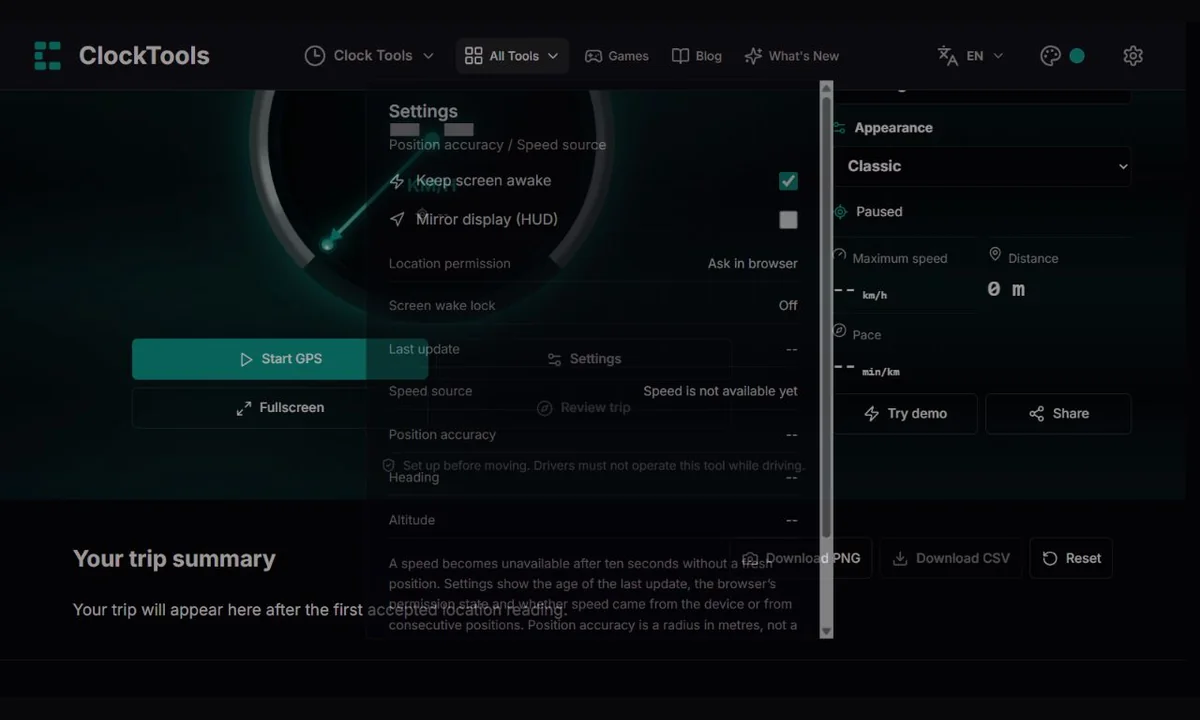
Press Start GPS and allow location access. The first position may not include speed. Wait for a fresh reading, and use Settings to inspect its source, position accuracy and age instead of assuming the device has stopped.
Pause when you finish. Review trip scrolls to the statistics below the dashboard. Download PNG for a branded snapshot or CSV for a spreadsheet. Reset asks before clearing an existing trip.
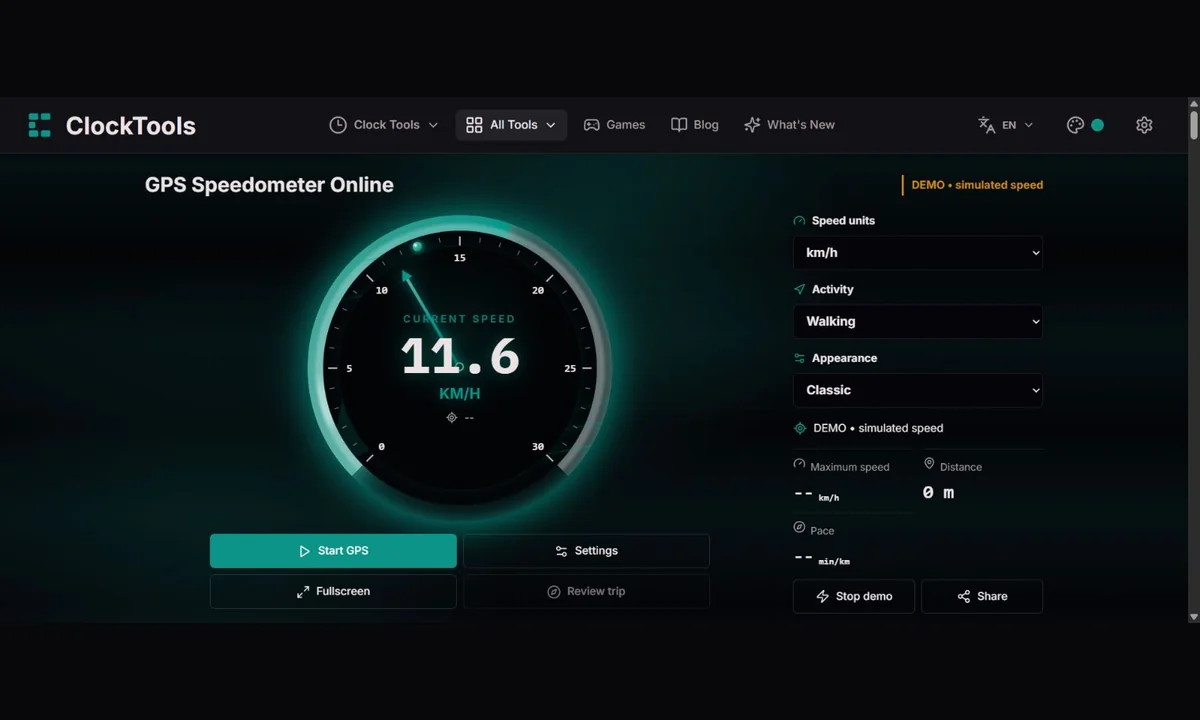
Our classic view uses a 0–240 km/h passenger scale: a familiar road-car layout with enough room to show ordinary journeys without crowding all movement near zero. The markings describe the display, not a speed limit, a recommended driving speed or the maximum speed of your vehicle.
The needle stops at the edge if a valid reading exceeds the scale; the numerical readout continues to show the received speed. Walking and Cycling offer more useful ranges for slower travel, so small changes are easier to see.
| Activity | km/h | mph | knots | m/s |
|---|---|---|---|---|
| Passenger | 240 | 149.1 | 129.6 | 66.7 |
| Walking | 30 | 18.6 | 16.2 | 8.3 |
| Cycling | 80 | 49.7 | 43.2 | 22.2 |
Walking and Cycling use the same smaller scales in every appearance. Passenger restores the range of the selected speedometer. Changing the appearance keeps your activity and units, so choose Passenger to see the full vehicle range.
Reading the scale. At 90 km/h, the needle has travelled 37.5% of the 240 km/h sweep. This is a scale illustration, not a recorded journey.
A wider dial does not make GPS more accurate. Our speedometer can display high-speed readings supplied by a compatible device, but we have not validated it in these vehicles or at their top speeds. Reception, hardware and browser updates determine the result; the location accuracy radius is not a speed-error guarantee. W3C · Geolocation API
Use the walking range to see small changes more easily, then compare pace in minutes per kilometre or mile. Slow movement can be hard to separate from position drift, so treat a stop-start walking estimate as approximate rather than a fitness tracker record.
Set your phone securely before you leave. The cycling range keeps ordinary riding speeds visible without using the whole vehicle-scale dial. Review maximum speed, moving average and active time afterwards; do not handle the screen while riding.
As a passenger, compare the changing speed with the stops along your route. A tunnel can interrupt reception without interrupting the journey. We stop connecting measurements across long gaps so that a later position does not suddenly create a false distance jump.
Try the demo to explore the needle, themes and unit conversions without sharing a location. A classroom can compare 10 m/s with 36 km/h, then discuss why a precise-looking number is not the same as a precise measurement.
The engine keeps speed in metres per second. The display converts it using 3.6 for km/h, 2.2369362920544 for mph and 1.9438444924406 for knots. A change of units also changes the trip-distance label: miles for mph, nautical miles for knots, and metres or kilometres otherwise.
Walking and cycling make the dial easier to read at everyday speeds. Passenger mode restores the classic, digital or railway 240 km/h range, the racetrack 500 km/h range or the airplane 1,500 km/h range. If speed exceeds a dial’s range, the number remains visible even though the needle reaches its limit. Coloured dial zones are decoration, not speed-limit advice.
Classic uses a needle; Digital favours a large numeric display; Railway, Racetrack and Airplane add their own scenes. Switching appearance within the tool keeps the same session. The related pages below let you open a particular dashboard directly.
Try demo pauses GPS tracking and runs a simulated acceleration. It does not increase the real distance, maximum or moving average. The screen and PNG label the simulation, while the CSV remains a real-session summary. Stop the demo or press Resume GPS to return to measurement.
Elapsed time runs from the first accepted position, including pauses. Active time excludes a manual pause or stopped tracking. Moving time includes accepted movement intervals above 0.45 m/s. Moving average divides distance from those intervals by their duration; it is not an average over your entire outing.
A speed becomes unavailable after ten seconds without a fresh position. Settings show the age of the last update, the browser’s permission state and whether speed came from the device or from consecutive positions. Position accuracy is a radius in metres, not a guarantee that the displayed speed is accurate to a particular amount.
Fullscreen gives the display more room; Escape exits on browsers that support it. Keep screen awake requests a screen wake lock while tracking, but support and battery policies vary. Mirror display flips the dashboard for a reflected HUD experiment; it is not an approved substitute for vehicle instruments.
The PNG combines the displayed speed, its live/demo/paused status, real trip statistics, time of export and ClockTools branding. CSV gives you labelled summary fields for a spreadsheet. Neither export includes a route trace or raw latitude and longitude. Your trip is held in this page’s memory, so save the summary before closing or reloading it.
A traditional mechanical speedometer turns vehicle rotation into a readable movement of a needle. In an eddy-current design, a driven magnet creates torque in a nearby metal cup; a spring resists that movement. Their balance gives the pointer a position on the scale.
That engineering made a quick glance useful long before a dashboard could draw graphics. The dial was not measuring travel from satellites: its indication depended on the mechanical connection and calibration of the vehicle.
Official reference: Smiths Instruments: The History of the Speedometer
A dial lets you judge roughly where a reading sits within a range. A number tells you the value itself. We keep both because they answer different questions: “What does it say?” and “How far through this scale is that?”
Changing from km/h to mph also changes the labels. The same journey has not become faster or slower; it is being expressed in another unit. The final label may be a decimal because we retain the equivalent endpoint instead of pretending every unit has the same round maximum.
Our classic face borrows the readability of a vehicle instrument, but its source is your device’s location service. It is not connected to the wheels, dashboard or vehicle electronics. That makes it convenient for a passenger comparing different journeys on the same phone.
It also brings different limitations. Buildings, poor reception, old fixes and the browser’s update rate can affect a reading. Use the source and accuracy information alongside the display; never use this page to replace a vehicle’s instruments or to justify unsafe driving.
Long before a phone could show a moving blue dot, researchers noticed that a satellite’s radio frequency changed as it moved towards or away from an observer. Observations of Sputnik in 1957 helped demonstrate how that Doppler shift could reveal an orbit. Reversing the problem suggested another possibility: if a satellite’s path was known, its signal could help locate the receiver. GPS grew out of a much longer history of radio navigation, engineering and timekeeping, rather than a single smartphone invention.
That history is useful when you look at our dial. The screen is the final, friendly layer of a measurement chain involving satellites, receivers, operating-system services and a browser. A beautifully animated needle cannot repair a weak signal at the start of that chain.
GPS satellites broadcast timed signals. A receiver compares when a signal was sent with when it arrived to estimate the distance to each satellite. In the basic three-dimensional solution, at least four satellites are needed to solve for position and the receiver’s clock offset. Satellite clocks are therefore part of the measuring instrument, not merely a way to display the time of day.
The same infrastructure supports time transfer as well as navigation. NIST explains how GNSS signals help compare clocks across distant locations. ClockTools began with time tools, so this connection is especially fitting: the speed on this page depends on a world of coordinated timing even when all you see is a number in km/h.
A vehicle speedometer usually infers motion from wheel or drivetrain rotation. Tyre size, pressure, calibration and the design of the instrument can affect that reading. A location-based estimate follows a different route: the device may report horizontal speed directly, or we may estimate it from the distance between accepted positions. Neither method makes our browser tool a calibrated reference instrument.
In an aircraft, the distinction becomes more important. Ground speed describes motion relative to the Earth; airspeed describes motion relative to the surrounding air. Wind can change the relationship between them. Our airplane theme does not measure airspeed, and a visually impressive aircraft dashboard should never be mistaken for a flight instrument.
Imagine two cyclists covering 12 kilometres. One rides steadily for 40 minutes; the other stops for a ten-minute conversation. Their moving averages may be similar, but elapsed time tells a different story. That is why we keep elapsed, active and moving time separate instead of hiding all three behind one average.
A practical pace example is 1.5 m/s: that is 5.4 km/h, or approximately 11 minutes 7 seconds per kilometre. But if your location uncertainty spans tens of metres, a short walk may not provide enough displacement for a reliable estimate. Watching the source, freshness and position accuracy is often more informative than collecting extra decimal places. Our summary helps you interpret what was measured, including the limits.
Speed source. We use the browser Geolocation API. It may combine satellite, Wi-Fi, cellular or other location sources; we cannot choose the hardware source. Valid device-reported horizontal speed is preferred. When it is absent, we estimate surface distance with the Haversine formula between usable positions and divide by time. Position-derived distance requires both accuracy radii to be at most 50 m and displacement of at least 3 m or half the sum of those radii, whichever is larger. Consecutive device speeds use trapezoidal integration for distance. Duplicate, out-of-order, invalid, more-than-30-second-old or excessively future-dated positions are rejected. Intervals longer than 20 seconds are not joined, and displayed speed expires after 10 seconds. Pausing breaks the segment so resuming cannot bridge the pause.
These are conservative browser estimates, not certified measurements. The movement threshold is 0.45 m/s; slow movement and weak fixes can be undercounted. We apply a broad 1,000 m/s sanity bound, not a calibrated acceleration or anomaly detector. Position accuracy is not speed accuracy. Terrain, curved routes, background suspension and signal quality can affect results. Do not use this tool for driving decisions, aviation, legal evidence or safety-critical measurements.
How do we calculate and check the readings? · Corrections policyYes. Open our GPS speedometer in a supported browser over HTTPS. Location access is requested only when you press Start GPS. You can try the visual demo without enabling location.
Some devices provide a position but no speed. We need usable movement between positions before estimating speed. An old or unavailable reading is not evidence that you are stationary, so we display a dash rather than inventing a zero.
Location estimates can drift, especially indoors. We reject duplicate and old timestamps, avoid distance from weak position pairs, and require displacement above a noise threshold. These checks reduce obvious artefacts but cannot remove every inaccurate reading.
No. The browser’s accuracy field describes horizontal position uncertainty in metres. It does not supply speed uncertainty. Device-reported speed and position-derived speed can behave differently even when the position accuracy looks good.
You can try as a passenger when device use is allowed. Windows, tunnels and the vehicle structure may interfere with reception. The airplane display shows estimated ground speed, never airspeed or navigation guidance.
Not reliably. Browsers and operating systems can suspend location updates in the background or when the screen locks. An optional wake lock may keep a supported screen on, but does not guarantee background tracking.
No. The demo pauses tracking and animates simulated speed. Real trip totals remain separate. PNG identifies a simulated display, and CSV exports the real trip summary rather than fictitious demo travel.
Tell us the page, browser, device, selected activity and units, whether it was live or demo, and the source and accuracy shown in Settings. A redacted PNG or CSV is helpful. Do not send an exact home address or raw coordinates.
For GPS speedometer corrections, include the affected dashboard, browser and device, units, activity, live or demo state, last-update age and speed source. Describe the expected and observed behaviour and attach a redacted export if helpful. We reproduce a report with controlled location sequences where possible, check timing and conversion rules, then update the tool and relevant guidance. Never publish or send private coordinates to demonstrate a problem.
Report a problem