How to play 2048
The examples below show the merge before the next random tile appears. Start the board yourself; choosing a mode does not start its clock.
Choose your challenge
Classic leaves time open. Sprint gives two minutes, Break five minutes, and 100 Moves counts only board-changing moves. Daily uses the UTC date.
Slide and combine
Focus the board and use arrows or W A S D, or swipe on it. Equal neighbours merge once per move. A slide that changes nothing adds no tile.
Review one decision
One undo restores the previous successful move, not the time you spent. The result shows your score, highest tile, moves and active playing time.
Practice with a purpose
Learn to plan a merge
Use Classic to compare two directions before moving. In a line of 2, 2, 4, moving left makes 4, 4; the new tile cannot merge again until another turn. Before running the move, write down the compressed row and expected score gain. Then compare the actual merge with that prediction before judging the new random tile. A correct merge can still leave a poor position; the empty cells and available next directions explain why.
Take a bounded break
Choose the five-minute mode when you want a short session with a clear stopping point. Pausing or leaving the tab stops active playing time; this is not a wall-clock break alarm. The two-minute mode is useful for repeating a familiar plan at a faster pace; five minutes leaves more time to inspect a spawn. Compare highest tile and board mobility as well as points. Neither active-time limit tells you how long a paused session has occupied your afternoon.
Compare a daily route
Agree on the UTC date and mode with a friend, then compare moves and screenshots. The same move sequence is reproducible; different moves need not produce identical boards. Save the board before a difficult decision and note its direction and move count. Use the single undo only when that decision is worth revisiting. A mode link does not transmit this position; send an exported result or screenshot separately when discussing it.
One move, two merges
| Before ← | After | Score added |
|---|---|---|
| 2 · 2 · 2 · 0 | 4 · 2 · 0 · 0 | +4 |
| 2 · 0 · 2 · 2 | 4 · 2 · 0 · 0 | +4 |
| 2 · 2 · 4 · 0 | 4 · 4 · 0 · 0 | +4 |
| 4 · 4 · 8 · 8 | 8 · 16 · 0 · 0 | +24 |
What Is The 2048 Game?
2048 is a single-player sliding number puzzle on a 4 by 4 board. A new game begins with two numbered tiles. Every input slides all movable tiles toward one edge, and adjacent tiles with the same value combine into their sum. Two 2 tiles become 4, two 4 tiles become 8, and that doubling pattern continues through 16, 32, 64, 128, 256, 512, 1024, and the familiar 2048 goal. The rules are compact, but every move changes the space available for later combinations.
The puzzle was created by Gabriele Cirulli and released as open-source software under the MIT License. ClockTools keeps the recognizable warm beige board, cream low-value tiles, orange and red middle tiles, gold high tiles, four-direction movement, classic score calculation, and 2048 win condition. Our interface adds responsive touch controls, timed and move-limited modes, a seeded daily challenge, local records, restrained feedback, and accessibility settings without turning the classic mode into a different puzzle.
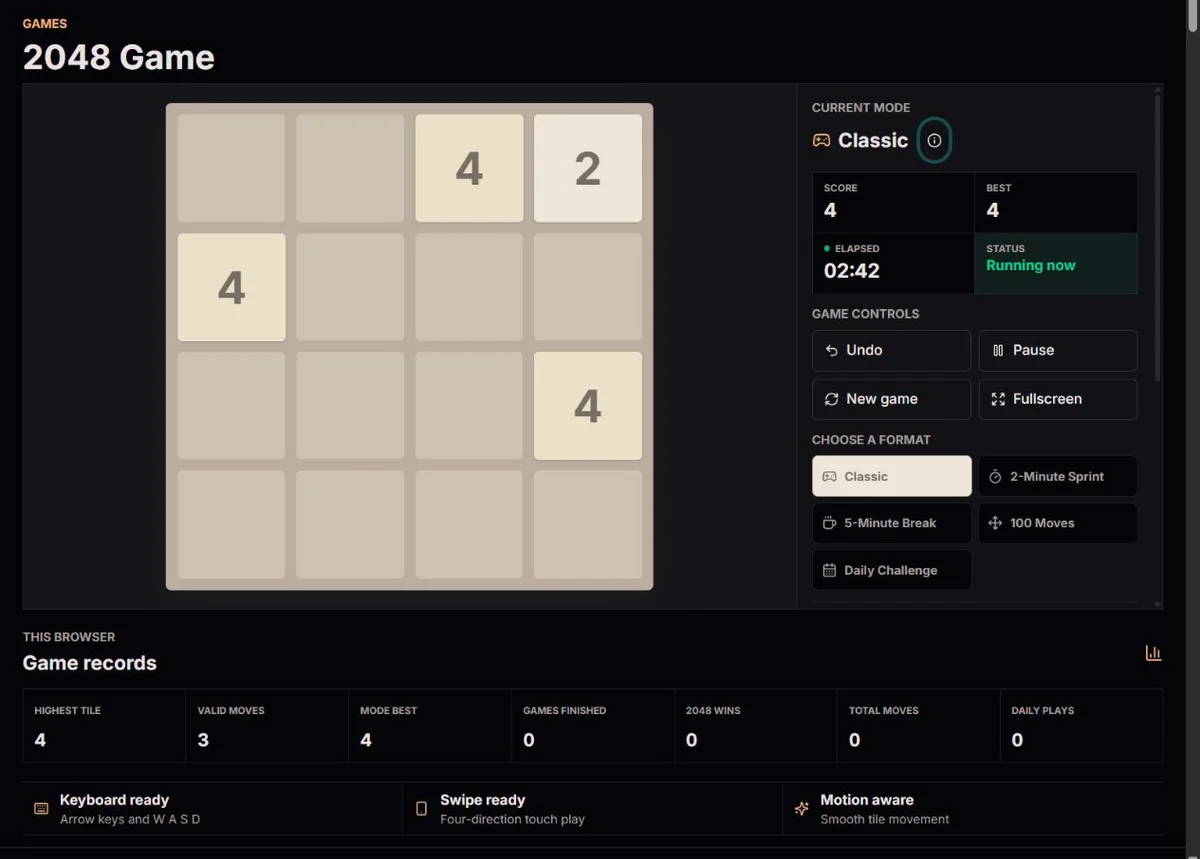
You do not need an account, installation, or game download. The complete board runs in the browser on desktop, tablet, and mobile. Arrow keys and W A S D work on a keyboard, while a deliberate horizontal or vertical swipe moves the board on a touch screen. The board remains square and uses stable cells so moving labels, animations, and larger numbers do not shift the surrounding layout.
How Does A 2048 Move And Merge Work?
A move has two stages. First, all tiles travel as far as they can toward the selected side. Second, matching neighbors combine in that direction. Each original tile can participate in only one merge during a move. A row containing 2, 2, 2, 2 therefore becomes 4, 4 rather than 8. A row containing 2, 2, 4 becomes 4, 4 on that move; those two 4 tiles do not combine again until a later input. This one-merge rule is central to planning reliable sequences.
After a successful move, one new tile appears in an empty cell: a 2 with 90 percent probability or a 4 with 10 percent probability. An input that cannot change the board does not change the score, move count or spawn sequence. In Classic, the board is blocked only when it is full and no horizontal or vertical pair can merge. Reaching 2048 opens the result dialog. Continue is available unless the selected challenge has already exhausted its time or move allowance.
Scoring records the value of every newly merged tile. Combining two 8 tiles creates 16 and adds 16 points. If another pair creates 32 during the same move, that move adds 48 points in total. A high score reflects the full chain of successful combinations, not merely the value of the largest tile. ClockTools shows score, best score, largest tile, valid moves, elapsed time, and the active challenge limit where it matters.
Which ClockTools 2048 Game Modes Can You Play?
Classic mode is the standard untimed 2048 game. There is no move ceiling and no countdown. It is the best place to learn how rows compress, how merges are ordered, and how a large corner tile can anchor a board. Classic mode autosaves after meaningful changes, so an unfinished playable board can continue in the same browser later.
The 2-Minute Sprint lasts 120 seconds of active play; the 5-Minute Break allows five minutes with the same merge rules. Click to start before making a move. Pause or hide the tab to stop active time, then resume explicitly. The countdown uses elapsed timestamps rather than assuming every timer callback arrives on schedule. Reaching the time limit ends the attempt even if an undo remains available: restoring a board does not restore time.
The 100 Moves challenge counts successful board changes and ends after the one-hundredth valid move. An arrow press that cannot move or combine anything does not consume the allowance. This mode rewards efficiency because every spawn and every merge must fit inside a fixed decision budget. The Daily Challenge includes the same one-use undo as every other mode and uses a date-based random sequence so players can compare attempts made under the same daily generator.
Each mode keeps its own session and best score in this browser. Switching modes preserves the previous board and stops its active clock. New game replaces the selected session, including its one-use undo allowance. Fullscreen, sound, vibration and reduced motion affect presentation, not merge arithmetic or tile probabilities. Export result saves the current board and statistics as JSON; Screenshot saves the visible tiles as PNG. Sharing a mode sends its link, not a score submission.
What Is The Daily 2048 Challenge?
The Daily Challenge derives a deterministic pseudo-random sequence from the current UTC date and the successful-spawn number. Players opening the same date receive the same random samples. The exact empty cell selected can still depend on the board created by a player's earlier moves, so matching inputs produce a reproducible run while different strategies naturally create different boards. The date changes at midnight UTC rather than at a device-specific local midnight.
Daily Challenge includes the same one-use undo as every other mode. Undo restores the board before your latest successful move and rewinds the deterministic spawn sequence to that point. Once used, it remains unavailable for the rest of that game, so every player has the same single correction allowance.
A seeded daily game is useful for friendly comparison because randomness is controlled without removing strategy. Score, highest tile, moves, and elapsed time describe different aspects of an attempt. None is a universal ranking by itself: a fast run may use more risky moves, while a methodical run may produce a stronger board with a longer elapsed time.
Which Strategies Help In 2048?
A dependable starting principle is to keep the largest tile near one corner and build an ordered chain beside it. If the highest values remain on one edge in descending order, small tiles have a clearer path into future merges. Constantly changing the protected corner can scatter large numbers through the middle, where they divide the board and make new combinations harder to route.
Preserve empty cells. Open space is not wasted space; it is the room that allows rows to slide, pairs to meet, and an inconvenient new tile to be absorbed. Before making an attractive merge, check what the board will look like after the new tile spawns. A move that gains immediate points but leaves one empty cell and no flexible row may be weaker than a quieter move that keeps several directions available.
Build in stages. Try to combine small tiles away from the protected high-value corner, then feed finished values into the ordered edge. Look for merge chains where one move aligns several pairs without violating the one-merge rule. Avoid trapping a 2 or 4 between unrelated large tiles, because freeing that cell can require several disruptive moves. When two choices appear similar, prefer the one that keeps more legal directions.
Many players limit movement in the direction opposite their chosen corner, but this is a guideline rather than a commandment. A temporary reverse move can be correct when it prevents a loss or creates a larger planned chain. The important question is whether the move preserves the board's structure. ClockTools provides one undo per game in every mode, letting you inspect and correct one recent decision. After use, it stays unavailable for that game, even if you continue playing or refresh the page.
Timed modes need a different balance. Repeating a stable two- or three-direction rhythm can reduce hesitation, but blindly cycling directions eventually damages the ordered edge. In 100 Moves, avoid no-op key presses even though they do not consume the formal move limit; they still interrupt concentration. In every mode, the best strategy is the one you can execute while noticing new spawns and maintaining enough space to recover.
How Do Score, Autosave, And Privacy Work?
ClockTools stores each active mode, its latest eligible undo state, whether the one undo has been used, personal best scores, largest tiles, aggregate finished games, and settings in local browser storage. This allows an unfinished board to resume after a refresh without creating an account or restoring a consumed undo. Data saved in one browser profile does not automatically appear on another device, and clearing site data removes it. Private browsing or restrictive storage policies may prevent persistence.
Game rules, daily random samples and points are calculated locally; an ordinary move does not submit a score to a gameplay server. Share this mode sends a link to the selected format. Export result saves the current board and statistics as JSON, while Screenshot saves the visible board as PNG. These files are shared only when you choose to pass them on. Sound, vibration, fullscreen and downloads depend on browser support and permissions. They do not change the calculated board or score.
Best score is tracked separately for every mode because a two-minute session is not directly comparable with an untimed Classic board. The records panel also shows games finished, wins, total moves, and daily completions kept by the current browser. These figures are personal session records, not claims about worldwide rankings. Restarting a mode begins a fresh board while leaving established best records available.
Origins and influences
Gabriele Cirulli released the original 2048 in 2014. The 2048 project repository identifies 1024, Saming’s 2048 and an indirect influence from Threes. These related puzzles are not interchangeable: their tile values, movement and spawning rules can differ. Knowing that lineage is more useful than treating every number-merging game as the same invention.
The small board keeps the rules readable while each move affects several rows at once. Two identical tiles can be useful in one arrangement and awkward in another. The original game logic makes the important distinction explicit: a newly formed tile cannot merge again during that move.
ClockTools keeps the familiar palette and classic merge rules. Timed sessions, the move budget and daily seed are additional practice constraints, not original-game rules or official competitions.
What happens between moves
A move first resolves the tiles toward the chosen edge, then adds one tile to an empty cell. The score and move counter change only when the board changes. Keeping that order separate from animation prevents the visual transition from deciding the result.
Tile motion uses transform-based animation. Its appearance depends on the display, browser and workload; no refresh rate is guaranteed. Reduced-motion preferences remove tile effects and confetti while keeping the same rules and result statistics.
Daily play derives each spawn sample from the UTC date and spawn index. Undo restores that index as well as the board. Equal samples still choose among the empty cells available on that path, so identical seeds alone do not make different strategies converge.
Read the result, then decide what to review
The result distinguishes reaching 2048, no available moves, time expiry and completion of the 100-move budget. A high score is not the same as a 2048 tile, and “100 moves complete” does not by itself mean the target was reached. Continue resumes a won board only while the selected allowance remains. To understand one decision, compare the pre-move row with the merged row before the next spawn: [2,2,2,0] gives [4,2,0,0] left or [0,0,2,4] right, adding 4 points either way.
Undo is one correction, not unlimited exploration. It restores the latest board-changing move, including score, move count and spawn index; intervening ineffective inputs do not create a new undo position. In 100 Moves, an unused undo after move 100 can return the board to move 99 and allow one replacement decision. It does not reset the one-use allowance or refund active time. At an expired time limit the board can be restored, but the timed attempt remains finished. New game starts another session, not a continuation of the old result.
Methodology
The classic rules are checked against the original game logic: a 4 × 4 grid, two starting tiles, one merge per tile per move, and a new 2 with 90% probability or 4 with 10% probability after a valid move. Score is the sum of created merge values. Timing uses elapsed timestamps during active play, not a count of timer callbacks.
Limits
Games and best scores are local practice records, not a verified leaderboard. Storage may be blocked or cleared. Hidden tabs pause; suspended devices and browser restrictions can affect when the display updates. Sound, vibration, fullscreen and downloads depend on browser support. Daily boards are comparable only with the same date, mode and move path.
Corrections
If a result seems wrong, note the mode, UTC date, previous board, direction, score change and whether undo was used. A screenshot or exported result helps reproduce the issue. Damaged saves remain untouched until New game replaces the session; no repair can recover site data already removed by the browser.
Testing methodologyQuestions about the game
What is the 2048 game?
2048 is a single-player sliding number puzzle on a 4 by 4 grid. Move all tiles in one direction, merge equal neighboring values, keep open cells available, and try to create the 2048 tile.
How do you play 2048?
Use the arrow keys, W A S D, or swipe on the board. A successful move slides the tiles, combines matching pairs once, and adds a new 2 or 4 tile. Keep making legal moves while building larger powers of two.
Are these the classic 2048 colors and rules?
Yes. ClockTools uses the recognizable warm board, cream low tiles, orange and red middle tiles, and gold high tiles. Classic mode preserves the 4 by 4 rules, scoring, 90 percent 2-tile spawn, 10 percent 4-tile spawn, and one merge per tile per move.
Can I continue after reaching 2048?
Yes, unless the time or move allowance has already ended. Reaching 2048 opens the result dialog. Continue keeps the score and board for higher tiles; it does not extend a timed or 100-move challenge beyond its limit.
What is the Daily 2048 Challenge?
The Daily Challenge uses the current UTC date and successful-spawn number to create a reproducible random sequence. Matching moves on the same date produce a matching run, while different moves can create different empty-cell layouts.
Does the 2048 game save automatically?
When browser storage is available, each mode automatically saves the board, score, moves, active elapsed time, latest eligible undo position and whether the single undo has been used. On returning, start the restored session yourself; it does not resume running automatically. A saved Daily Challenge is restored only for its matching date. Progress belongs to this browser profile, without account synchronization to another browser or device. Blocked or cleared storage can prevent saving or remove that progress.
Can I undo a move?
Yes. Every mode allows one undo per game. It restores the board before your most recent successful move. Once used, it stays unavailable for the rest of that game, including after more moves or a page refresh.
Does 2048 work on mobile?
Yes. Swipe directly on the board in any of the four directions. The stable square layout adapts to phones, tablets, laptops, and desktop screens.
Is ClockTools 2048 free and private?
The game is free and requires no login. Progress and records belong to this browser profile when storage is available. Share this mode sends a link to the mode, not the visible result or saved board. Copy, JSON export and Screenshot are separate actions for the result you choose to send.
Who created the original 2048 game?
Gabriele Cirulli created the original open-source 2048 game in 2014 and released it under the MIT License. ClockTools preserves the familiar rules and palette while adding its own interface, modes, daily challenge, local records, and accessibility controls.
Does undo give me more time?
No. Undo restores one board position once per game. It does not refund active playing time or restart an expired timed session.
Are my scores compared with other players?
No. Records belong to this browser. A shared mode link is not a score submission, and exported results are not independently verified.