Developer Tools
What Is a Sandboxed Iframe?
A capability-by-capability guide to iframe sandboxing, opaque origins, token interactions, and safer HTML preview design.
By Vigneshwaran Vijayakumar, Developer and Publisher | | Reviewed under the ClockTools editorial policy
Table of contents
A sandboxed iframe is an embedded browser document with extra restrictions applied by the iframe's sandbox attribute. With an empty sandbox value, the browser starts from a restrictive baseline; individual allow-* tokens return only the capabilities the embedded content needs. For an HTML preview, the safest useful design is not “trust the code.” It is “give the preview a separate boundary, add the minimum permissions, and keep secrets out of the experiment.”
What changes when an iframe is sandboxed?
An ordinary iframe creates a nested browsing context. Same-origin policy, Permissions Policy, Content Security Policy, and the framed site's own headers still matter, but the frame is not automatically stripped of every browser capability.
Adding sandbox asks the browser to impose an additional set of restrictions. The WHATWG HTML Standard defines the attribute as an unordered, space-separated set of tokens. The absence of a token keeps its corresponding sandbox restriction in place; adding a token lifts a particular restriction.
That direction is easy to misread:
<iframe sandbox srcdoc="<p>Static preview</p>"></iframe>This is the restrictive form. It does not mean “no sandbox options selected.” It means the sandbox is active and none of its optional capabilities have been restored.
<iframe
  sandbox="allow-scripts allow-forms"
  srcdoc="<button type='button'>Run</button>">
</iframe>
This version permits scripts and form behavior while leaving other restrictions in place. The exact security outcome still depends on where the content comes from and what the surrounding application exposes.
Which restrictions apply by default?
The full standard contains more detail than one checklist, but these categories explain most preview behavior.
| Restricted area | What the restrictive baseline prevents | Why a preview may care |
|---|---|---|
| Script execution | JavaScript does not run | Static HTML/CSS previews may not need it |
| Form submission | Forms cannot submit | Interactive examples may need validation without real submission |
| Popups and new contexts | New windows and tabs are constrained | Prevents an example from freely spawning pages |
| Top-level navigation | The frame cannot freely replace the host page | Keeps a preview from navigating the editor away |
| Origin treatment | Content can be assigned a unique opaque origin | Separates storage and same-origin access from the host |
| Downloads | Downloads are blocked without the relevant permission | Stops an example from initiating files by default |
| Modals | Alert, confirm, and prompt are blocked | Some teaching examples use dialogs, but they interrupt the user |
The MDN iframe reference lists the current tokens and explains what each one restores. Check that reference instead of copying an old token list into a long-lived security control.
What do the common allow tokens restore?
Think of each token as a capability decision, not a convenience switch.
| Token | Capability restored | Question to ask before adding it |
|---|---|---|
allow-scripts | JavaScript execution | Does this preview genuinely need behavior? |
allow-forms | Form submission | Can the example send data to an external destination? |
allow-modals | alert, confirm, and prompt | Can a dialog trap or repeatedly interrupt the user? |
allow-popups | Creation of popup browsing contexts | Is a new window part of the intended exercise? |
allow-downloads | Download initiation | Should user code create local files? |
allow-same-origin | Retention of the resource's normal origin | Could that origin share privileges or storage with the host? |
allow-top-navigation-by-user-activation | User-initiated top-level navigation | Is leaving the editor an explicit user action? |
Some tokens interact. Reviewing them one at a time is necessary but not sufficient. The origin of the framed document, whether it is srcdoc or a remote URL, the host's Content Security Policy, and any message bridge between frame and parent all affect the boundary.
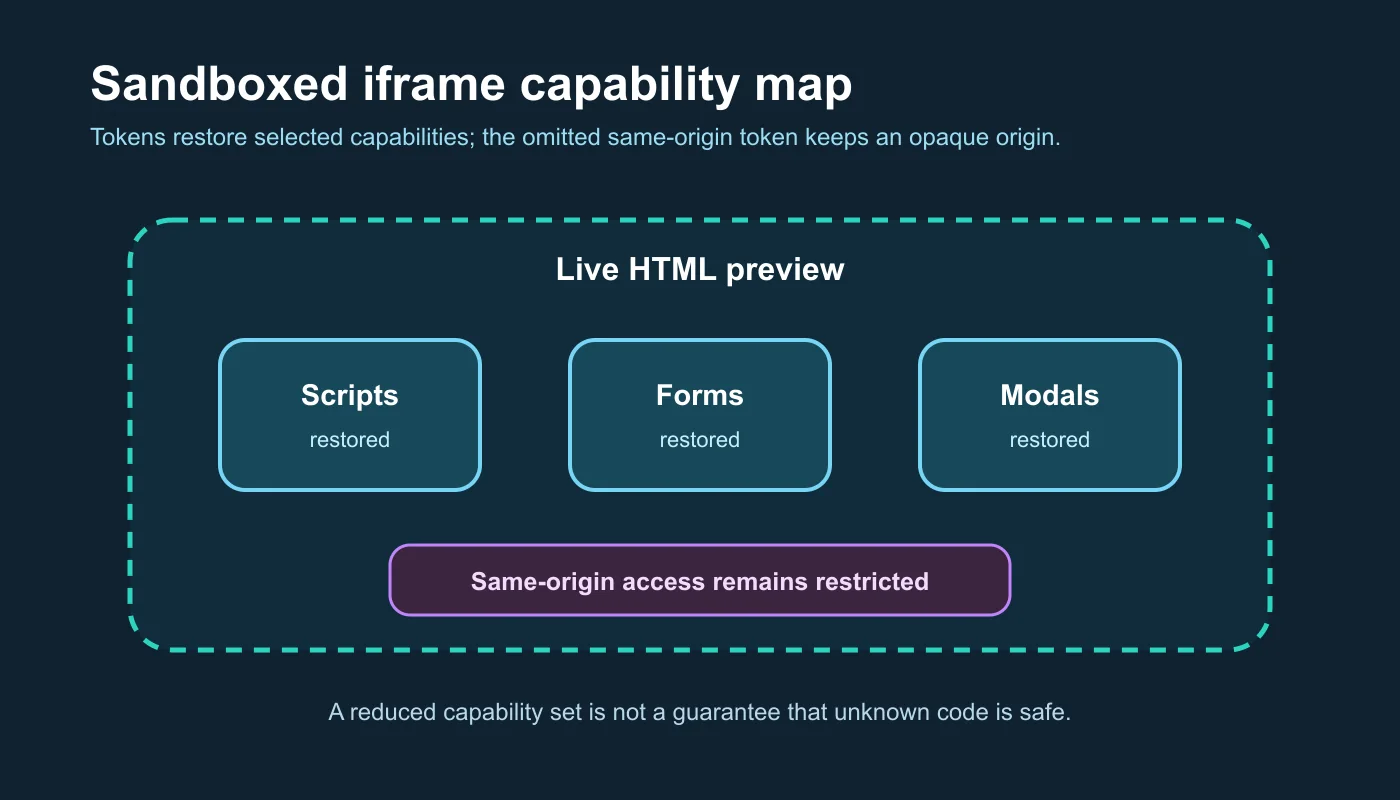
The diagram describes a permission boundary. It does not claim that any token set makes arbitrary code harmless.
Why does an opaque origin matter?
Without allow-same-origin, sandboxed content is treated as coming from a special origin that fails normal same-origin checks. Developers often call this an opaque or unique origin.
For an inline srcdoc preview, that separation is valuable. The preview can render a document without being treated as the same application origin as the editor page. It cannot simply reach into the parent's DOM or read same-origin storage as though it were another component of the host.
Opaque origin does not mean “offline” or “network disabled.” If scripts are allowed, preview code may still make network requests that browser policies and the destination permit. It can use CPU and memory, manipulate its own DOM, and communicate through channels the host deliberately exposes. The boundary reduces authority; it does not certify the code.
MDN warns particularly about combining allow-scripts and allow-same-origin when the embedded content is same-origin and can remove its own sandbox attribute. The important lesson is contextual: do not restore both capabilities merely because an example fails without them.
How does the ClockTools preview configure its sandbox?
The live ClockTools real-time HTML editor builds the preview with srcdoc. When JavaScript is enabled, its iframe sandbox value is:
allow-scripts allow-forms allow-modals
The implementation intentionally omits allow-same-origin, allow-popups, top-navigation permissions, and download permission. The interface labels the preview as an opaque sandbox, making the origin decision visible rather than hiding it in source code.
That configuration supports common teaching examples: scripts can update the preview, forms can exercise browser validation and submission behavior, and modal examples can run. It does not turn unknown code into trusted code. The editor's own guidance therefore tells users to avoid secrets and review unfamiliar scripts.
The page also captures console messages and exposes a document-check panel. Those are observability features, not sandbox permissions. A console panel helps explain a failure; it does not prevent a request. A structural check can flag a missing label; it does not conduct a complete security review.
What did a capability check show?
I inspected the rendered preview element in the live ClockTools workspace rather than relying only on marketing text.
| Check | Observed live state | Meaning |
|---|---|---|
| Preview source | srcdoc document present | The current HTML is embedded directly into the frame |
| Sandbox attribute | allow-scripts allow-forms allow-modals | Three capabilities are restored |
| Same-origin token | Absent | The preview retains an opaque origin |
| Interface label | “opaque sandbox” | The boundary is disclosed to the user |
| Supporting panels | Console and Checks visible | Runtime and document feedback are available |
The iframe title was “Live HTML preview,” which also gives assistive technology a purpose label for the embedded document.
This inspection confirms the configured boundary at that moment. It does not prove that every possible script is safe, and it does not replace a review of the message bridge, external-resource handling, Content Security Policy, or future code changes.
Which token combinations deserve extra caution?
Use a threat-based review instead of a universal token recipe.
allow-scripts plus allow-same-origin
This pair can seriously weaken isolation when the embedded document is same-origin and can affect its embedding conditions. If both are required, serve untrusted content from a deliberately separate origin and analyze the escape paths rather than treating the attribute as the only boundary.
Forms plus network access
allow-forms restores submission, but scripts and ordinary HTML elements may also send requests in other ways. Never put credentials, private customer data, or bearer tokens into an untrusted preview and assume the sandbox will contain them.
Popups plus escape behavior
allow-popups lets a frame open a new browsing context. allow-popups-to-escape-sandbox lets the new context avoid inherited sandbox flags. That can be useful for a deliberately isolated advertisement or external link, but it expands the review surface.
Top navigation
Top-navigation permissions allow the frame to replace the host page under defined conditions. A code playground rarely needs that. If navigation is part of the lesson, consider intercepting and displaying the destination instead of granting the preview control over the top-level page.
What can a sandbox not protect?
A sandbox is one browser mechanism, not a complete hostile-code platform.
- It does not stop a user from opening the same content directly outside the frame.
- It does not guarantee that allowed scripts will be fast, polite, or free of infinite loops.
- It does not automatically block every network request.
- It does not sanitize HTML or prove that a URL is safe.
- It does not secure secrets already placed inside the preview.
- It does not replace server-side validation for real forms.
- It does not validate accessibility, semantics, or cross-browser behavior.
- It does not protect another service that accepts a request from the preview.
The boundary also changes over time as browsers and standards evolve. Feature behavior should be tested in the browsers the audience actually uses, and the token list should be reviewed against current specifications.
How should you design a browser code preview?
Start with the empty sandbox attribute, then add one capability at a time. For each addition, create a small acceptance test and a corresponding abuse test.
| Reader job | Minimum starting point | Test before release |
|---|---|---|
| Render static HTML and CSS | Empty sandbox | Scripts, forms, popups, and top navigation remain blocked |
| Teach DOM scripting | Add allow-scripts | Script runs, host DOM and storage remain isolated |
| Demonstrate native form validation | Consider allow-forms only if submission is required | Unexpected destinations cannot receive sensitive data |
| Demonstrate dialogs | Add allow-modals temporarily | Repeated dialogs cannot make the host unusable |
| Load user-controlled projects | Separate origin plus layered controls | Sandbox, CSP, messaging, resources, and limits are reviewed together |
Keep the parent-frame message protocol narrow. Validate the sender, message shape, and allowed commands. Do not accept arbitrary code or navigation instructions through a generic “execute” message unless that is the explicitly isolated product you intend to build.
Offer a JavaScript-off mode for static inspection. Add stop, reset, or reload controls for runaway examples. Surface console errors without mirroring sensitive parent data into the frame. Treat external stylesheets and scripts as network dependencies whose hosts and future contents are outside the editor's control.
For a focused experiment, the real-time HTML editor exposes responsive widths, console capture, checks, and its opaque sandbox state. For release work involving packages, servers, credentials, tests, or deployment, move the code into a local repository and use a fuller development and security-review workflow.
Frequently Asked Questions
What does the iframe sandbox attribute do?
It applies extra restrictions to the framed document. An empty sandbox value starts from the restrictive baseline, while space-separated allow tokens restore selected capabilities such as scripts or forms.
Does sandboxed mean the iframe is completely safe?
No. Sandboxing reduces authority but does not guarantee that code is trustworthy, block every network request, prevent resource exhaustion, sanitize HTML, or protect secrets placed inside the preview.
What is an opaque origin in a sandboxed iframe?
When allow-same-origin is absent, the framed document is treated as having a special origin that fails normal same-origin checks. This helps prevent it from acting as the same application origin as the parent.
Why is allow-scripts with allow-same-origin risky?
For same-origin content, restoring both capabilities can undermine the isolation the sandbox was meant to provide, including scenarios where framed code can remove the sandbox. Use a separate origin and a full threat review when both are required.
Can a sandboxed iframe make network requests?
Potentially, yes. Sandboxing does not act as a universal network firewall. Allowed scripts and HTML resources can still make requests that browser policy and the destination permit.
Should an HTML playground allow JavaScript?
Only when the reader job needs it. A static HTML/CSS viewer can keep scripts blocked. An interactive playground can add allow-scripts while preserving an opaque origin and layering resource, messaging, reset, and secret-handling controls.

About The Author
Vigneshwaran Vijayakumar
Founder, Developer and Publisher of ClockTools | Digital Marketing Manager | India
Vigneshwaran is an engineer with decades of technical experience, including professional work as a Digital Marketing Manager in Dubai. His work connects data analysis, search engine optimization, conversion-rate optimization, content systems, visual production, and applied AI and machine learning. At ClockTools, he turns that multidisciplinary experience into focused browser utilities and practical, source-aware guides.