Developer Tools
GUID vs UUID: What Is the Difference?
GUID and UUID usually name the same 128-bit identifier, but version, format, ordering, and system contracts still matter.
By Vigneshwaran Vijayakumar, Developer and Publisher | | Reviewed under the ClockTools editorial policy
Table of contents
GUID and UUID usually describe the same kind of identifier: a 128-bit value designed to be unique without asking one central counter for the next number. The words come from different naming traditions. UUID is the standards term, while GUID is especially common in Microsoft software and developer tools.
That short answer is useful, but it does not settle every practical question. Two identifiers can share the familiar 8-4-4-4-12 text shape and still use different UUID versions, generation rules, ordering behavior, or binary serialization conventions. When a database column, API, or application says GUID, the safest approach is to confirm the accepted format and version rather than relying on the label alone.
Use the ClockTools GUID Generator when you need browser-generated UUID v4 or UUID v7 values, bulk output, validation, or export-ready formatting. The generation and validation steps run locally in the browser.
GUID vs UUID: Are they the same?
In most everyday development work, GUID and UUID are interchangeable names for a 128-bit identifier. The current IETF standard, RFC 9562, explicitly notes that UUIDs have also been known as globally unique identifiers. A value such as 550e8400-e29b-41d4-a716-446655440000 can therefore be called either a UUID or a GUID without changing its characters.
The important distinction is between a name and a generation scheme. Calling a value a GUID does not tell you whether it is version 4, version 7, an older time-based version, or a platform-specific construction. Calling it a UUID does not guarantee that an application accepts every standardized version. The label identifies the broad data type; the version and surrounding contract identify how the value behaves.
| Question | GUID | UUID |
|---|---|---|
| Typical context | Microsoft APIs, .NET, Windows, SQL Server | Internet standards, databases, distributed systems, APIs |
| Usual size | 128 bits | 128 bits |
| Familiar text form | 8-4-4-4-12 hexadecimal groups | 8-4-4-4-12 hexadecimal groups |
| Does the name specify a version? | No | No |
| Can the terms refer to the same value? | Yes | Yes |
This is why a GUID vs UUID comparison should focus less on which word is "correct" and more on the system requirements behind the word.
Why are there two names?
UUID means universally unique identifier. It is the terminology used by the IETF standards that define the layout, variants, versions, text representation, and generation considerations. GUID means globally unique identifier and became deeply established in Microsoft platforms. The .NET System.Guid type is a familiar example.
Both names survived because software ecosystems keep their vocabulary for compatibility. A Microsoft API may expose a Guid, a PostgreSQL schema may use a uuid column, and a JSON API may call the field id. All three can carry the same canonical text value.
There is no need to rename every GUID field to UUID merely for terminology. There is a need to document the accepted version, whether casing matters, whether braces are accepted, and how the value is serialized when it crosses system boundaries.
What does a UUID look like?
The common human-readable form contains 32 hexadecimal digits separated into five groups:
xxxxxxxx-xxxx-Mxxx-Nxxx-xxxxxxxxxxxxThe group lengths are 8, 4, 4, 4, and 12. Including four hyphens, the canonical string is 36 characters long. M indicates the version nibble in layouts covered by the standard, while bits represented by N identify the variant. For example, the 4 in 550e8400-e29b-41d4-a716-446655440000 identifies UUID version 4.
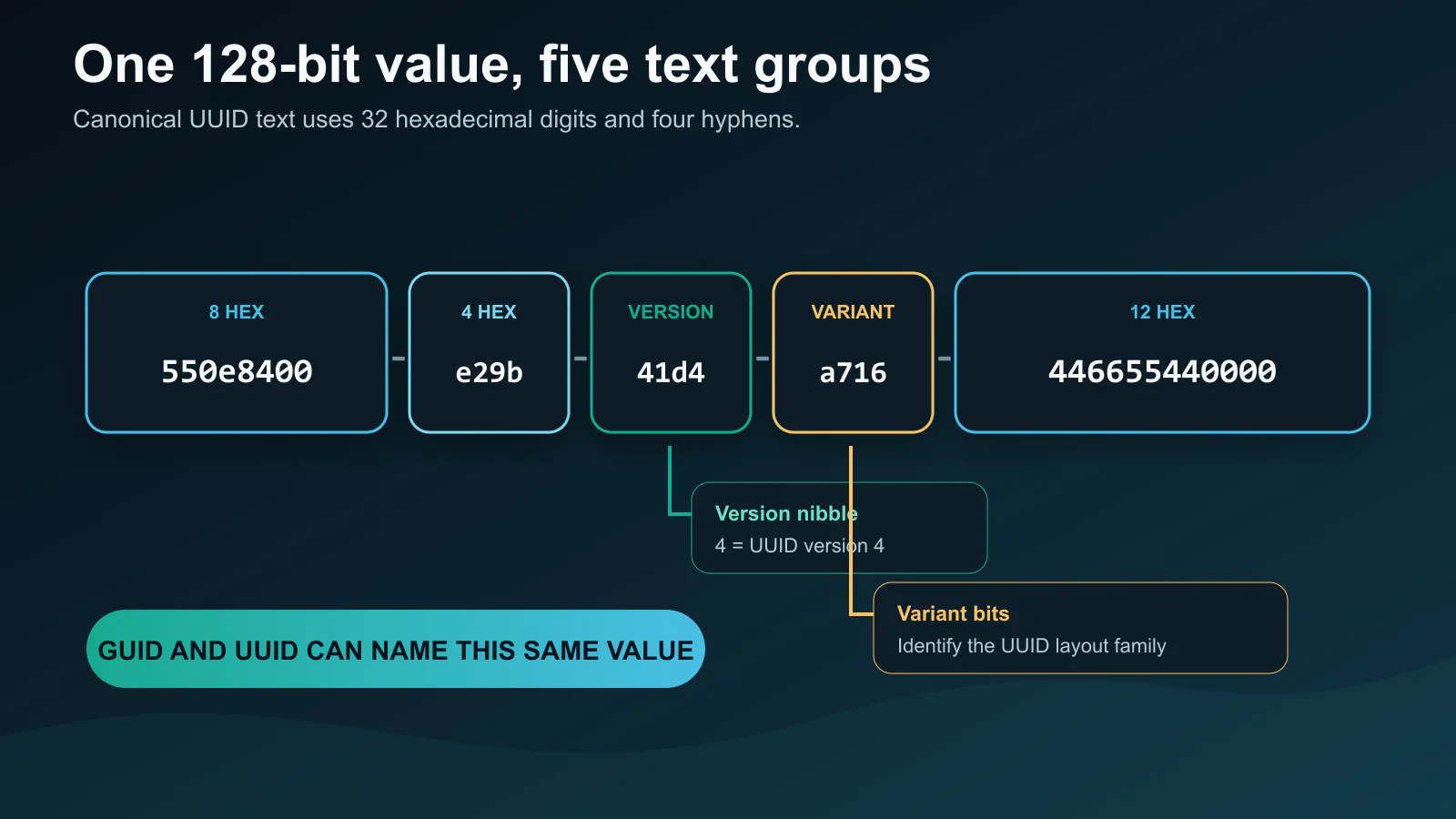
Hexadecimal casing does not change the numeric value. A716 and a716 represent the same bits. Hyphens, braces, a urn:uuid: prefix, or a compact form may change the string accepted by a parser, but they do not necessarily change the underlying identifier. That is one reason ClockTools separates generation from formatting.
How do UUID v4 and UUID v7 differ?
UUID v4 is the widely used random version. Most of its available bits are filled from a random or pseudorandom source, with required bits set for the version and variant. It works well when identifiers should not reveal creation order and when generation happens independently across many clients or services.
UUID v7 is time ordered. Its first 48 bits carry a Unix epoch timestamp in milliseconds, followed by version, variant, and random data. Values generated later generally sort after values generated earlier. This can be friendlier to ordered indexes and logs because new records are less likely to land at unrelated positions across the key space.
Time ordered does not mean perfectly sequential. Multiple UUID v7 values created within the same millisecond still need additional data to remain distinct, and clock behavior matters. It also does not mean secret: a v7 value exposes approximate creation time by design. RFC 9562 contains the normative layouts and generation guidance for both versions.
Which version should you choose?
Choose the version that matches the receiving system and the behavior you need.
| Requirement | Usually prefer | Why |
|---|---|---|
| Broad compatibility with existing UUID-aware systems | UUID v4 | It is mature, familiar, and commonly accepted |
| No creation-time information in the identifier | UUID v4 | The value is random rather than time ordered |
| Keys that roughly follow creation time | UUID v7 | The timestamp prefix supports chronological sorting |
| Existing API explicitly requires one version | Required version | Compatibility outranks preference |
| Human-visible short code | Neither by default | UUIDs are identifiers, not friendly confirmation codes |
| Authentication token or password reset secret | A dedicated secure-token design | Uniqueness and secrecy are different properties |
Do not switch versions only because one sounds newer. Check your database driver, validation library, API schema, and downstream consumers first. A validator written years ago may reject a valid v7 value because it only recognizes older versions.
Can the same UUID look different?
Yes. The same underlying 128 bits can be presented in standard lowercase, uppercase, braces, quoted text, compact hexadecimal, or URN form. ClockTools can also package generated values as lines, CSV, JSON, or SQL-friendly output. These are representation choices, not new identifiers.
Binary exchange deserves more care. Some platform APIs historically expose GUID fields or byte arrays in an order that differs from the network byte order described by modern UUID specifications. A string round trip may look correct while a raw 16-byte round trip does not. When systems exchange binary UUIDs, document the byte order and test against a known value instead of assuming every library serializes identically.
For URL query strings or path segments, use the canonical form when possible. If a surrounding value needs escaping, the ClockTools URL Encoder can encode the complete parameter without altering the identifier itself.
How should you store GUIDs and UUIDs?
Prefer a database's native UUID or unique-identifier type when it is available and supported by your tooling. A native type validates the shape and normally stores the 128-bit value more compactly than a 36-character text column. It can also make intent clearer to schema readers.
Text storage remains reasonable when a system lacks a native type or when compatibility requires a string. In that case, normalize one representation, define the allowed length, and avoid mixing braces, URNs, uppercase, and compact values in the same column. Consistent formatting simplifies equality checks, exports, and support work.
Index behavior depends on the database, workload, insertion pattern, and index design. UUID v7 may improve locality for some append-heavy primary-key workloads, but it is not a universal performance guarantee. Measure with your own database and realistic data. Keep business meaning in separate columns; an identifier should not replace a creation timestamp, customer number, or access-control rule.
How can ClockTools generate and validate them?
The online GUID and UUID generator offers a focused workflow:
- Select UUID v4 for random identifiers or UUID v7 for time-ordered identifiers.
- Choose a quantity from 1 to 1,000.
- Select standard, uppercase, braces, quoted, compact, or URN formatting.
- Choose plain, Base64, Base64URL, or URL encoding when the destination requires it.
- Export as lines, CSV, JSON, or SQL, or copy the results directly.
- Paste an existing value into the validator to inspect its normalized form, version, variant, and recognized special values.
Generation uses the browser's cryptographic random source. UUID v4 sets the required version and variant bits. UUID v7 combines the current Unix epoch millisecond value with random data and the required layout bits. The page does not need to upload generated identifiers for these operations.
When comparing two exported lists, use the Text Diff Checker to spot a missing, repeated, or reformatted entry without scanning every line manually.
What mistakes should you avoid?
The first mistake is treating "unique" as "impossible to collide." UUID designs make accidental collision extraordinarily unlikely when generated correctly, but software should still use a uniqueness constraint where duplicates would be harmful. A broken random source, copied fixture, import error, or application bug can create a duplicate even when the mathematics is sound.
The second mistake is using a UUID as proof of authorization. A hard-to-guess identifier can reduce casual discovery, but it does not grant permission safely by itself. Check the authenticated user's access on every protected request.
The third mistake is silently changing representation. Removing hyphens, decoding Base64, or converting to bytes should be reversible and tested. Keep one canonical value in logs so operators can trace it across services. If a parser rejects an identifier, validate the version and format before generating a replacement; replacing an ID can break references that already point to it.
Frequently Asked Questions
Are GUID and UUID the same thing?
Usually, yes. Both terms commonly refer to a 128-bit identifier with the same standard text form. UUID is the IETF standards term, while GUID is especially common in Microsoft ecosystems.
Is a GUID always a UUID version 4?
No. The word GUID does not identify one UUID version. A GUID-shaped value may use version 4, version 7, another standardized version, or a platform-specific generation method.
Should I use UUID v4 or UUID v7?
Use v4 when you want a broadly compatible random identifier without embedded creation time. Consider v7 when chronological sorting and index locality matter, provided every receiving system supports it.
How many characters are in a standard GUID or UUID?
The canonical text form has 32 hexadecimal digits and four hyphens, for 36 characters total. Braces, URN prefixes, compact formatting, or quotes can change the displayed length.
Can I use a UUID as a secret token?
Do not assume uniqueness provides secrecy. Authentication and reset tokens need a design specifically intended for secure, unpredictable credentials, along with expiration and authorization checks.
Does ClockTools upload generated UUIDs?
The GUID Generator performs generation, formatting, and validation locally in the browser. It uses the browser cryptographic random source for the random portions of supported UUIDs.

About The Author
Vigneshwaran Vijayakumar
Founder, Developer and Publisher of ClockTools | Digital Marketing Manager | India
Vigneshwaran is an engineer with decades of technical experience, including professional work as a Digital Marketing Manager in Dubai. His work connects data analysis, search engine optimization, conversion-rate optimization, content systems, visual production, and applied AI and machine learning. At ClockTools, he turns that multidisciplinary experience into focused browser utilities and practical, source-aware guides.