Step 1
Choose the representation
Use the format and size required by your own application. Review the theoretical bits; fixed prefixes add no randomness.
A random string is not a credential issued by another service. Keep the output private from generation through revocation.
A random string is not a credential issued by another service. Keep the output private from generation through revocation.
Use the format and size required by your own application. Review the theoretical bits; fixed prefixes add no randomness.
Generate a batch, hide the values when needed and copy only to a trusted destination. Changing settings or clearing results cancels pending generation.
Review the private export, store the secret safely and clear the display. Revoke an active key in the consuming application, not on this page.
Generate a 256-bit hex value if your own verifier accepts that format. Register it at both ends through a secure channel; a label does not activate verification.
Use Base64URL and a separate public ID for lookup. The ID is not authentication; the server must check the secret and its permissions.
Generate ten independent tokens for local tests. Keep production secrets out of fixtures and repositories; use JSON when exact values matter.
A public key ID lets a server find a credential record without exposing the secret itself. This tool optionally creates a separate 96-bit random hex ID. That identifier is not a UUID and is not an extra 96 bits of secret strength.
UUIDs are structured identifiers with version and variant fields; some versions carry time or other organized data. Even a random UUID should not be assumed to satisfy an authentication protocol merely because it looks unpredictable. The protocol must specify what is secret and how it is verified.
Keep lookup IDs, labels and credentials separate in your data model. Rotate the secret independently when needed, enforce uniqueness on the server and treat a leaked secret as compromised even if the public ID is unchanged. The identifier standard explicitly discusses unpredictability and security considerations. RFC 9562 on UUID security.
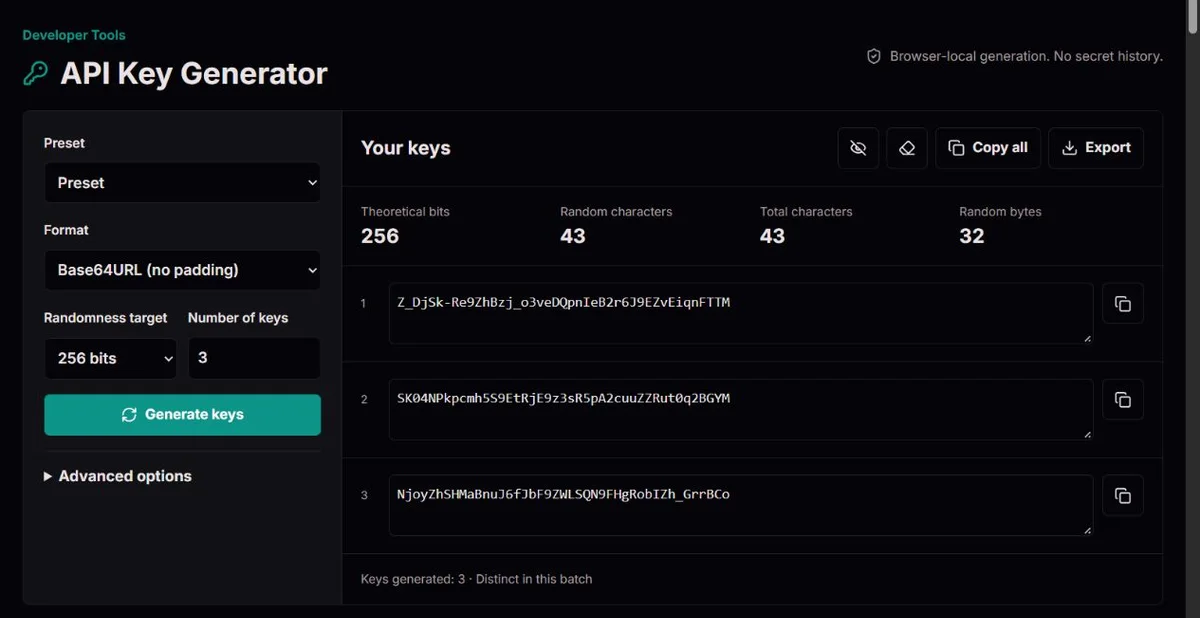
32 × 8 = 256Random-byte budget64 HEX / 43 Base64URLTwo equivalent encodingsN × log₂(A)Character-alphabet calculationThirty-two random bytes provide 256 nominal random bits. The same bytes require 64 hex characters or 43 unpadded Base64URL characters. The longer representation is not stronger; it is simply a different alphabet.
For character alphabets, each independent uniform choice contributes log₂(A) theoretical bits. Rejection sampling avoids modulo bias when A does not divide 256. This calculation assumes a working cryptographic random source; a pleasant distribution in one batch does not establish that assumption.
Random-bit generator design, entropy sources and validation are separate subjects. This browser tool uses crypto.getRandomValues and never substitutes Math.random, but it does not certify your browser or claim NIST approval. NIST’s recommendation explains the design of deterministic random-bit generators, not a certification of this page. NIST SP 800-90A Rev. 1.
Cryptographic browser randomness is required. Byte formats encode random bytes; custom alphabets use rejection sampling. Duplicate checks are limited to the current batch. Generation, clear and page-exit actions invalidate pending callbacks, and no partial batch is released.
No third-party API credentials, access rights or expiration rules are issued. Secrets never enter settings links or local preferences. Clipboard history and plaintext downloads are outside the page’s control; clearing the display is not secure memory erasure or server-side revocation.
Report format, size, quantity and a synthetic example, never a real secret. A confirmed generation defect may require replacing previously registered keys in your application. Use trusted infrastructure for high-assurance production generation.
No. It is a separate lookup identifier and is deliberately not counted toward the secret’s theoretical bits.
Yes. Clear results or leave the page before it is published; stale generation callbacks cannot repopulate the output.
No. References explain the underlying concepts and do not certify this website, browser or device.
We keep the quick task quick: choose your format, generate, and copy. When your integration needs something specific, the same tool supports byte encodings, character alphabets, application labels, public key IDs and batches of up to 1,000.
No account or installation is required. Use the information below to choose settings deliberately, rather than assuming a longer-looking string is always stronger.
Base64URL avoids the plus and slash characters of ordinary Base64 and omits padding. Hexadecimal is easy to inspect and widely accepted, but uses more characters for the same random bytes.
Base32 uses uppercase letters A–Z and digits 2–7 without padding here. Ordinary Base64 retains its standard padding.
Always check the receiving application's format requirements; encoding is not encryption.
Suppose your application accepts at most 48 characters, including a dev_ prefix. At 256 bits, Base64URL contributes 43 random characters, so the four-character prefix makes 47 in total. Hex contributes 64 random characters and would make 68, which does not fit. A suffix uses more of the same allowance. The random length and total length shown by the tool answer different questions: the first describes the secret material; the second tells you what the receiving field must hold. RFC 4648 explains why representations of the same bytes have different lengths. Check the receiver's alphabet as well as its limit before choosing the shorter format.
Character formats offer letters, digits, a defined symbol set or your own printable ASCII alphabet. Repeated alphabet characters are removed so they do not gain extra probability.
The similar-character option removes 0, O, 1, I, l and |. Choose a bit target to let us calculate the needed length, or an exact character count to meet a field limit.
An alphabet with fewer choices needs more characters to reach the same theoretical randomness.
For a custom alphabet, printable means non-space ASCII characters here: accented letters, emoji, tabs and spaces are rejected. After deduplication and any similar-character removal, at least two distinct choices must remain. If the alphabet becomes invalid, change it deliberately rather than expecting the tool to substitute another one. Prefixes and suffixes follow a different rule: each may contain up to 32 ASCII letters, digits or the symbols _ . : -. A string accepted as an alphabet is not necessarily accepted as a label.
Exact character count applies to character alphabets, not the byte-encoding formats. A fixed field limit does not automatically mean a fixed amount of randomness. For example, 32 uniformly chosen hexadecimal characters have 128 theoretical bits, whereas 32 choices from an alphabet of 64 distinct characters have 192. If the field is too short for the application's required size, do not truncate an already generated value or count its label as random characters. Select a compatible representation and check the resulting calculation before generating; if no allowed combination fits, the application requirement needs clarification.
API token starts with 256-bit Base64URL. Webhook secret uses 256-bit hex when your own verification system needs a shared secret.
Application secret uses 512-bit Base64URL; development batch prepares ten 256-bit tokens. These are configuration shortcuts, not universal standards or keys issued by a provider.
Prefixes and suffixes help identify an application or environment, but a live_ label does not make a key active or grant any permissions.
Copy individual secrets or the full batch. Optional key ID pairs provide a separate 96-bit random public identifier for looking up a credential record; keep the secret private and do not use the ID as authentication.
JSON preserves exact values. TXT supports line, comma or space separators.
CSV escapes cells and neutralizes formula-leading symbols, which can add an apostrophe. The .env export validates variable names and rejects incompatible quoting; it targets Node dotenv files and must not be sourced as a shell script.
Downloads are plaintext secrets, not encrypted backups.
Hiding results is useful when a screen is visible to other people, but the 24 mask dots are a display convention, not the secret's length. Copy and export still contain the real values. Changing generation settings clears the displayed batch, including a format change: it prepares a new generation rather than converting the old secret to another encoding. Securely transfer a batch you need before changing those settings. Inside the export dialog, changing the file format or TXT separator only reformats that same batch.
Only 20 results are displayed per page, but Copy all and export use the whole batch. With ID pairs enabled, an individual Copy button copies the secret alone. JSON without pairs is an array of strings; with pairs it is an array of objects with key_id and api_key fields. Match that shape to your importer instead of treating the public ID as a second secret or assuming that the first visible page is the entire download. Keep the chosen ID and secret associated when registering credential records.
Choose JSON when a machine must receive the exact secret characters. CSV is prepared for spreadsheet viewing: a formula-leading value such as -example can receive a leading apostrophe, so a generic CSV parser may read a different literal value. The example is fabricated, not a usable key. Do not strip apostrophes from every imported key; an apostrophe can also be genuine alphabet output. OWASP's CSV injection guidance explains both formula interpretation and the limits of spreadsheet escaping. Re-saving a CSV in spreadsheet software is not a universal safety guarantee and is an unnecessary handling step for a production secret.
For .env, a name such as APP_TOKEN is valid; 1TOKEN or APP-TOKEN is not. The tool limits the name to 64 characters and rejects values containing a double quote or backslash instead of guessing how another loader will interpret them. Node.js documents its own dotenv syntax; other consumers need their own compatibility check. If export rejects a custom-alphabet value, use JSON or a controlled transfer appropriate to that application. Renaming a downloaded file does not remove the incompatible characters, and a .env file containing secrets still needs protected storage.
For byte formats we draw ceil(target bits / 8) random bytes and report bytes × 8 nominal random bits. For N independent characters chosen uniformly from an alphabet of A distinct characters, theoretical entropy is N × log₂(A).
A bit target therefore needs ceil(target bits / log₂(A)) characters. For example, a 256-bit target with digits only needs 78 digits, not 32.
Fixed prefixes, suffixes and a separate public ID do not count toward secret entropy. These calculations describe the generation design; they are not a measurement or certification of your browser's random source.
32 bytes × 8 = 256 bits
| Encoding | Characters from 32 bytes |
|---|---|
| Hex | 64 |
| Base64URL | 43 |
| Base64 | 44 |
| Base32 | 52 |
These lengths exclude any prefix or suffix. Encoding changes representation, not the underlying randomness.
The generator uses the browser's crypto.getRandomValues API and requires a secure context. It never falls back to Math.random, timestamps, keyboard activity or a predictable seed.
Byte encodings are lossless representations. Character generation uses rejection sampling: values in the uneven remainder are discarded before mapping bytes to characters.
This avoids the bias caused by applying modulo to every byte when the alphabet size does not divide 256. Each batch is checked for repeated secrets and IDs, with bounded retries and a failure instead of an incomplete result.
Generation and export preparation happen locally. ClockTools does not send generated values to its servers or put them in URLs, analytics or persistent storage.
This page starts in a fresh document without our analytics and session-replay loaders, even when you arrive from another tool. Optional saved and shared settings omit all free-text fields and all generated keys.
Normal page requests still reach the hosting provider. Copying sends a value to your clipboard; downloading writes plaintext to your device.
Browser extensions, clipboard synchronization, malware or someone viewing your screen can still expose it. Clear results removes them from this interface, but cannot guarantee secure erasure from browser memory or delete external copies.
A random string becomes an API credential only when your application registers and verifies it. Configure least-privilege access, transport over HTTPS, revocation, expiration and rotation in that application.
Do not embed server secrets in frontend bundles or commit them to a repository. Store production credentials in an appropriate secrets-management system.
For sensitive production environments, prefer generation inside your trusted infrastructure; the Node.js, Python and OpenSSL examples let you generate fresh secrets locally without copying one from a website. No website can guarantee an uncompromised browser or device.
Regression tests cover encoded lengths, known encoding vectors, custom alphabet validation, rejection sampling, entropy calculations, affixes, duplicate handling, exports and safe settings serialization. These automated tests do not establish reliability on every browser and device, verify system clipboard or file-saving behavior, or confirm analytics behavior on the published site.
Checking a sample for duplicates or a pleasing character distribution does not prove cryptographic randomness. This tool is not independently certified, and a test of our code is not a security audit of your entire application.
Tell us the selected format, size mode, bit or character count, quantity, browser and the steps that reproduce the problem. Use a fabricated example rather than a live key, webhook secret or customer data.
Reports follow our Corrections Policy. If we confirm a material generation or export defect, we should explain the affected behavior, add a regression test and state whether earlier keys need regeneration.
Changing this page cannot revoke keys already registered in another system; you must replace or revoke those there.
Examples create one fresh secret with the selected format and affixes. They never embed the displayed key or create an account, permission or expiry rule. Public key IDs and bulk generation are not included.
import { randomBytes } from 'node:crypto';
const key = "" + randomBytes(32).toString('base64url') + "";No. Obtain that key from the provider. ClockTools generates random strings for applications you control; it does not create provider accounts, credits or access rights.
Not automatically. A 256-bit random secret is our general default, but your protocol and application requirements decide the format and size. Strong randomness cannot fix leaked keys, missing authorization or insecure storage.
The alphabet matters. Thirty-two uniform hexadecimal characters represent 128 bits; 32 decimal digits represent about 106.3 bits. Thirty-two random bytes represent 256 nominal bits and need 64 hex characters or 43 unpadded Base64URL characters.
No global uniqueness guarantee is possible here. We detect duplicates within the current batch. With sufficient random bits collisions are very unlikely, but the receiving system should still enforce unique credential records.
Yes. Copy settings link includes only predefined format, size, quantity and toggle values. It leaves out generated keys, prefixes, suffixes and custom alphabets. A custom alphabet resets to Base64URL in saved or shared settings.
No. Clear results removes the displayed batch. Revoke or replace an active key in the application that accepts it. Clipboard history, downloaded files and previously exposed copies are outside this tool's control.
Methodology and limitations: Web Crypto · RFC 4648
GUID Generator · Methodology and limitations · Corrections policy